Stealthworks
- By
Adds directional detection for supported mobs and an eye that shows when they grow suspicious or detect you.
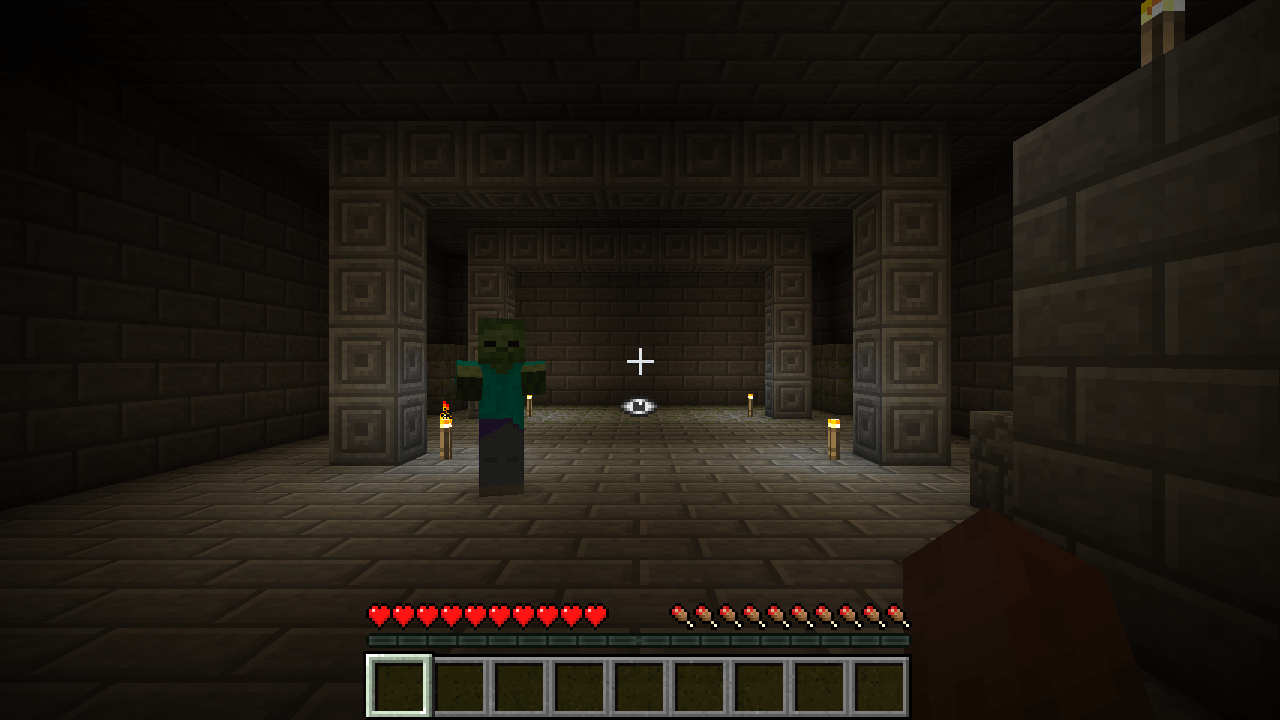
The fully open eye shows that the zombie has spotted the player.
Description
Supported mobs build awareness based on where they're looking, how close you are, and whether you have cover. Sneaking slows detection and displays an eye with three awareness states.
AI usage disclaimer: This mod was developed with AI-agent assistance using this agent workflow. The project owner reviewed the work during development.
The Forge-format download targets Cleanroom with built-in MixinBooter 12.1 or newer. Cleanroom 0.7.14-alpha supplies 12.1. Install the same Stealthworks version on the client and server.
Playing with Threatworks
Stealthworks works on its own and pairs with Threatworks 1.2.0. Together, they aim for more believable encounters while keeping supported mobs' usual movement and attacks.
Stealthworks handles target detection for the mobs it supports. Threatworks handles target selection and switching.
Stealthworks shares detection decisions with Threatworks for stock zombies using ground melee and stock skeletons using vanilla bows. Once Threatworks is tracking one of those fights, it uses threat to choose among detected players the mob can attack.
How mobs spot you
- Facing and distance. By default, visual awareness builds fastest at close range directly in front of a mob. Buildup is slower toward the sides and farther above or below the mob's look direction. It stops outside the mob's field of view, including directly behind it.
- Cover and proximity. In 1.0.0, solid barriers, including transparent blocks such as glass, block both sight and close-range detection. A mob can build visual awareness when it can see the player's head or upper torso. Close-range detection works from any direction. Whether mobs can see through transparent blocks may change in a future update.
- Invisibility. Ordinary invisibility hides you from sight. A mob can still notice you up close, and one that already remembers you can keep pursuing you.
- Disguises. A matching mob head shortens the mob's visual detection range on supported paths. Wearing a skeleton skull reduces that range for a skeleton using a vanilla bow.
The sneaking eye and detection reset
While you sneak, the eye reflects the highest awareness among nearby supported mobs and those already targeting you.
- Closed. The mobs contributing to the eye are unaware of you.
- Half open. At least one mob is suspicious. With default settings at normal server speed, suspicion starts to fade after 1 second without new awareness buildup and takes up to about 5 seconds total to clear.
- Fully open. At least one mob has detected you. Until Threatworks takes over the encounter, the default reset is 10 continuous seconds at normal server speed with neither a valid target nor renewed detection of a remembered player. A mob can remember you while it pursues you or fights another eligible player.
Move the eye from Mods > Stealthworks > Config. Use the crosshair, a screen edge, or a corner as its anchor, then fine-tune the position with horizontal and vertical offsets. Each player can choose their own placement.
Combat alerts and co-op
A confirmed hit that removes health or spends absorption can reveal you to the mob you struck. A hit in either direction can make nearby idle allies of that mob turn toward the impact if they have a clear line to it. The alert gives them the location, and they still have to discover you for themselves.
Mobs track awareness separately for each player. A mob can target one player while remaining unaware of another, and it can remember several detected players at once.
When the mods share a mob's detection state, a successful Threatworks taunt can reveal a hidden fighter. Threatworks starts the encounter reset timer when no eligible fighters remain in a tracked fight.
Summons and temporary protection
Summon alerts work in standalone play and alongside Threatworks. Nearby allies can turn toward a supported summon impact. They still need to discover the summoner independently, and the alert leaves any protection on the summoner in place. Examples include zombie melee and skeleton arrows from Electroblob's Wizardry, Spirit Bear melee from Ancient Spellcraft, and owned Drowned melee and tridents from Oceanic Expanse.
Addons can grant two kinds of temporary protection.
- Discovery-only protection stops affected mobs from discovering you. A mob that already knows you can keep attacking.
- Vanish is an escape ability. It makes affected mobs forget you and stop targeting you. Those mobs cannot detect or target you while it lasts. Once it ends, they have to discover you again.
A skeleton arrow already in flight can still hit you during Vanish. If a teammate keeps a Threatworks encounter going, your earned threat can count again once the mob discovers you. An addon can set either kind of protection to end if you land a qualifying hit on a covered mob.
Stealth points and equipment
Stealthworks adds up points from all applicable sources, including equipped gear and active effects. By default, a positive total slows visual and close-range detection, with a bigger visual benefit from a mob's side than head-on. A negative total speeds up detection. Extra positive points give diminishing returns. Even with a very high total, a mob can still detect you if you stay where it can see or sense you.
With default settings and sight alone, a total of +100 points increases visual detection time by about 25% head-on and roughly doubles it directly to the side, compared with zero points at the same position.
Equipment point assignments start empty. To give a player 60 points while they wear an iron helmet, add minecraft:iron_helmet@head=60 to equipmentPoints.assignments in the server's config/stealthworks.cfg and restart.
Packs can also configure other sources that contribute alongside equipped gear.
- Baubles can supply points from configured accessories while you wear them.
- Bubbles supports the same equipped accessory assignments when used in place of Baubles.
- Quality Tools can add a bonus or penalty from a configured reforge on equipped gear.
- Just Another Food System can apply points while a configured food effect is active.
- Setworks can apply points while a configured equipment set bonus is active.
- Statusworks 1.4.0 can apply a bonus or penalty while a configured status effect is active.
Point provider versions and setup
Mob coverage
Vanilla defaults cover zombies, husks and zombie villagers in unmounted melee, plus skeletons and strays using vanilla bows. Bosses use their own targeting rules.
Mods with default mob coverage
Stealthworks applies its detection rules by default to the listed mobs in supported combat states when their mods are installed. Coverage registry and settings
- Abyssal Depths (submerged Sea Serpent)
- The Aether (Aechor Plant and Mimic)
- Ancient Spellcraft (unowned Stone Guardian and hostile Sage)
- Ancient Warfare 2: Tweaked (hostile faction archer with a vanilla bow and soldier with an iron sword, both dry and unmounted)
- Beast Slayer (Fiery Hunter with a vanilla bow)
- Better Animals Plus Plus (Tarantula and injured submerged Shark)
- BetterEndForge Backport (End Slime at damaging sizes)
- Biomes O' Plenty (Wasp)
- Charm (Spectre)
- Chocolate Quest Repoured (hostile, leaderless Zombie and Skeleton in dry, unmounted combat)
- Deep Below (submerged Lunkertooth)
- Deeper Depths (Bogged with a vanilla bow and Breeze using wind charges)
- Defiled Lands (Shambler, Twisted Shambler and Host)
- Depths of Madness (unsummoned Thrall in water outside its prayer phase)
- Dungeon Mobs Reborn (Hook Horror and Beholder)
- Eerie Entities (Cursed Armor and dormant Pumpkin Slime)
- Electroblob's Wizardry (Evil Wizard and wild Ice and Lightning Wraiths)
- End Expansion - The Lamented Islands (retaliating Depths Chomper)
- Exotic Birds (provoked Cassowary)
- Explorercraft (Enderghast)
- Fish's Undead Rising (Amber Scarab, Osvermis and Enigmoth)
- Frozen Fiend (Iceologer)
- Future MC (provoked Bee before its sting and aggressive adult Panda during retaliation)
- Ice and Fire: RotN Edition (Dread Thrall and Dread Scuttler while uncommanded)
- Illagers+ (Furantur in ground melee and Archer with a vanilla bow)
- Magma Monsters (molten Magma Monster out of water or lava, and Magma Monster Grunt in ground melee)
- Mo' Creatures Extended (wolf-form Werewolf and Flame Wraith)
- Mowzie's Mobs (Foliaath and Barakoana)
- Mutant Creatures Legacy (provoked untamed Spider-Pig)
- Mystical World (provoked untamed Lava Cat)
- Natura Legacy (Nitro Creeper and Baby Heatscar Spider in the Nether)
- Project: Vibrant Journeys (Banshee)
- Quark: RotN Edition (Ashen with a vanilla bow, Dweller, Forgotten and Wraith)
- Stygian End Re-Continuation (Blastling, End Skeleton with a vanilla bow and Snareling)
- Unseen's Dungeon Additions (Stormvier and Galvonizer after awakening, plus Bareant Spirit)
- Veilings (untamed Wicked Veiling Custodian)
Pack settings
Packs can tune detection and forgetting, opt in to available experimental adapters, or exclude mob types by entity ID. By default, combat alerts reach eligible allies of the same type. Pack settings can change the alert radius and group different mob types together.
- Detection for the stock zombie and skeleton paths uses the follow range set by Rough Mobs Revamped. Eligible mobs respect the targeting limits of Potion Core's Fix Blindness when enabled.
- Packs using Special AI can turn off its two call-for-help triggers if they want Stealthworks to handle the alert response.
- With PlayerRevive, downing leaves temporary protection running on its original timer. A confirmed death clears the protection.
Pack configuration | Combat compatibility
Addon API
The Java API lets addons supply stealth points and send a location-only disturbance to eligible allies. Awareness clearing and temporary protection, including Vanish, can affect one mob, a nearby group, or the mobs currently targeting a player. Addon API | Source
Stealthworks Team