
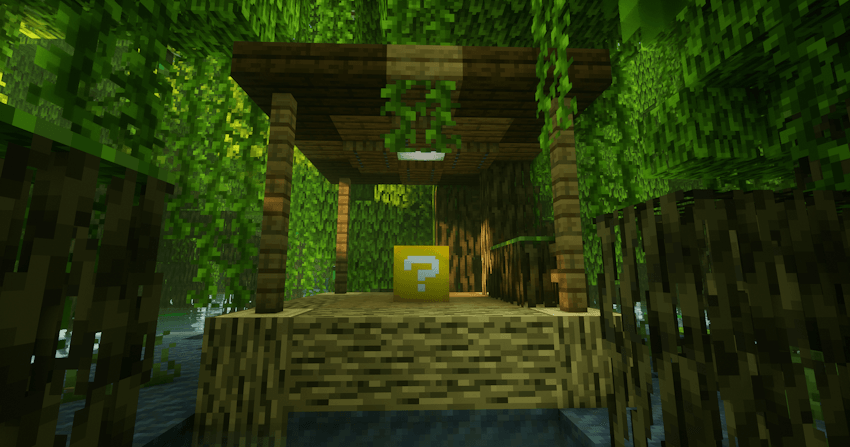
A classic Lucky Block mod with traps, awfull and great loot to spice up your game. You can either craft those lucky blocks with eight gold ingots and quartz or a watermelon slice, or find them in your world, and simply break it to gamble your way through your survival game.
This mod has a default compatibility with the following mods :
- Create
- Corail Tombstone
- Alex's Mobs
- Aquamirae
- L_Ender's Cataclysm
- Cold Sweat
- Farmer's Delight
- Eureka! Ships!
- Artifacts
- Relics
- Immersive Engineering
- Electrodynamics
- Nuclear Science
- Chemical Science
- Modular Force Fields
- Ballistix
- Assembly Line
- Cobblemon
- Alex's Caves
- Dungeons and Taverns
- Moog's Voyager Structures
- Ad Astra
- Per Spatium
- When Dungeons Arise
- When Dungeons Arise - Seven Seas
- Repurposed Structures
- Towns And Towers
Adding your own mod compatibility :
You are allowed to edit the mod file and redistribute it to friends for a server.
Open the mod file (or with a datapack) and add a json file at :
resources/data/forge/loot_modifiers/global_loot_modifiers.json
Inside this json file, you will write something like this :
{
  "entries": [
    "pastekluckyblock:<your_new_loot_modifier>",

  ],
  "replace": false
}
Replace <your_new_loot_modifier> with the name of the next file we are adding which is the loot modifier. In the mod's default architecture, the name is simply the mod_id of the new mod which you are adding your compatibility with. Now, add the new loot modifier file at :
resources/data/pastekluckyblock/loot_modifiers/your_new_loot_modifierjson
Of course renaming it according to the previous name you choose, preferably a mod id. This file will contain information such as the target loot tables, the loot table you will add and the mod that needs to be loaded in order to load the loot modifier. Here is an example with Alex's mobs :
{
  "type": "pastekluckyblock:loot_table",
  "conditions": [],
  "injected_loot_table": "pastekluckyblock:injections/alexsmobs",
  "target_loot_tables": [
    "pastekluckyblock:chests/mid_loot",
    "pastekluckyblock:chests/good_loot",
    "pastekluckyblock:chests/lucky_loot"
  ],
  "modid": "alexsmobs"
}
In the "target_loot_tables", it is pretty clear you have the 3 choice for the 3 possible chests from the lucky block mod, mid loot being the one from a lucky block with gray smoke, good loot the one with xp orb and lucky loot the best one with totem particles. The "modid" field has to match the mod id of the items from the loot tables you are adding; if you add items from create but put down electrodynamics as the mod id, the loot table will only be loaded when electrodynamics is loaded, and if create isn't, it will be empty. The other important field is "injected_loot_tables" that you will want to replace with :
pastekluckyblock:injections/<your_new_loot_injection>
With <your_new_loot_injection> the name of the next file, which is also usually just the mod id like the previous file.
Now with all that set up we can add our loot table. This actually isnt really a classic minecraft loot tables, but a replica from the mod which imitate the vanilla loot table style. This means not all vanilla functions are available. In this location :
resources/data/pastekluckyblock/injections/your_new_loot_injection.json
Add a file like this (example with chemical science) :
{
  "trigger_chance": 0.30,
  "pools": [
    {
      "rolls": {
        "min": 1,
        "max": 3
      },
      "entries": [
        { "type": "minecraft:item", "name": "chemicalscience:circuitmaker", "weight": 1 },
        { "type": "minecraft:item", "name": "chemicalscience:organicsolarpanel", "weight": 1 },

        { "type": "minecraft:item", "name": "chemicalscience:soda", "weight": 10,
          "functions": [
               { "function": "minecraft:set_count", "count": { "type": "minecraft:uniform", "min": 1, "max": 16 } }
                       ]
        },

        { "type": "minecraft:item", "name": "chemicalscience:sword_tungstencarbide", "weight": 1,
          "functions": [
               { "function": "minecraft:enchant_with_levels", "levels": { "type": "minecraft:uniform", "min": 0, "max": 50 }, "treasure": true},
               { "function": "minecraft:set_damage", "damage": { "type": "minecraft:uniform", "min": 0.0, "max": 0.9 } }
                       ]
       }
      ]
    }
  ]
}
For this you can follow minecraft guidelines on adding a chest loot table, except there we have the "trigger_chance" which is the chance for the loot table to be injected in a lucky block chest (usually between 0.10 and 0.50) and the "type" and the "random_sequence" fields are missing. In terms of allowed function, you can use "minecraft:set_count", "minecraft:set_damage", "minecraft:enchant_with_levels" and "minecraft:enchant_randomly".
I recommend going through the code source (it is on github) and checking how things are made in the data folder, but really it is not that hard. Additionally, in your minecraft config file, you can find :
config/pastekluckyblock-common.toml
In which you will find at the bottom :
	#Enable detailed debug logs for Pastek Lucky Block loot injections.
	#This will show which tables are injected, missing items and other errors.
	#Default: false
	debugLogging = false
Set debugLogging to true and you will have extra information in minecraft logs for testing your loot table when adding it, like did it load properly or did the trigger chance trigger when placing a lucky block chest.
If you need help of course contact me on discord it takes 10s of my time, it really isn't a problem.
Configuring Pastek's Lucky Block :
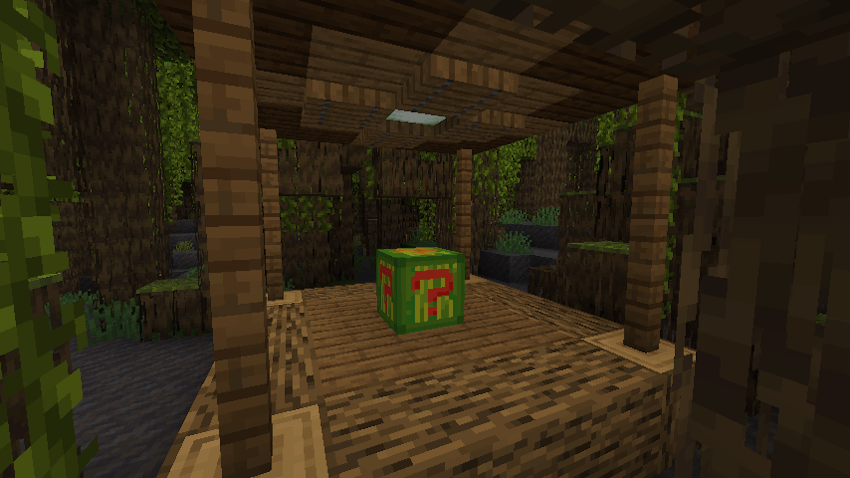
You may want to configure the mod either to rebalance the lucky block, to add other mods chests loot tables to the lucky block's loot or to change the lucky block texture to a very cool watermelon lucky block (yes it did took me a good hour to make this useless functionnality).
First, after launching Minecraft with Pastek's Lucky Block for the first time, you will be able to find the config file of the mod here :
AppData/Roaming/.minecraft/config/pastekluckyblock-common.toml
Open this file with notepad, visual studio or a can opener and we can start editing some things to your taste.
	#Chance out of 100 for BAD loot
	#Default: 15
	#Range: 0 ~ 100
	badChance = 15
	#
	#Chance out of 100 for MID loot
	#Default: 40
	#Range: 0 ~ 100
	midChance = 40
	#
	#Chance out of 100 for GOOD loot
	#Default: 40
	#Range: 0 ~ 100
	goodChance = 40
	#
	#Chance out of 100 for LUCKY loot
	#Default: 5
	#Range: 0 ~ 100
	luckyChance = 5
In those fields, you can balance the chance for each pool of lucky block loot. For example, with a 100 in badChance and 0 in the others, when breaking the Lucky Block you will only get the awfull traps. Just change every field like badChance, midChance, goodChance and luckyChance to a number between 0 and 100 and make sure the total is equal to 100.
To add (or remove) the random loot table from other mods you can get, you will have to go through this field :
	#List of loot table IDs for random chests.
	#Accepts both vanilla and modded loot tables.
	#Example: "minecraft:chests/simple_dungeon"
	lootTables = ["minecraft:chests/simple_dungeon", "minecraft:chests/abandoned_mineshaft", "minecraft:chests/stronghold_library", ...]
There are default integrations as you will see if you open the actual file, and if you want to add some loot tables, find the data/modid/loot_tables/ folder of the mod you want to add a loot table from and simply add it to this list.
Now for the most important part, at the very beginning of the config file you will find this field :
	#If true, the Lucky Block will have a watermelon custom texture.
	useWatermelonLuckyBlockTexture = false
Set useWatermelonLuckyBlockTexture to true to get a beautifull watermelon texture on your lucky block like this :
Translation for english and french
You're of course free to use this mod in your modpack without credits or anything.
For questions, suggestions or anything :
Discord : roi_pasteque
Pastek's Lucky Block Team

Owner