Vamooses Dye Studio
- By
Vamoose Dye Studio replaces Blizzard's dye UI with an enhanced interface for browsing, previewing, and managing housing dyes with custom palettes and live dyeing.
Screenshot 2026-05-22 at 23.58.43.png
Screenshot 2026-05-22 at 23.57.11.png
Screenshot 2026-05-22 at 23.57.43.png
Description
Vamoose's Dye Studio
A dye companion for WoW Housing. Browse all 77 dyes by color, build custom palettes, plan your purchasing with target stocks, and dye decor live with a Blizzard-replacement picker.
A standalone dye companion. No other addons required (Auctionator optional for Send-to-AH).
What's New in v2.11.1
- Four Settings checkboxes now change their setting. "Protractor in the editor's Advanced mode", "Play sound on apply", "Mark dye herbs in bags" and "Herb tooltips show their dyes" ticked and unticked when clicked but kept their old setting, so the Protractor still opened in Advanced mode after it was turned off. Each one now saves and stays set across /reload and logouts. The bag dots change after a /reload, and the checkbox's tooltip says so.
Features
Dye Browser
Browse every housing dye with multiple ways to organize them.
- Colors tab — the nine official dye families (Red, Orange, Yellow, Green, Blue, Purple, Brown, Black, White), each section ordered light to dark. Click a chip to filter; click "All" to see grouped sections. Family headers show the applications you hold.
- Custom tab — Your own saved palettes with side popout. Click any palette to filter; Edit mode lets you click dyes to add/remove. Import/export strings to share.
- Theme tab — 24 curated palettes (factions, classes, seasons, and the CraftyLuna contest-winner palette). Each section header describes the colours it holds.
- Herbs tab — Reverse-lookup which dyes each herb crafts into, with current AH prices per herb and stock counts. In 12.1 this is the full dye chart: every dye colour across the top, expansions down the side, the crafting herb in each cell, colour-coded by what you can craft from herbs on hand.
- Dye herbs in your bags — In 12.1, dye herbs in your bags carry a coloured dot for each dye they craft, and their tooltips name those dyes. Each has its own toggle in Config, both on by default.
- Owned filter — The "Owned only" toggle in the title bar shows only dyes in your inventory (bags + bank + reagent bank + warband). It is available in every mode.
- Search — Filter the dye list by name; works across all tabs.
- Shift-click any dye or herb to search the Auction House for it.
Color Harmony
Pick a dye and Dye Studio suggests colour companions for it, drawn from the full dye catalogue.
- Strategies — Neutral grounding, Monochromatic (lighter and darker of the same hue), Analogous (wheel neighbours), Complement (the opposite), Split-complementary, Triadic, and Clash (a deliberately discordant hue). A neutral dye swaps these for Tones, Contrast, and Accent.
- Colors tab — the suggestions appear as a band of swatches beneath the selected dye, over a wash of that colour. Click a swatch to jump to that dye.
- Live mode and Canvas — a strategy strip (Live) or a Harmonise menu (Canvas) fills the decor's other channels around your focused channel in one click, completing every channel of the piece.
- Coverage-aware — each channel shows what part it dyes and how much of the decor's surface it covers ("Part - Material - NN%"). Harmonise reads this to place the lead colour on the largest surface. The "Apply all" toggle re-dyes every channel from one starter dye, balanced by area.
Stock Tab
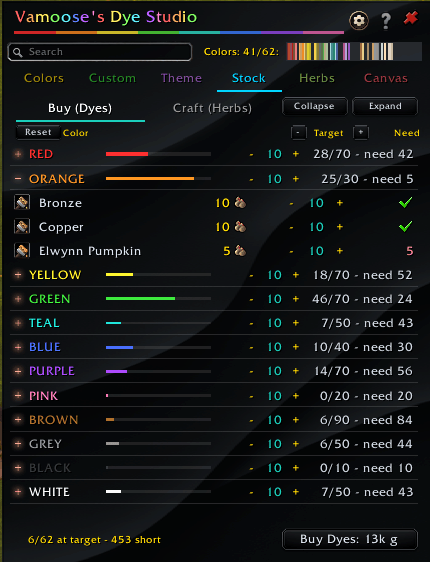
Plan your dye purchasing across your full collection target rather than one dye at a time.
- Per-color-group targets — "Target 3 of every red dye" sets the floor for the whole group. Collapsible per-group sections show have, target, and need.
- Per-dye overrides — Want 10 Horde Red specifically? Override the group default; a small revert button lets you reset back to the group baseline. (In 12.1 a family shares one dye stack, so targets are set per family.)
- Master +/- — Bumps every group target up or down by 1 (shift+click for 10).
- Two modes:
- Buy — restock by buying finished dyes from the AH
- Craft — restock by buying herbs and crafting. The side panel shows the consolidated herb shopping list with each herb's cheapest unit price and total cost
- One-click Restock-and-Send-to-AH — Sends a shopping list to Auctionator (separate VDS-Dyes and VDS-Herbs lists per mode). Auctionator is optional. If it's not installed, the send button shows a prompt instead of erroring.
- Cost rollups — Top stat strip shows at-target, total, deficit, and cost. Bottom button shows total spend before you commit.
Custom Palettes
Create, edit, and share color combinations.
- Up to 20 palettes with up to 20 dyes each
- Auto-named when you create one — "Palette 1", "Palette 2"… or type your own
- Edit mode — Click any dye in the main list to toggle membership. The dye chips above show the current contents
- Import / Export — Share palettes as encoded strings. The import dialog accepts the current
VDS:format and the legacyVDSR:format from the beta - Rename / Delete / Export buttons under the palette list
Live Dye Mode
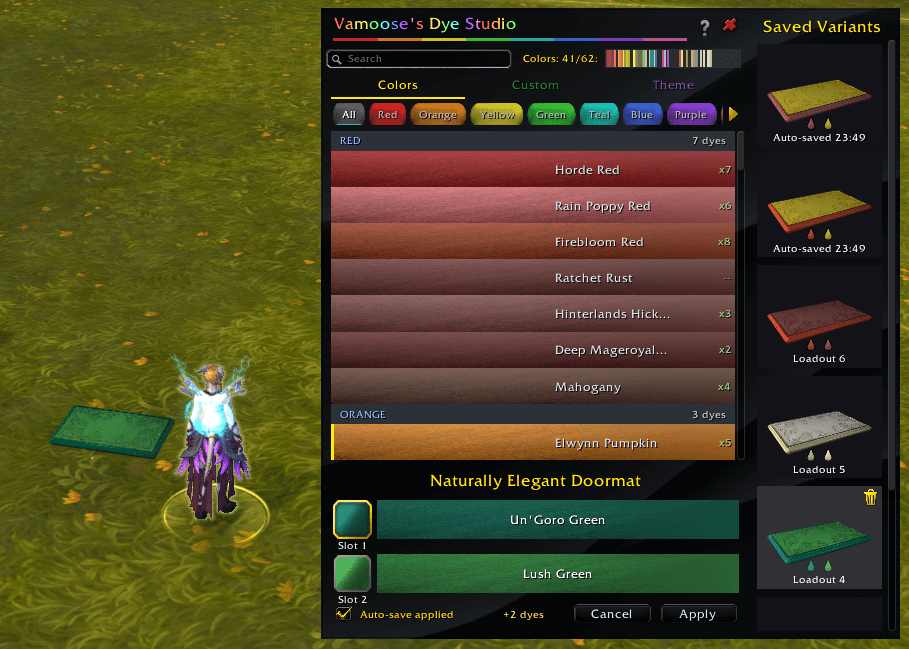
Replaces Blizzard's dye picker with VDS when you open a decor's dye slot.
- Auto-open — Toggle "Replace Blizzard's dye picker" in Config. On by default. The VDS window opens automatically inside the housing editor when you click a dye slot.
- Per-slot focus — The active slot has a gold border (matching the Canvas channel picker). Click any dye to apply to the focused slot.
- Cost preview — "+N dye(s) -N back" tracks Blizzard's dye-bottle costs as you preview changes.
- Recent dyes strip — The last 12 dyes you applied show as swatches under the action bar. Click one to apply it to the focused slot. Saved account-wide between sessions.
- Owned-only warnings — Slot labels go red when you're previewing a dye you don't own, and the locked Apply button's tooltip names the missing dye.
- Revert / Apply — Apply commits your changes. Revert puts every slot back to the last applied state and keeps you in the editor. Both grey out when there are no pending changes.
- Owned only toggle — Action-bar checkbox filters the dye list to dyes you own while editing.
- Auto-save — On by default ("Auto-save dyes on Apply" in Config) saves each applied combination as a Saved Dyes entry.
- Apply sound — On by default ("Play sound on apply" in Config) plays the game's own chime when you press Apply.
- Save Dyes button — Saves the decor's currently displayed dyes without applying them.
- Auto-stage newest — Optional checkbox on the Saved Dyes panel: selecting a decor whose type has Saved Dyes pre-loads the newest entry as pending changes.
Protractor (Advanced mode)
A small movable window in the house editor's Advanced mode for typing what the game only lets you nudge. On by default; toggle it under Settings.
- Rotate — Type an angle for the selected axis, or for X, Y or Z directly, and press Enter. 0 / 90 / 180 / 270 are one click. Select switches axis; - / + turn one degree. The rings in the world and the window agree on which axis is selected.
- Scale — Type a percentage, decimals allowed, or click 50 / 100 / 150 / 200. Smaller / Larger step one percent. Lands within a few hundredths of a percent; Shift-click the game's bar for an exact tick value.
- Move — Set a step count and click a direction. 30 steps is about one small grid square, and the same count always moves the same distance.
- Reset — The game's own reset for the active tool: scale to 100%, or all three angles to 0.
Canvas Tab
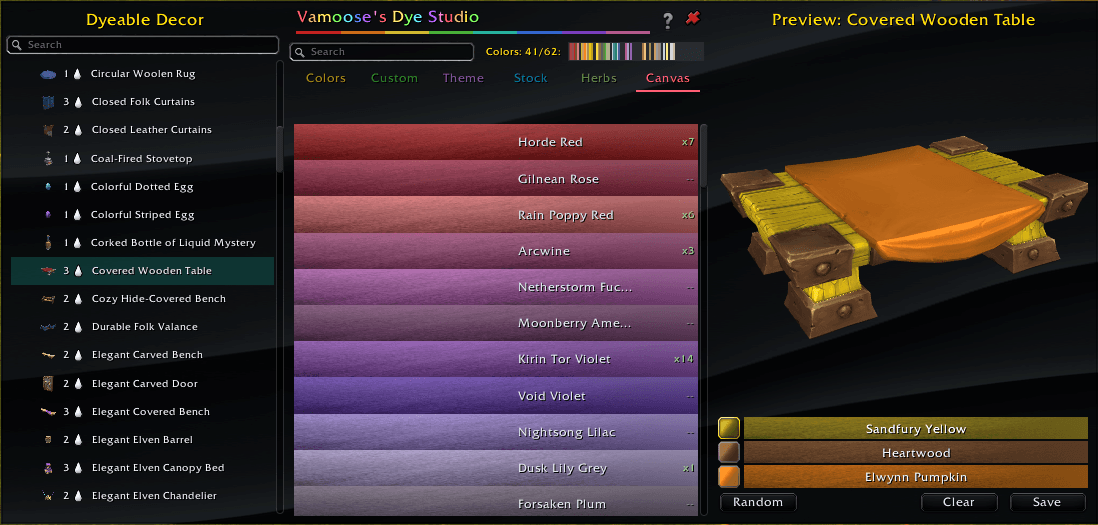
Preview dye combinations on a 3D decor model before applying them to a real decor.
- Decor picker with category filter — Category dropdown narrows the list to a Housing category (Furnishings, Walls, etc.)
- Scope filter at the top — Narrows the available dyes to a curated theme or one of your custom palettes; default is "All Dyes"
- Available decor — Lists every available dyeable decor, owned or unowned
- Per-row channel droplets and saved-dyes count — Each picker row shows droplet icons for the decor's dye channels and a count badge for its Saved Dyes
- Saved Dyes chip wall — Saved entries for the selected decor appear as color chips below the channel pickers in the preview panel. Click a chip to apply
- Per-channel editor — Pick a channel, pick a dye, see it on the model immediately
- 3D ModelScene preview — Drag to orbit, scroll to zoom
- Saved dyes per decor — Auto-named "Saved 1", "Saved 2"… or type your own. Saving the same combination twice no longer creates a duplicate. Up to 10 saved entries per decor
- Save via the chip wall — The "+" tile at the end of the chip wall saves the current channel selections as a new entry
- Random / Clear — Quick-action buttons under the channel editor. Random fills channels from the current Scope; Clear empties all three channels
- Saved Dyes also appear in Live mode's gallery — Live's gallery shows the same entries as 3D preview tiles with hover-X to delete
Quick Start
Type /dyes or /vds to open the Dye Studio.
Commands
/dyesor/vds— Toggle Dye Studio/vds debug— Toggle debug logging/vds minimap— Toggle the minimap icon/vds hardreset— Wipe all VDS data (requires /reload)
Pro Tips
- Click a dye to select it (detail strip shows below). Shift-click to search the AH by name.
- Stock tab is the new shopping workflow. The per-row cart count is gone; targets in the Stock tab drive the Restock-and-Send-to-AH flow.
- Canvas right-click clears the active channel. Canvas left-click applies the dye to the active channel.
- Live mode keeps the same window open inside Blizzard's housing editor.
- Custom palettes — Click "+ New" and press Enter to accept the auto-name. Click "Edit" to start clicking dyes to add or remove.
- Help button (?) in the title bar shows the full feature guide.
- Minimap button — Click to toggle the studio, drag to reposition. Hide it with
/vds minimapor the Config toggle.
Installation
- Download from CurseForge (or extract to
World of Warcraft/_retail_/Interface/AddOns/) - Folder must be named
VamoosesDyeStudio /reloadin-game- Type
/dyesto open
Requirements
- World of Warcraft: Midnight (12.0.0+)
- Access to Housing (level requirement)
- Optional: Auctionator for Stock tab's Send-to-AH
More Addons by Vamoose
- Vamoose's Housing Decor Guide — Track, craft, preview, and acquire all 1,700+ housing decorations across all professions
- Vamoose's Endeavors — Housing endeavor tracker: tasks, XP, house level, coupons, cross-faction leaderboard
- Vamoose's Neighbors — Neighborhood directory with plot owners, waypoints, and initiative tracking
- Vamoose's Companion — A companion personality that reacts to your adventures with contextual commentary
- Vamoose's Pet Patrol — Find uncollected wild battle pets in your current zone
- Vamoose's Guild Crafter — Find which guildies can craft what you need
- LiteWQ — Lightweight world quest tracker with reward icons, subzone rollup, and warband alt tracking
Support & Feedback
Found a bug or have a suggestion? Report it on our Discord.
Discord: https://discord.gg/RWZaxJaHFP
Buy Me a Coffee: https://buymeacoffee.com/vamoose
Author: Vamoose Version: 2.11.1 Game Version: 12.1.0 (Midnight)
Keywords: dye, dyes, dyeing, color, colors, colour, colours, housing, house, decor, decoration, palette, palettes, theme, pigment, herb, herbs, crafting, restock, auction, auctionator, midnight, 12.0.7, 12.1, blizzard replacement, dye picker, canvas, loadout, swatch, dye studio, vamoose
Vamooses Dye Studio Team

Owner