Vamooses Guild Crafter
- By
Search recipes and find crafters — integrated into Guild & Communities and the Crafting Orders NPC
Screenshot 2026-03-29 at 11.45.30.png
Screenshot 2026-03-29 at 11.48.40.png
Screenshot 2026-03-29 at 11.47.19.png
Screenshot 2026-03-29 at 12.06.59.png
Description
Vamoose's Guild Crafter
Find which guildies can craft what you need.
Ever stood at the crafting orders NPC wondering if anyone in your guild can make that item? Or scrolled through the guild roster clicking [View] on every crafter one by one? Guild Crafter solves both problems.
What's New in 1.5.0
- Expansion filter — a new dropdown next to the profession picker narrows the recipe list to one expansion (newest first). It combines with the search box and the "Known by guild crafters" toggle.
- Fixed a "secret number value" menu error in protected content. Guild roster and crafter details the game marks as protected are now treated as unknown instead of crashing menu layout.
- The Crafters tab button no longer overlaps other addons' launchers (e.g. Guild Roster Manager) in the Guild & Communities side-tab column.
Features
Guild Crafters Tab
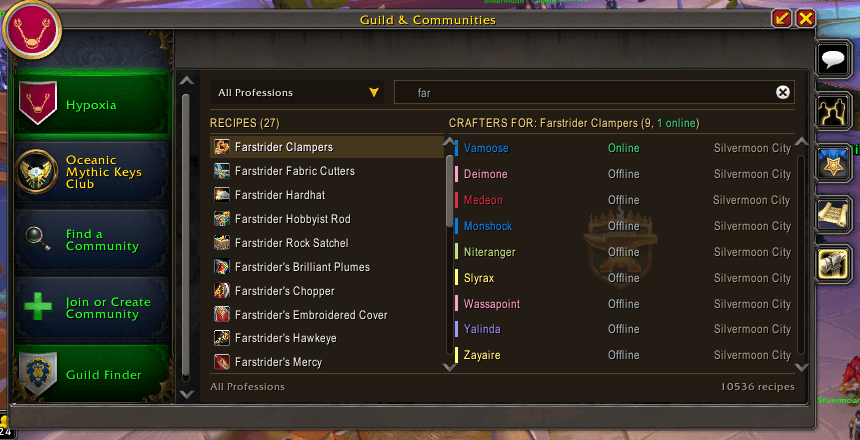
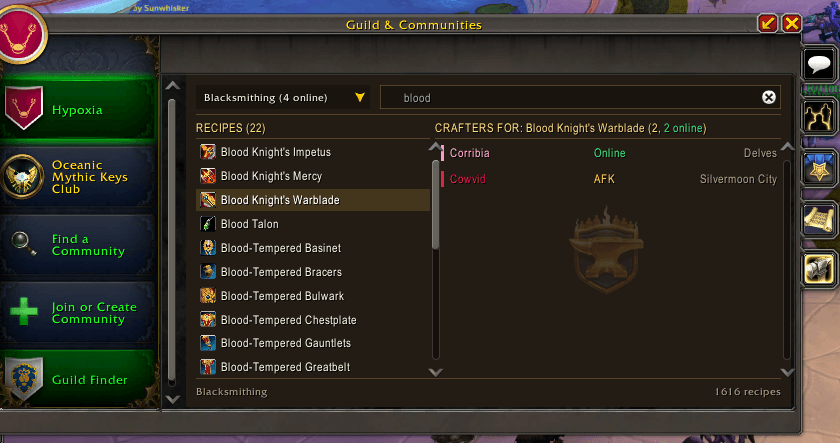
A new tab in your Guild & Communities window with a two-column layout. Select a profession (or "All Professions" to search everything), optionally narrow to one expansion, type a recipe name, and instantly see which guild members know it — with class colors, AFK/DND/Mobile status, and zone.
Crafting Orders Integration
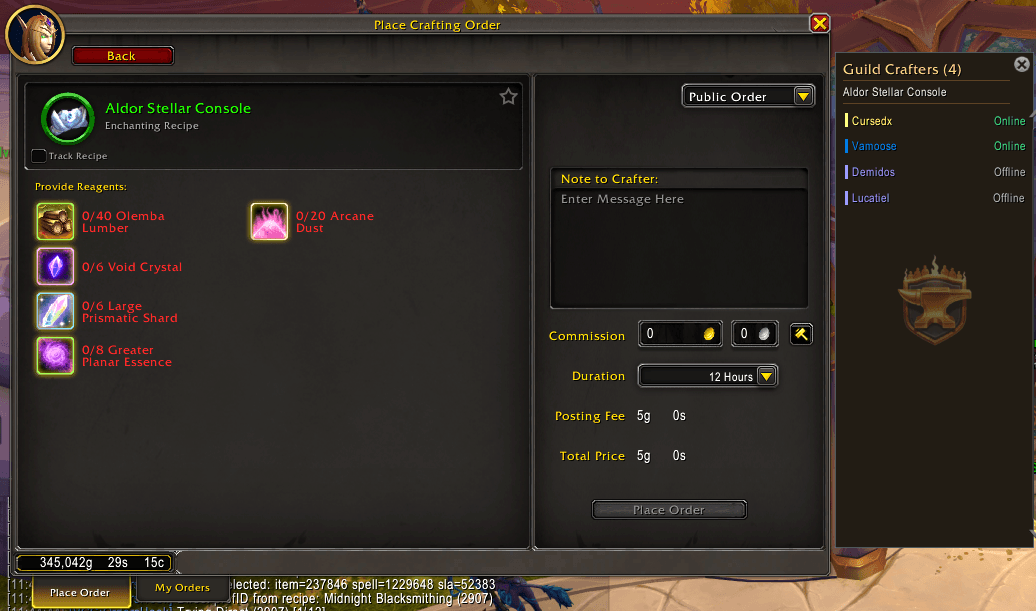
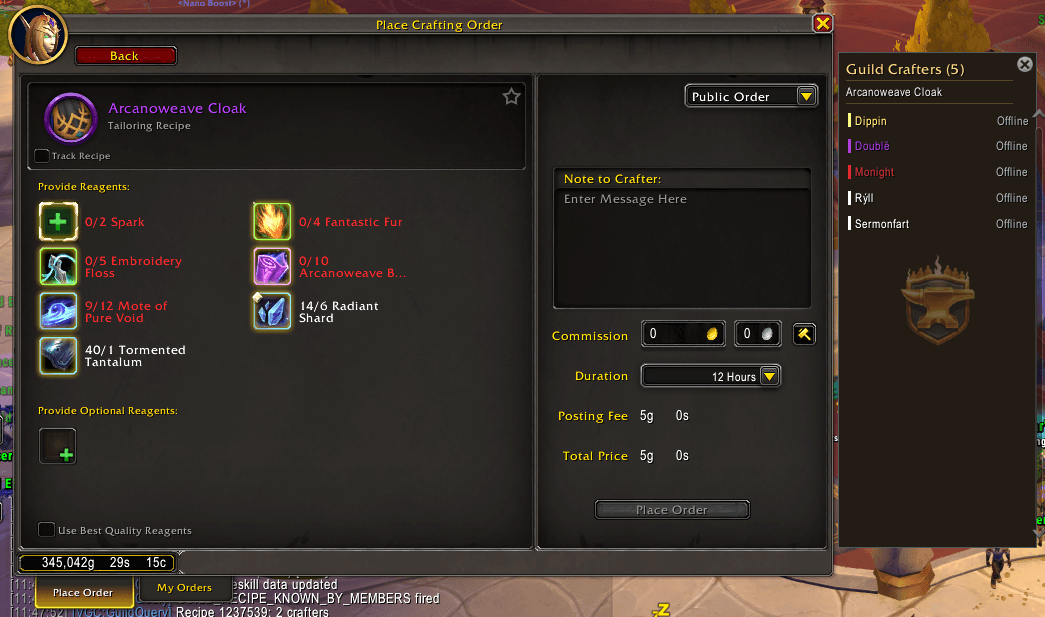
When you're at the Crafting Orders NPC and select a recipe, a side panel automatically appears showing guild members who can craft it. Works for both new crafting orders and recrafting — drop an item into the recraft slot and see who in your guild can recraft it. Click a name to set them as the personal order recipient, or right-click to whisper or invite to group.
Crafting Order Scan
Open any crafting table and get an instant summary of available orders — Guild, Public, Personal, and Patron — printed to chat. Helpful if you forget to check (like me!)
Smart Crafter Display
- Online/offline/AFK/DND/Mobile presence badges
- "5 crafters, 3 online" vs "all offline" vs "no guild members know this recipe"
- Distinguishes recipes not tracked by Blizzard's API vs genuinely unknown
- Left-click to set as personal order recipient
- Right-click context menu: Set as order recipient, Whisper, Invite to Group
How It Works
- Uses Blizzard's guild tradeskill APIs at runtime — no persistent database, no scanning delay
- "All Professions" mode scans every guild profession sequentially with progress display
- Crafter lookup queries the server directly for accurate, real-time results
- Last-used profession remembered across sessions
- Search text persists across profession switches
Usage
Open the Guild & Communities window and click the anvil tab on the right side. Select a profession from the dropdown (or "All Professions"), then type in the search box to find recipes. Hover a recipe for its tooltip, click to see crafters.
At the Crafting Orders NPC, just browse recipes normally — the Guild Crafters panel appears automatically.
Slash Commands
/vgc— Open the Guild Crafters tab/vgc find <name>— Quick search from chat (e.g./vgc find soul sprocket)/vgc orders— Toggle crafting order scan on/off/vgc tab— Toggle guild tab integration on/off/vgc debug— Toggle debug output
More Addons by Vamoose
- Vamoose's Housing Decor Guide — Track, craft, preview, and acquire housing decorations across all professions
- Vamoose's Endeavors — Track Housing Endeavor progress across all your characters
- Vamoose's Neighbors — Neighborhood directory with plot owners, waypoints, and initiative tracking
- Vamoose's Dye Studio — Browse, preview, and manage housing dyes with custom palettes and live dyeing
- Vamoose's Companion — A companion personality that reacts to your adventures with contextual commentary
- Vamoose's Pet Patrol — Find uncollected wild battle pets in your current zone
- LiteWQ — Lightweight world quest tracker with reward icons, subzone rollup, and warband alt tracking
*Part of the Vamoose addon suite. Questions or feedback? Visit the Discord: https://discord.gg/RWZaxJaHFP*
v1.5.0 | Vamoose
guild crafter, guild crafting, crafting orders, guild professions, who can craft, find crafter, guild recipes, profession search, work order, personal order, guild order, blacksmithing, engineering, alchemy, enchanting, inscription, jewelcrafting, leatherworking, tailoring, midnight professions
Vamooses Guild Crafter Team

Owner