Vamooses Neighbors
- By
Browse neighborhoods, track endeavor progress, find friends' houses, and visit neighbors endeavors - all from one panel.
Screenshot 2026-02-22 at 15.04.16.png
Screenshot 2026-02-22 at 15.04.32.png
Screenshot 2026-02-22 at 15.05.14.png
Description
Vamoose's Neighbors
Your neighborhood directory for World of Warcraft Housing -- see who lives where, check endeavor progress, and visit friends.
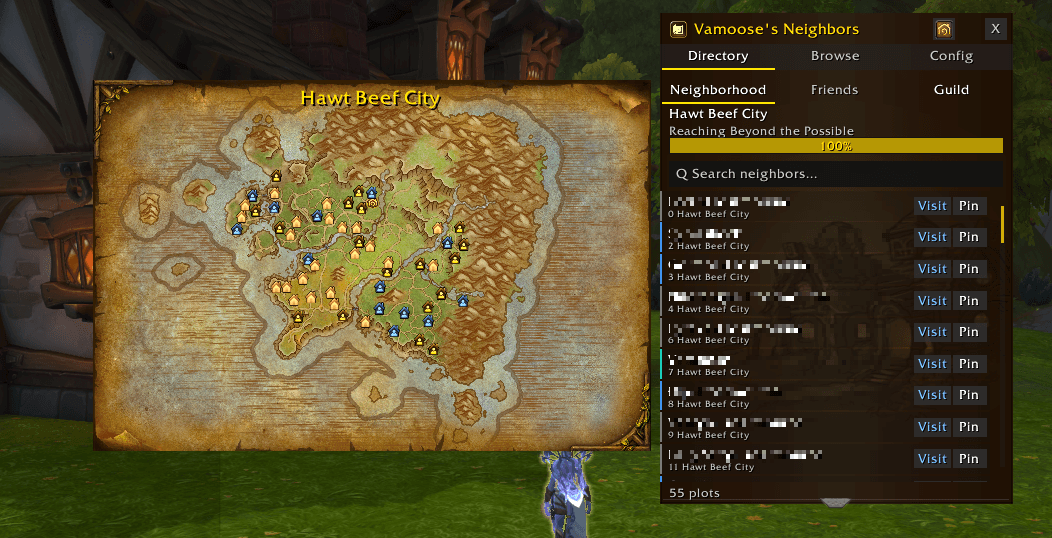
Browse every plot in your neighborhood at a glance. See who owns each house, check which endeavor each neighborhood is running and how far along it is, discover new neighborhoods before you commit, and find your Battle.net friends' and guild members' houses across all neighborhoods -- all from one compact panel with an embedded map.
New - link to a fan guide for the addon - https://youtu.be/JNsOikV2izU
Directory Tab -- Your Neighborhood at a Glance
See every plot owner in your current neighborhood.
- My Homes -- One row per owned house with faction icon, neighborhood name, house name, live cooldown remaining, and a dedicated Teleport button for each house (two houses = two buttons)
- Plot List -- All plots with owner names, color-coded by relationship (teal = you, blue = friend, gold = guild, gray = stranger, dim = empty)
- Search -- Filter by owner name or plot name
- Sort -- Sort by plot number or owner name (ascending/descending)
- Pin Button -- Set a native waypoint to any plot with super-track arrow
- Visit Button -- Teleport directly to a neighbor's house via SecureActionButton (combat-safe)
- Endeavor Progress -- Live progress bar showing the current endeavor name and completion percentage (shows "Loading endeavor…" while the game API catches up)
- Return to Previous Location -- Header button to bounce back after visiting another player, without needing the housing dashboard
- Favourites + Custom Groups -- Star any owned plot, friend, or guildie to pin to the top; right-click for a context menu that adds/removes them to named groups (persisted across reloads)
- Faction Badge -- Neighborhood name is prefixed with the Alliance or Horde atlas so you can see the faction at a glance
- Last Endeavor Contribution -- A clock button reads the endeavor activity log and shows each plot owner's last contribution beside their name, colored by how recent it is. Sort by the Activity column to put the least active first
- Discord Tags -- Record a Discord name against any plot owner. Tags show beside the character name and are matched by the search box
Friends Sub-Tab -- Find Your Friends
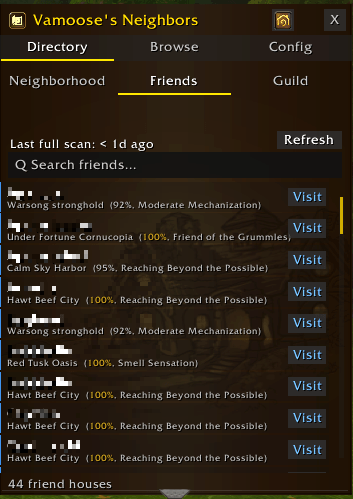
Locate all your Battle.net friends' houses across every neighborhood.
- Cross-Neighborhood -- Scans all BNet friends and shows their houses regardless of which neighborhood they're in
- Search -- Filter by friend name, neighborhood name, or subdivision number
- Subdivision -- Each row names the subdivision the house sits in, so guild subdivisions sharing one name stay distinct
- Visit -- Blue visit button on each row to teleport directly to a friend's house
- Incremental Scan -- Only new friends are scanned on login; removed friends are pruned automatically. Weekly full re-scan catches data drift. Force Refresh triggers a complete re-scan at any time.
- Endeavor Progress -- Each friend's neighborhood shows its current endeavor and completion percentage
- Endeavor Filter -- A dropdown on the sort row filters the list to only friends whose neighborhood is running a chosen endeavor. Each endeavor is color-coded in the list and the dropdown
Guild Sub-Tab -- Find Your Guildmates
Locate all your guild members' houses across every neighborhood.
- Every Member Listed -- One row per guild member, whether or not the scan placed a house for them, so a member living outside the guild's neighborhoods is still there to visit
- Scan Guild -- Sweeps the guild's neighborhoods for who lives on each plot, in about a dozen requests, and keeps the answer between sessions
- Refresh, then Visit -- House keys are issued per session, so each row's button fetches that member's key first and turns into a gold Visit button once it has one
- Search -- Filter by member name, neighborhood name, Discord tag, or subdivision number
- Subdivision -- Each row names the subdivision the house sits in, so two guildmates in different subdivisions of one neighborhood are told apart
- Guild Change Detection -- Automatically wipes cache and re-scans when you switch guilds
- Endeavor Progress -- Each member's neighborhood shows its current endeavor and completion percentage
- Endeavor Filter -- A dropdown on the sort row filters the list to only guildmates whose neighborhood is running a chosen endeavor
- Last Endeavor Contribution -- A Check activity button reads the endeavor activity log for your current neighborhood and shows each member's last contribution beside their name, colored by how recent it is
- Discord Tags -- Record a Discord name against any member. Tags show beside the character name and are matched by the search box
- Inactive First -- An ordering option that lists members with no contribution at the top, then the oldest contributions
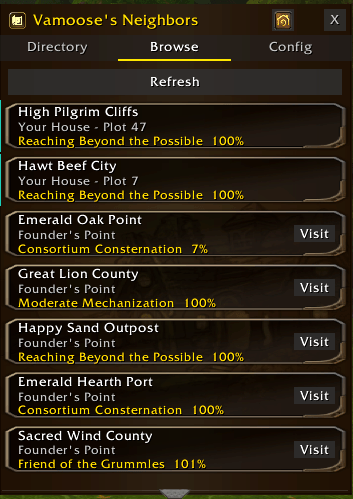
Browse Tab -- Discover Neighborhoods
Explore neighborhoods beyond your own using the House Finder. See which endeavor each neighborhood is running and how far along they are -- before you commit.
- Neighborhood List -- Scrollable list of discoverable neighborhoods with type and owner info
- Endeavor Progress -- Each neighborhood shows its current endeavor name and completion percentage, fetched live
- Your Houses -- Your own houses pinned at the top with a teal accent bar
- Click to Explore -- Click any neighborhood row to view its plots in the Directory and embedded map
- Recent Visits -- Browse tab has a Recent sub-tab showing your last 250 visited neighborhoods with timestamps, recorded however you arrived
- Visited Ticks -- A tick beside neighborhoods you have been to since the weekly reset
- Clear Ticks -- Reset the ticks mid-week from the Recent sub-tab to start a fresh sweep, without losing your visit history
- BNet Search -- Search for neighborhoods your Battle.net friends live in
- Auto-Refresh -- List refreshes periodically and on charter accept/decline events
Embedded Map Drawer
An animated neighborhood map that slides out from the panel.
- Animated Map -- Neighborhood map loads with a smooth column-by-column fade-in (toggleable in config)
- Color-Coded Pins -- Plot markers colored by ownership (teal = self, blue = friend, gray = stranger, dim = empty)
- Waypoint Tracking -- Click any pin to set a waypoint; a blue tracking marker appears on the map
- Clear Waypoint -- Right-click the waypoint pin, or close the map, to clear it
- Chat Sharing -- Shift-click a pin to share a clickable map link in chat
- Pin Tooltips -- Hover to see owner name, plot name, and action hints
- Neighborhood Title -- Current neighborhood name displayed in themed header font on the map canvas
- Auto-Show -- Map opens automatically when neighborhood data is available, closes on Friends/Config tabs
- Toggle -- Manual toggle via header button; remembers your preference
- Plot Marker Overlay -- Numbered circles on plots for identification and screenshot sharing. Empty and taken plots are switched on independently from the palette button, each with a color you choose and a number color set to Auto, Dark or Light
House Finder Integration
Endeavor progress and visited marks shown directly on Blizzard's House Finder.
- Each neighborhood button in the native House Finder shows its current endeavor name and progress percentage
- A tick on the right of the button means you have visited that neighborhood since the weekly reset, or since you last cleared the ticks yourself
- Data loads automatically as you browse -- no extra clicks needed
Config Tab
- Discord -- Join link with one-click copy
- 8 Themes -- Solarized Dark, Gruvbox Dark, Everforest Dark, Everforest Access, Kanagawa Dark, Housing Theme, Accessibility HC, Colorblind Safe
- Language -- Override auto-detected client language from 12 options (reloads UI on change)
- Font Selector -- Choose from multiple font families
- UI Scale -- Stepper buttons at 0.1 increments (0.5x - 2.0x)
- Auto-Show Map -- Toggle automatic map drawer behavior
- Animated Map Effect -- Toggle tile fade-in animation on/off
- House Finder Endeavors -- Show/hide endeavor progress on Blizzard's House Finder
- Visited Marks -- Show/hide the tick on neighborhoods you have visited
- Neighborhood Manager -- Enable right-click tag system for categorizing neighbors (off by default)
- Clear Tags -- Reset all neighbor tags at once (appears when Neighborhood Manager is enabled)
- Export Neighborhood Data -- Copy the current subdivision's plots, owners, endeavor contribution, and Discord tags as comma-separated text
- Export Guild Data -- Copy every guild member house as character, neighborhood, plot and Discord tag, across all neighborhoods
- Minimap Button -- Show/hide with drag positioning
- Debug Mode -- Toggle verbose logging
Quick Start
Type /vn to open the panel.
Tabs: Directory | Browse | Config
Commands:
/vn-- Toggle main panel/vn minimap-- Toggle minimap button/vn theme <name>-- Switch theme/vn wipe-- Clear all caches and rescan (troubleshooting)
Requirements
Required:
- World of Warcraft: Midnight (12.1.0+)
More Addons by Vamoose
- Vamoose's Housing Decor Guide — Track, craft, preview, and acquire housing decorations across all professions
- Vamoose's Endeavors — Track Housing Endeavor progress across all your characters
- Vamoose's Dye Studio — Browse, preview, and manage housing dyes with custom palettes and live dyeing
- Vamoose's Companion — A companion personality that reacts to your adventures with contextual commentary
- Vamoose's Pet Patrol — Find uncollected wild battle pets in your current zone
- Vamoose's Guild Crafter — Find which guildies can craft what you need
- LiteWQ — Lightweight world quest tracker with reward icons, subzone rollup, and warband alt tracking
Support & Feedback
Found a bug or have a suggestion? Please report on our Discord!
Discord: https://discord.gg/RWZaxJaHFP
Buy Me a Coffee: https://buymeacoffee.com/Vamoose
Author: Vamoose Version: 1.13.2 Game Version: 12.1.0 (Midnight)
Also known as: neighbours, neighbourhood, neighbourhoods, neighbor finder, neighbourhood directory, housing neighbours, wow neighbourhood addon
Vamooses Neighbors Team

Owner