LiteWQ
- By
Lightweight world quest tracker — reward icons, subzone rollup, warband alt tracking, and mini mode right on your map.
Screenshot 2026-03-24 at 17.53.18.png
Screenshot 2026-03-24 at 17.53.45.png
Screenshot 2026-03-24 at 17.55.00.png
Screenshot 2026-03-24 at 17.55.26.png
Description
LiteWQ
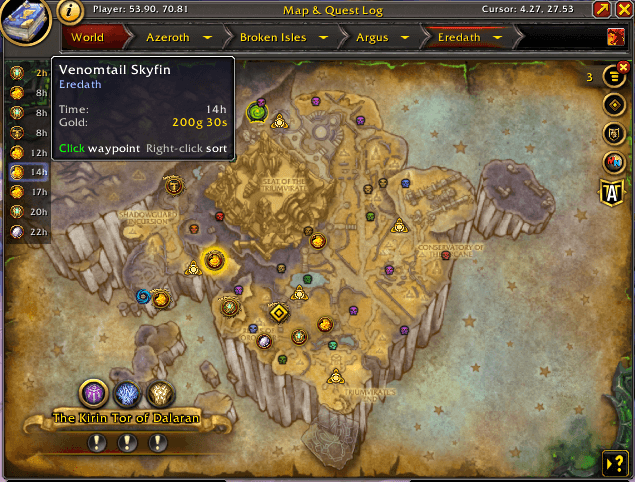
A lightweight world quest tracker that lives right on your map.
How to Use
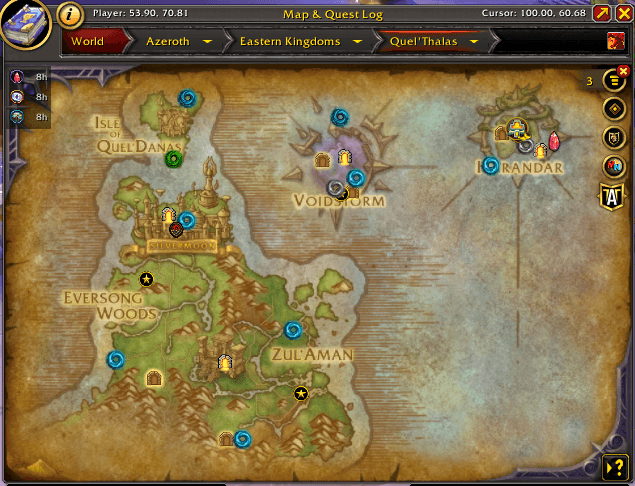
Open your world map and the list appears automatically on the left side.
- Click a row to focus the quest, just like clicking its pin on the map, and jump to its zone. Click again to unfocus. (Turn on the waypoint icon in the top row to drop a waypoint too.)
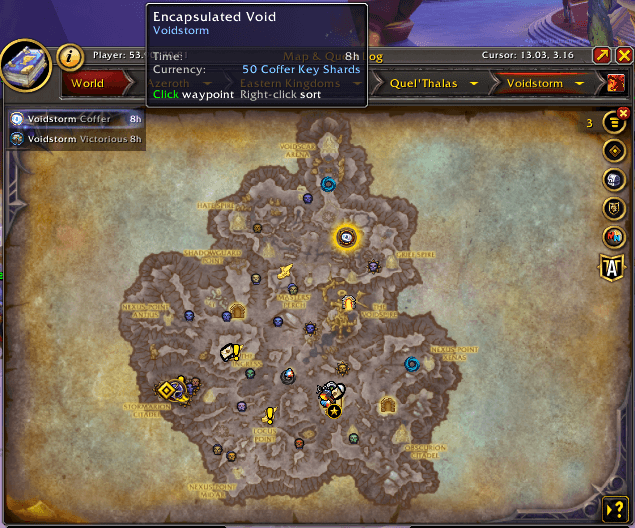
- Hover a row to highlight the quest pin on the map
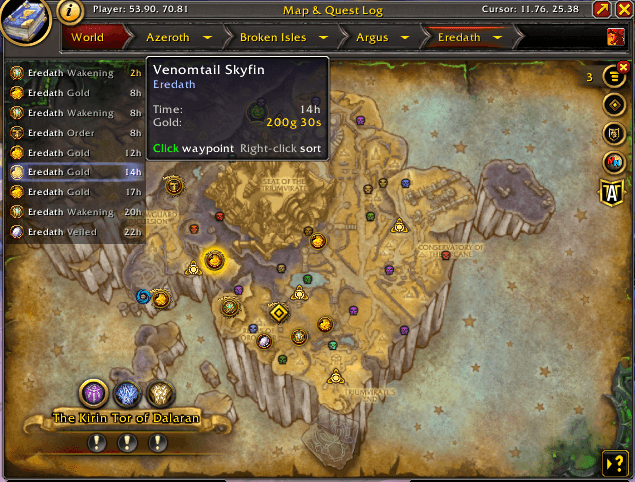
- Right-click any row to cycle sort modes (time, reward, distance, zone, name)
- Shift-click any row to toggle mini mode (icons + time only)
/litewqto toggle the panel,/litewq resetto refresh
What's New in v1.3.0
- Clicking a row works like clicking the quest's pin. It focuses the quest, so your on-screen arrow points to it, and clicking the focused quest again unfocuses it. The row highlight follows the focus, including when you click a pin on the map.
- No waypoint by default. Clicking a row no longer drops a map pin that you then have to clear. To get the waypoint back, click the waypoint icon in the panel's top row or type
/litewq waypoint. - Waypoints show on top of the reward badge. A waypoint dropped on a quest used to sit hidden underneath it.
- Continent maps fixed. From a continent map, waypoints now land on the quest, and sorting by distance measures to where each quest actually is.
See Your Rewards Instantly
Each row shows a reward icon with a quality-colored border — green for uncommon, blue for rare, purple for epic, orange for legendary. Short labels tell you exactly what the reward is: "Helm", "Trinket", "Valorstones", "Gold".
Special quest types get their own icons: pet battles show a paw print, prey quests show the crystal, capstone and world boss quests show their markers, and dungeon and raid quests show theirs.
Find Quests on the Map
Hover over any row and the matching quest pin lights up with a gold glow on the map. Click the row to navigate straight to that zone and focus the quest, the same as clicking its pin. Want a waypoint as well? Click the waypoint icon in the panel's top row to turn it on, and every quest you click gets a map pin.
When you're looking at a continent or region map, LiteWQ rolls up world quests from every child zone into one list. You'll see quests from every subzone at once — not just the zone you happen to be viewing.
Mini Mode
Shift-click any row to collapse the panel to just icons and time remaining — a slim strip that barely covers any map space. Shift-click again to expand back. Your preference is remembered across sessions.
Warband Alt Tracking
LiteWQ quietly records which world quests each of your characters completes. When you log onto an alt, quests that another character already finished show a green marker and list the character names in the tooltip.
Particularly useful for reputation quests where you only earn rep once per warband.
Designed to Stay Out of Your Way
- No configuration needed — works the moment you open your map
- Hides automatically when there are no world quests
- Fits itself to your map size
- Minimap button and Blizzard addon compartment button included
/litewq minimapto show or hide the minimap button/litewq waypointto turn the click-to-waypoint on or off
More Addons by Vamoose
- Vamoose's Housing Decor Guide — Track, craft, preview, and acquire housing decorations across all professions
- Vamoose's Endeavors — Track Housing Endeavor progress across all your characters
- Vamoose's Neighbors — Neighborhood directory with plot owners, waypoints, and initiative tracking
- Vamoose's Dye Studio — Browse, preview, and manage housing dyes with custom palettes and live dyeing
- Vamoose's Companion — A companion personality that reacts to your adventures with contextual commentary
- Vamoose's Pet Patrol — Find uncollected wild battle pets in your current zone
- Vamoose's Guild Crafter — Find which guildies can craft what you need
v1.3.0 | Made by Vamoose
LiteWQ Team

Owner