Housing Decor Guide
- By
Every housing decoration in the game, in one addon.** Browse the catalog with 3D previews, see where each piece comes from, track collection progress, plan and craft, design rooms before you build them, and place decor from the House Editor.
Screenshot 2026-06-08 at 08.04.47.png
Screenshot 2026-06-08 at 08.39.53.png
Screenshot 2026-06-08 at 08.40.05.png
Screenshot 2026-06-08 at 08.40.48.png
Screenshot 2026-06-08 at 08.41.12.png
Description
Vamoose's Housing Decor Guide
Every housing decoration in the game, in one addon. Browse the full catalog with 3D previews, see exactly where each piece comes from, track collection progress across your whole account, plan and craft what you need, design rooms before you build them, and even place decor straight from the House Editor.
Featured on Wowhead & Icy Veins!
"Track, Craft, Buy, and Sell Housing Decor"
Read the full article on Wowhead
What's New in v3.34.1
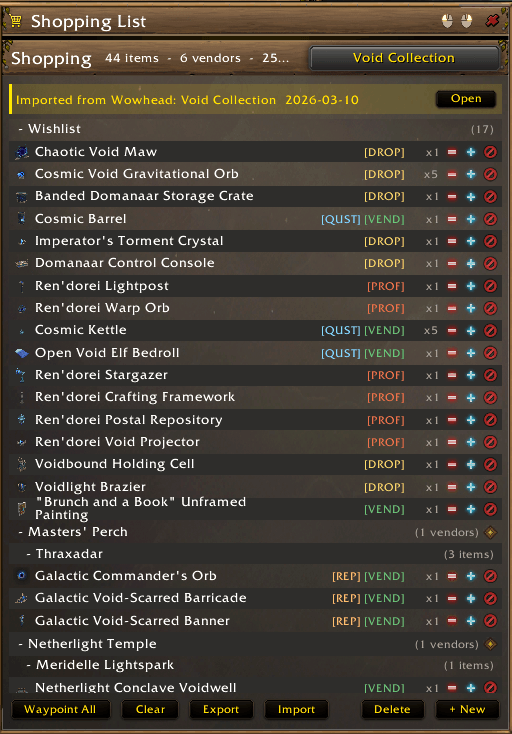
- The shopping list keeps its vendor headings when you send a blueprint's missing decor over twice. The second send rebuilt the list while the window was open, and the items arrived before anyone had worked out who sells them, so they all fell under Wishlist and the vendor headings disappeared until you closed the window and opened it again. Sellers are now worked out the moment a list arrives, whether you route it from a blueprint, paste it in as a code, or another addon sends it. Reported by Soul.
- The Destroy decor list holds still while you destroy from it. It sorts by how many copies you have stored, so every destroy reshuffled the list and could slide a different piece under your cursor between clicks. From your first destroy the order stays put. It sorts again when you leave the tab and come back, or turn the filter off and on.
The Decor Catalog
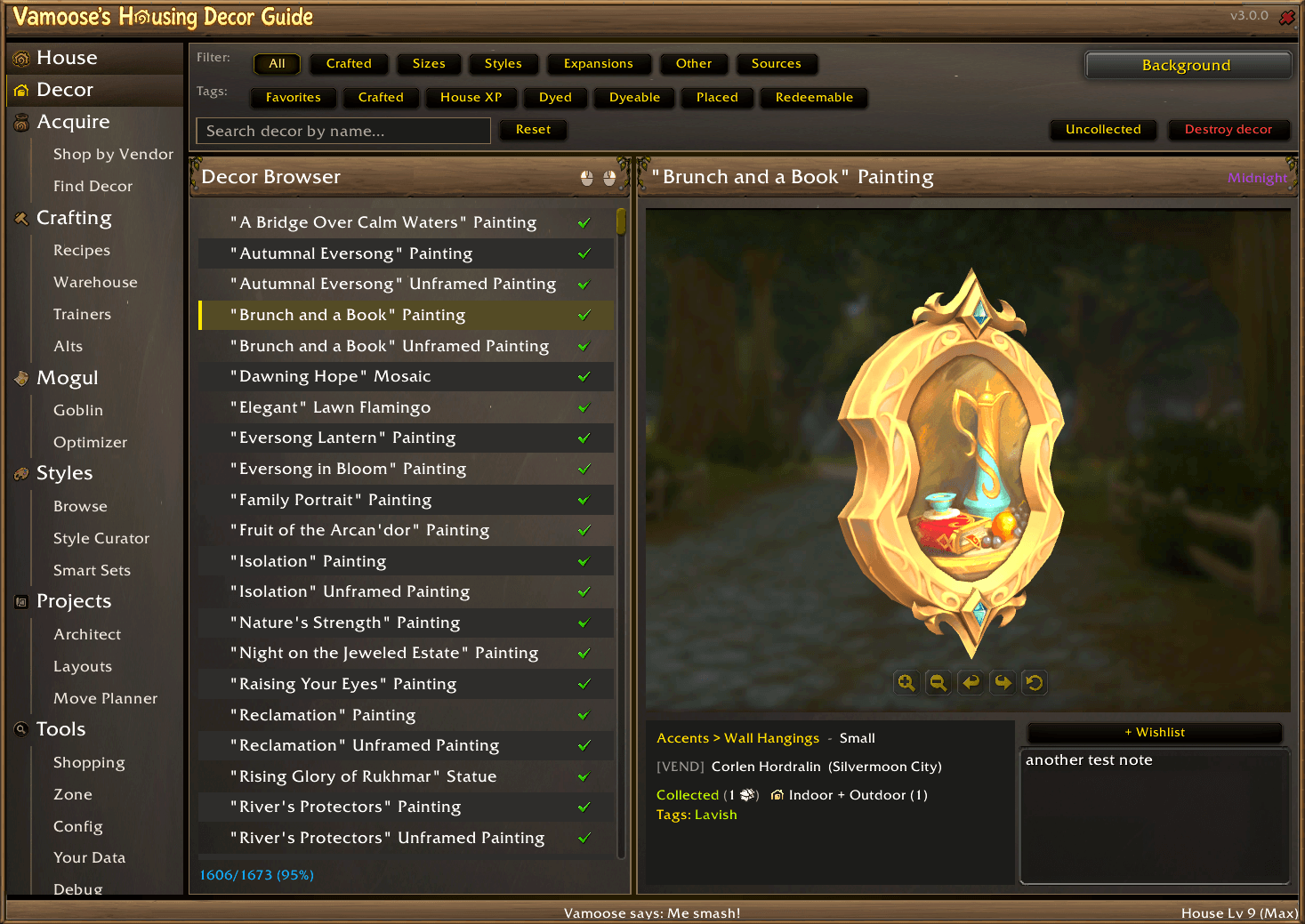
Every piece from the in-game Housing Catalog in one searchable list -- favorites, a collected check, a craftable-recipe star, and dye-variant color dots at a glance.
Compose filters across Crafted (by profession), Size (footprint tags plus placement-cost chips), Styles, Expansions, Sources (vendor / quest / achievement / reputation / crafted / …), and more -- with a live "collected / shown" status readout and one-click Reset.
"New in <patch>" -- when a patch or hotfix adds decor to the catalog, a New chip appears in the filter row so you can browse exactly what was added (and what you're still missing, via the Uncollected toggle).
Uncollected toggle to focus on what you're missing; Destroy Decor toggle to manage stored duplicates, with a confirmed destroy dialog that counts each copy as the game takes it, or Ctrl-Shift-click a row to destroy one copy.
3D model preview of any piece -- rotate, zoom, swap the backdrop, and preview specific dye variants.
Rich detail card: category breadcrumb, size, source, owned/stored/placed counts, first-acquisition House XP bonus, and style/faction tags.
Private notes per item and a one-click + Wishlist that adds to your active shopping list.
Placeable pets -- a Pets filter listing the pets in your collection that can be placed on decor, ordered by size, with each pet's height shown against your own character, family filters, a full-size preview, and Summon or Dismiss.
Acquire -- where every piece comes from
Shop by Vendor: browse every decor vendor (searchable; filter by faction, expansion, zone, reputation, or source). Each vendor shows what they sell -- items and recipe scrolls -- with gold/currency costs, multiple payment options, and live [QUEST] / [ACH] / [REP] gate chips that brighten as you meet them. A map thumbnail plus Waypoint and Map buttons get you there; Map N Vendors pins a whole filtered list at once.
Find Decor: search any piece and see exactly how to get it -- a typed source line with the reputation faction and your live progress, a clickable achievement link, the alt who completed the quest (account-wide), craft/drop tags, and an "Available from" list of every vendor that sells it. Add to Cart, copy Wowhead links, or jump straight to a vendor.
Crafting
- Recipes -- browse craftable decor across professions and expansions. Filter by Known / Ready / Unknown -- "Ready" buckets recipes by how much of the materials you already hold, and "Unknown" finds recipes nobody on your account has yet. Queue crafts, preview the result in 3D, and see a materials panel (totals or per-recipe, direct or fully raw, bucketed by source) with an AH cost estimate.
- Warehouse -- track lumber and every reagent (bag / bank / warband bank, separately), how much you need for your queue and for all uncollected recipes, and a "Used In" cross-reference so you know what's worth farming. Lumber tracker auto-pops when you harvest lumber. Hovering any material lists every character holding some, so you know where your stock actually is. A title-bar badge tracks your account-wide Essence of Lumber, with a per-character mouseover.
- Trainers -- a profession trainer directory by expansion and faction, each with location, coordinates, and a one-click waypoint, plus a dedicated Midnight Recipe Sources table.
- Alts -- an account-wide grid of your best skill in every profession across every expansion, with per-character detail and decor-recipe completeness so you always know which alt to log in.
Lumber Tracker & Radar
Housing crafting runs on lumber, so there's a dedicated Lumber Tracker -- a standalone window with a live circular radar that plots nearby lumber nodes as blips around you (with your facing and the cardinal directions), built from the spots the addon records each time you harvest. Start a farming session to track how much you've gathered and your rate, see your stock versus what your craft queue still needs per lumber type, and let it pop up automatically when you start cutting. Session history feeds the Warehouse and Your Data tabs.
Mogul -- make gold (or finish your collection) from decor
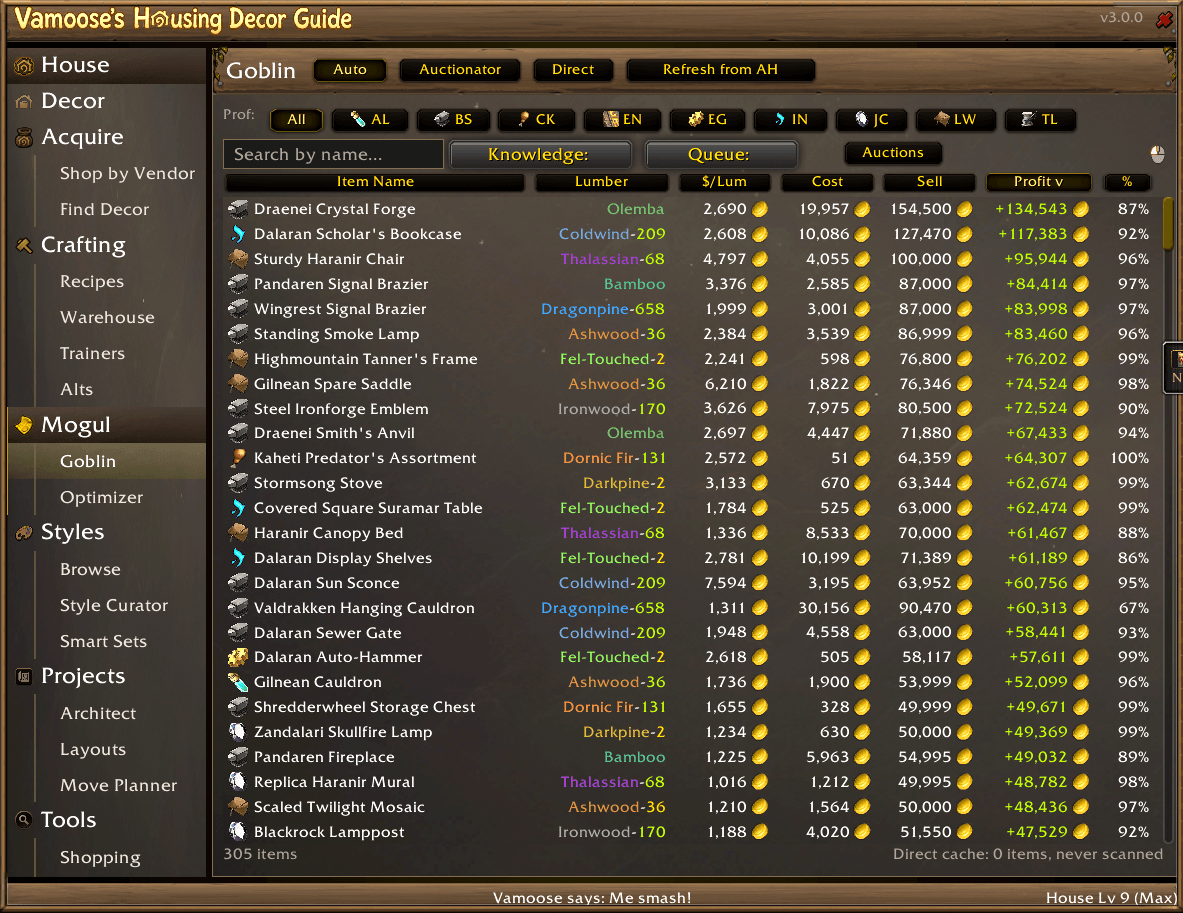
- Goblin -- a profit table for every craftable: material cost, sell price, profit, margin %, and gold-per-lumber, sortable and filterable, with a per-reagent cost breakdown on each row. Prices from TSM, Auctionator, a live AH scan, or vendor fallback. The #AH count highlights green when your own listings are among them, and a "Your Auctions" filter shows just the items you have listed.
- Optimizer -- ranks your recipes by profit or by new appearances for collection. Choose owned-mats vs buy-from-AH, scope to one character or the whole account, then Queue All or push the shopping list straight to Auctionator.
Styles -- organize and design
- Browse -- all your sets in one place: My Styles (grouped under categories you create, each folding with a click), Smart Sets, Shopping Lists, Snapshots, plus pre-authored Room Concepts and Useful Collections, each with a preview strip and collection count.
- Style Curator -- a workspace to file your decor into named styles: pick a source, multi-select from a category-browsable grid, move into a target style, with single-step undo and a coverage bar showing how much of your collection is organized.
- Smart Sets -- build filter-based sets from a deep tag taxonomy (room, mood, material, color, culture, motif, season, and more). Mark tags Signature / Accent / Clashing and watch a live, scored preview update against the whole catalog.
- Snapshots -- capture everything you've placed in a house as a saved set.
- Import a Build -- paste a friend's string, a wowhead.com URL, or a housing.wowdb.com build, preview it, and file it into My Styles, a Project Set, or a Shopping List.
Projects -- plan your house before you build
- Architect -- a drag-and-drop blueprint canvas: capture your real house onto the grid, lay out rooms across floors, watch live room and decor budget bars, and give each room a Design (its name plus its furnishings). One design can fill several rooms, and Auto-assign fills a whole capture in one click. Branch what-if layouts to experiment freely.
- Designs and Furnishing Sets -- designs persist across every layout and renovation; sets are reusable decor plans you equip into any number of designs. Plan with decor you don't own yet and send the gaps straight to your craft queue or shopping list.
- Layouts -- manage every saved layout, load one into the Architect, and share it as a compact code (or import someone else's).
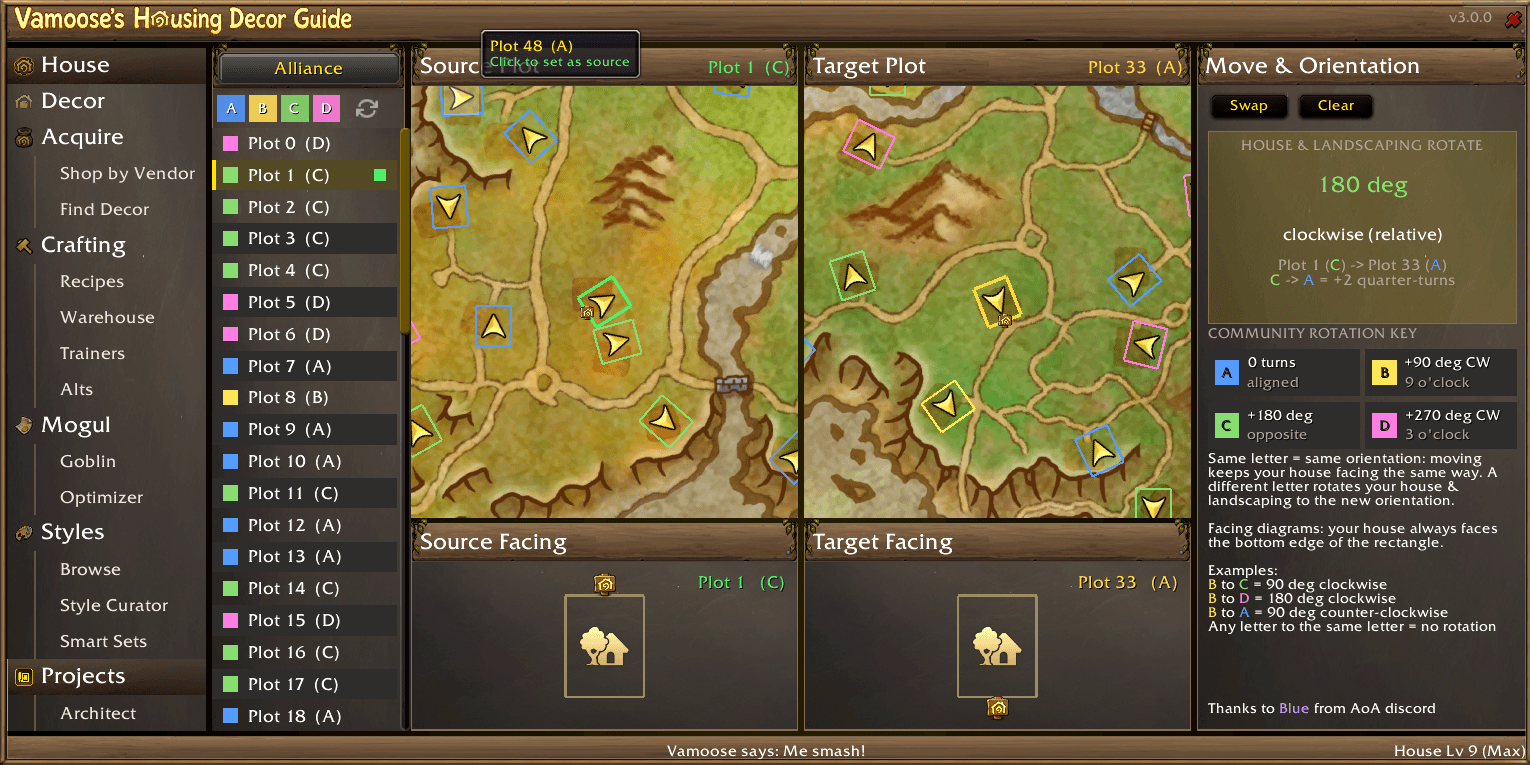
- Move Planner -- moving plots? Pick source and target and get the exact rotation (degrees + compass direction) your house and yard will need, with neighborhood maps and door-facing diagrams. (Rotation key courtesy of Blue, Art of Azeroth.)
Blueprints -- inspect and plan builds (WoW 12.1)
On a 12.1 client, a Blueprints tab appears under House. Paste any blueprint share code to inspect its full contents -- rooms, decor, dyes, fixtures -- and what you are missing, measured against whichever of your houses you pick, with room and decor budget meters and the game's own reason text when an import would be blocked. Pasted codes are kept in your own library with private names; your saved blueprint catalog shows alongside with rename and delete. Route missing items, dyes included, to a shopping list, import the contents as a Styles furnishing set, open House and Interior blueprints in the Architect, save a blueprint of your current house (full house, room, interior, or exterior), apply a code to your house through the game's import dialog, or link a blueprint in chat for others to import.
House -- your collection at a glance
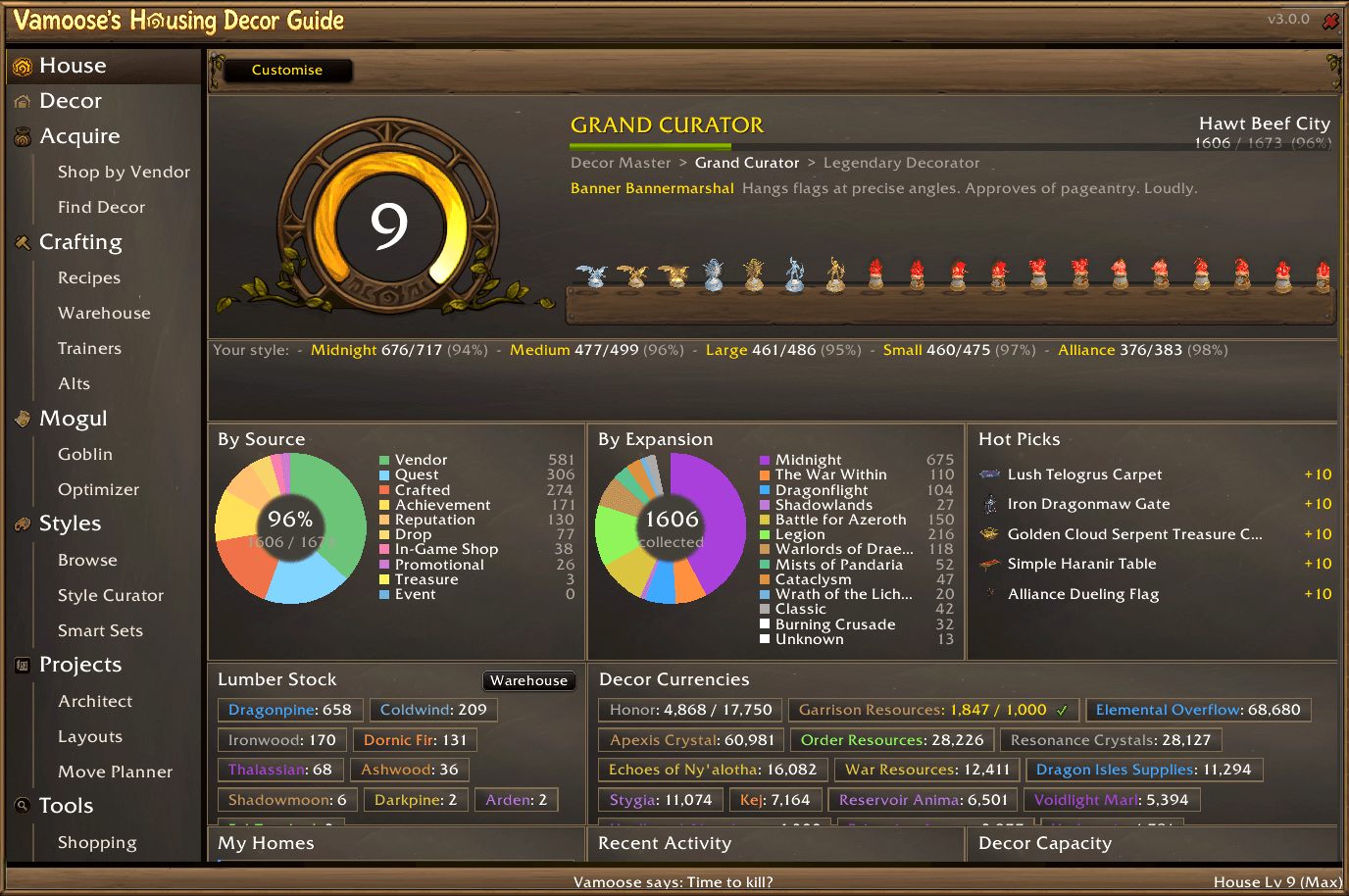
A personal dashboard: decorator profile with house level, favor, and Collector title progress; collection donuts by source and by expansion; "close to complete" and themed-set progress; House-XP "hot picks"; acquisition velocity and storage capacity; lumber wallet and decor currencies; favorites, recent activity, and your top uncollected-from vendors. Fully customizable -- toggle and drag-reorder every widget.
Right inside the House Editor
A companion window injects into Blizzard's House Editor so you can place decor with one click -- browse by your designs (each room's plan), your styles (grouped under your categories, each folding with a click), shopping lists, snapshots, room concepts, or what you've placed recently. Tooltips show ownership, placement cost, and the vendor that sells each piece; right-click sends a piece to your shopping list without leaving the editor. Indoor/outdoor filtering and dye variants are all handled for you.
Tools
- Shopping -- a floating, multi-list shopping manager grouped by zone and vendor, with "Waypoint All" and share/import codes. At a vendor, "Buy All" purchases every gold-priced list item in one paced pass, and right-clicking a gold-priced decor item opens a quantity picker. Items come off the list as you buy them.
- Zone alerts -- entering a zone with a decor vendor (selling something you're missing or have listed) can pop a window, ping chat, and play a sound -- each toggle optional.
- Your Data -- collection KPIs, achievement progress (decor, coupons, lumber milestones), and full crafting/farming history.
- Config -- multiple color themes with a live preview, UI scaling, and account profiles.
- Helpers -- optional collection marks on Blizzard's own windows: a collected/needed mark on vendor items and in the Housing catalog, and a reagent mark on bag slots, plus a decor-sourcing block on catalog tooltips. Each toggles under Settings > Helpers.
Integrations (all optional)
- TradeSkillMaster / Auctionator for pricing (and push shopping lists straight into Auctionator)
- TomTom for waypoints (falls back to Blizzard's native pin)
- Wowhead / wowdb build import
Quick Start
- Install and log in -- your old HDG data upgrades automatically.
- Open with
/hdg(or the minimap button / addon compartment). - Start in Decor to browse, Acquire to find pieces, or House for your dashboard.
Requirements
- World of Warcraft Retail 12.0.5+ (Midnight)
- No dependencies. TSM, Auctionator, and TomTom are optional enhancers.
Author: Vamoose Version: 3.34.1 Game Version: 12.1.0 (Midnight) Source / Issues: https://github.com/VamooseAddons/housing-decor-guide Discord: https://discord.gg/RWZaxJaHFP
Housing Decor Guide Team

Owner