Vamooses Endeavors
- By
Track your Housing Endeavor progress across all characters with a clean, theme-able interface showing tasks, completion status, and season milestones.
Screenshot 2026-01-27 at 23.51.56.png
Screenshot 2026-01-27 at 08.45.17.png
Screenshot 2026-01-26 at 08.28.48.png
Screenshot 2026-01-25 at 13.01.33.png
Screenshot 2026-01-25 at 13.09.33.png
Description
Vamoose's Endeavors
Track Housing Endeavor progress across all your characters!
See your neighborhood initiative tasks, track completion across alts, and never miss out on endeavor rewards.
Featured on Icy Veins! "Players Are Missing Housing Rewards - These 2 Addons Fix It"
What's New in v1.23.0
The minimap button tooltip shows your selected house and its progress. Hover the minimap button, or VE's entry in the addon compartment, to see the house selected in VE's dropdown and how far along its endeavor is, for example "423 / 1000 (42%)". Once the endeavor is done it says "Complete". Thanks to NoNe10 for the request.
Data broker displays show it too. If you use a broker bar such as Titan Panel or ChocolateBar, VE's entry now reads like "Oakhaven - 42%" instead of showing only the icon.
When it fills in. VE does not ask the game for your house list at login, so both readouts wait until you first open the VE window or the Housing Dashboard in a session. Until then the tooltip says "Open the window to load your house".
See CHANGELOG.txt for complete version history
Features
Endeavor Task Tracking
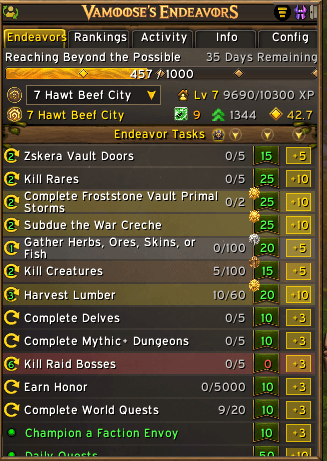
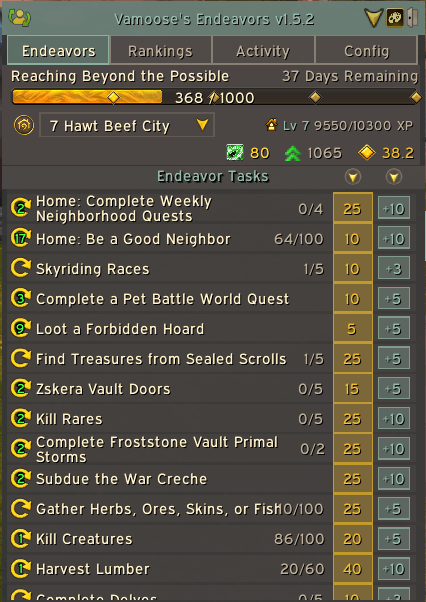
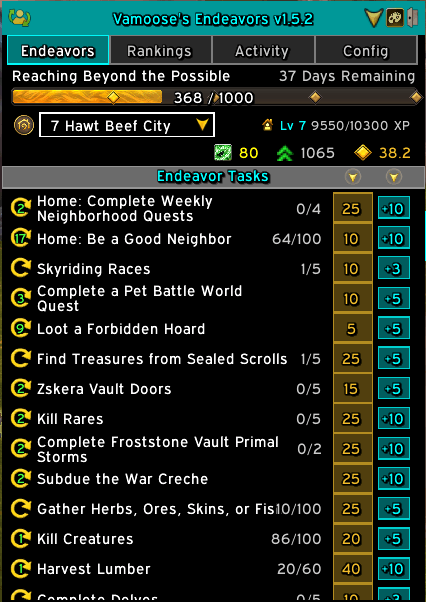
Track all housing endeavor tasks from the Neighborhood Initiative system.
- Completion Status - Green indicator for completed tasks, gray for incomplete
- Repeatable Tasks - Clear icon showing which tasks can be repeated
- Progress Display - Shows X/Y progress for multi-step tasks
- Point Values - Gold badge showing endeavor XP per task
- Coupon Rewards - Cyan badge showing coupon reward (with diminishing returns)
- Task Sorting - Click column headers to sort by XP or Coupons
- Task Favourites - Shift-click to pin up to 5 tasks for quick access
- House XP Available - Live remaining House XP budget straight from Blizzard's 12.0.5 native API, with current house XP and a projected end-of-cycle total in the tooltip
⭐ Alt Sharing & Leaderboard Grouping
The most requested feature! Group contributions by player account.
- Opt-in Alt Sharing - Share your alt list with guildmates who use this addon
- Leaderboard Grouping - Toggle to view rankings by player, not character
- Cross-Faction Support - BattleTag-based linking groups characters across Alliance/Horde
- Privacy-Focused - BattleTags hashed before broadcast (never shared in plain text)
- Your Alts Always Group - Even without sharing, your own characters combine
- Main Character Selection - Choose which name represents your account
Contribution Leaderboard
See who's contributing the most to your neighborhood!
- Rankings - Gold/Silver/Bronze colors for top 3 contributors
- Total Contribution - XP contributed by each member
- Group by Account - Toggle to combine alts into one leaderboard entry
- CSV Export - Export rankings data with Warband Group column
- Player Highlight - All your characters highlighted in accent color
Completion Chest Tracking
The 100% milestone reward, tracked end-to-end.
- Pulsing Chest Icon - On the progress bar, grows and shrinks while claimable, freezes once collected
- Progress Bar Tooltip - Hover the bar for cycle progress, and where to collect the chest when it's ready
- Auto Claim Detection - Detects the moment you click the chest in your neighborhood (~1 second)
- Account-Wide, Per-House - Claim on one alt locks the chest for all your alts on that house
- Cycle-Aware - Claim flag resets automatically each initiative cycle
- Login Status Line - Active-endeavor message tells you whether your chest is ready or already done
- Manual Override - Right-click the progress bar, or use
/ve claimed, to flag a chest the addon didn't see you collect
Activity Feed
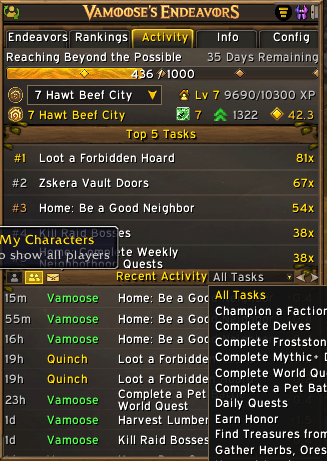
Track recent neighborhood activity in real-time.
- Top 5 Tasks - Most completed tasks by your neighborhood
- Activity Feed - Recent completions sorted by time (newest first)
- Player Names - See who completed what and when
- Coupon Earnings - Toggle to view actual post-DR coupon rewards per task
Season Progress
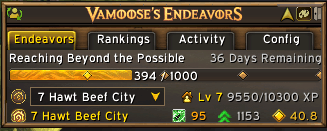
See your overall endeavor season progress at a glance.
- Progress Bar - Visual progress toward season goal
- Milestone Markers - Diamond indicators for reward thresholds
- Days Remaining - Countdown to season end
- Season Name - Current endeavor theme displayed
- Minimap Tooltip & Broker Text - Selected house and endeavor progress when you hover the minimap button, and on data broker displays
House Level & Coupons
Track your housing progress in the header area.
- Multi-House Dropdown - Switch between all your owned houses and track endeavor tasks for each separately
- House Level - Current level with XP progress to next level
- Community Coupons - Total coupons displayed in title bar
- Fetch Status - See loading state and last updated time
- Auto-Activate - Optionally set active endeavor when switching houses in dropdown
- Auto-Refresh - Updates when you earn rewards
Full Customization
Make the addon fit your preferences.
- UI Scale - Resize window from 80% to 140%
- Background Transparency - Set opacity from 30% to 100%
- Font Family - Choose from 6 fonts including Game Default (locale-aware) and Expressway
- Pin Window - Keep VE open through Escape key and auto-open on reload
- Show During Combat - Keep the window visible in combat instead of auto-hiding it
11 Beautiful Themes
Choose from 11 professionally designed color schemes.
- Housing Theme - Native WoW aesthetic with Blizzard Atlas textures
- Solarized Dark/Light - Classic developer themes, easy on the eyes
- Gruvbox Dark/Light - Warm, retro-styled with earthy tones
- Everforest Dark/Light - Nature-inspired green-grey forest tones
- Everforest Access - Everforest with enhanced contrast
- Kanagawa Dark/Light - Japanese-inspired ink and parchment aesthetic
- Accessibility HC - High contrast neon on black for maximum visibility
- Quick Toggle - Theme button in title bar, left-click next / right-click previous
Quick Start
Type /ve to open the main window.
Pro Tips
- Theme Button - Left-click to cycle forward, right-click to go back
- Minimap Button - Click to toggle window, hover for your selected house's progress
- Settings Tab - Font size, UI scale, transparency, font family
- Auto-Refresh - Data updates when endeavor events fire
- Refresh Button - Force update house level and tasks
Installation
- Download and extract to
World of Warcraft/_retail_/Interface/AddOns/ - Folder should be named
VamoosesEndeavors - Type
/reloador restart WoW - Type
/veto start!
Requirements
Required:
- World of Warcraft: Midnight (12.0.5+)
- Access to Housing (required level)
Commands
/ve- Toggle main window/ve status- Print initiative progress, House XP breakdown, and chest state in chat/ve claimed- Manually mark the active house's chest as claimed for the current cycle (useful if you claimed before v1.18 was running). Clears automatically next cycle./ve unclaimed- Clear the claim flag if you set it by mistake
More Addons by Vamoose
- Vamoose's Housing Decor Guide — Track, craft, preview, and acquire housing decorations across all professions
- Vamoose's Neighbors — Neighborhood directory with plot owners, waypoints, and initiative tracking
- Vamoose's Dye Studio — Browse, preview, and manage housing dyes with custom palettes and live dyeing
- Vamoose's Companion — A companion personality that reacts to your adventures with contextual commentary
- Vamoose's Pet Patrol — Find uncollected wild battle pets in your current zone
- Vamoose's Guild Crafter — Find which guildies can craft what you need
- LiteWQ — Lightweight world quest tracker with reward icons, subzone rollup, and warband alt tracking
Support & Feedback
Found a bug or have a suggestion? Please report on our Discord!
Discord: https://discord.gg/RWZaxJaHFP
Buy Me a Coffee: https://buymeacoffee.com/Vamoose
Author: Vamoose Version: 1.23.0 Game Version: 12.0.7+ (Midnight)
Vamooses Endeavors Team

Owner