Vamooses Pet Patrol
- By
Track wild battle pets in every zone with collection status, quality upgrades, and an interactive map
Screenshot 2026-03-14 at 22.30.04.png
Screenshot 2026-03-14 at 20.47.08.png
Screenshot 2026-03-14 at 20.45.29.png
Screenshot 2026-03-14 at 20.41.09.png
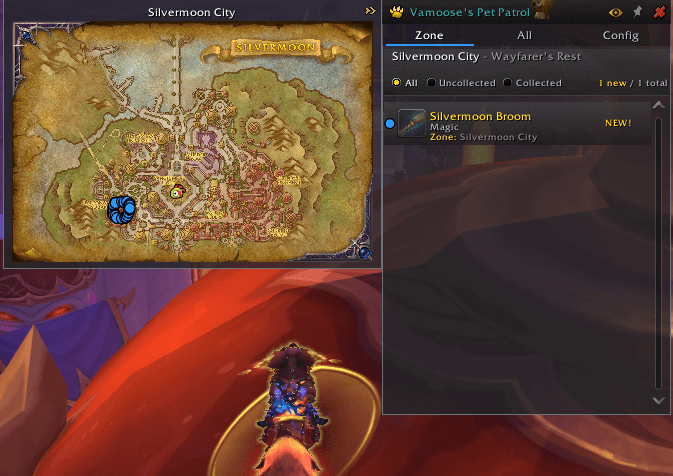
Screenshot 2026-03-14 at 20.38.55.png
Description
# Vamoose's Pet Patrol
**Never miss an uncollected battle pet again -- see what's available in your zone at a glance, with a map to find them.**
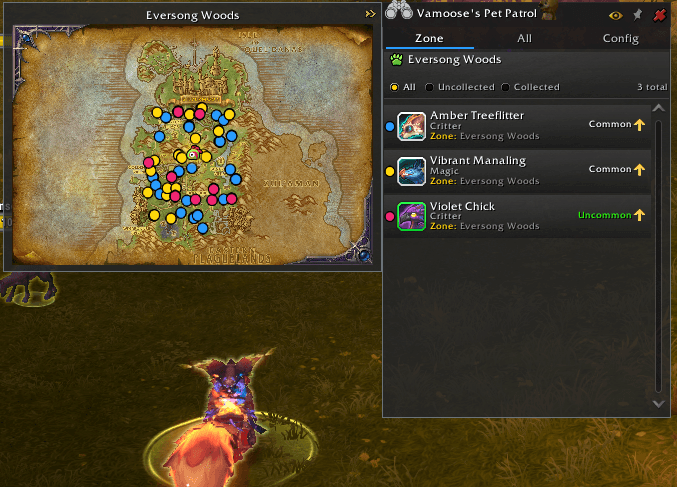
Vamoose's Pet Patrol tracks wild battle pets as you explore, alerting you when there are uncollected pets in your current zone. Browse your zone's pets with quality and upgrade indicators, open an animated map with spawn pins, or search the complete pet database by source type.
---
## What's New in v2.1.0
**Send in the spawns the map does not have.** However a pet turns up, whether you looked at it, fought it, trapped it, or picked it up off the ground, the spot is checked against the map that ships with the addon and kept when there is no pin for it. Patch 12.1's pets count too: they are not fought but clicked, so putting your cursor on one is enough, and the spot is recorded where the pet stands rather than wherever you were when you got round to opening your bags. Everywhere you find one is drawn on your own map, so a zone you have explored stops looking as empty as it did before you found anything.
A blip appears beside the addon's name in the title bar when you have something worth sharing. Click it and you get the list, an explanation of what it is for, and the Discord link to drop it into. Nothing is ever sent on its own: it leaves your computer only if you send it, and the window shows you what is in it first. Spots the map already covers are not recorded, so what you send is only ever new information, and standing on one spawn all evening records it once rather than two hundred times.
**The Coiled Isle has its first spawn pins.** The zone shipped with no pin data at all, because the coordinates come from a scrape that predates the patch. The Croakfrog's two spots are the first to arrive the new way. Every pin the addon ships still comes either from that scrape or from a submission a person read first.
**Zones added in patch 12.1 list their wild pets again.** The Coiled Isle has seven, and the Zone tab said "No wild pets in this zone", because the list of which pets live where came only from the scrape. The game itself knows, and Pet Patrol now reads that too, so a new zone is populated the day it opens. Map pins still need the scrape, so a brand-new zone may list its pets before it can show you where they are. 42 zones and 283 pet-zone pairings were missing this way, not only the new ones.
**Also in this release**
- The pets and zones added in patch 12.1 are dated correctly instead of reading "Unknown". 105 pets are now placed, and the families, sources and achievements behind them were refreshed at the same time
- Opening an achievement from a pet's source works again. Patch 12.1 removed the call behind it, so the click threw an error instead of opening the achievement window
## Pet Detail Panel -- Everything About One Pet
**Click any pet in either tab and a panel opens beside the list.**
- **3D Model** -- Rotating preview framed the way Blizzard frames it in the Pet Journal
- **Every Look** -- Species with alternate appearances list each one with the chance of getting it; click to preview it on the model
- **Your Copies** -- Each copy you own side by side with its level, breed and quality; select one to see its stats
- **Stats Against the Ceiling** -- Health, power and speed shown next to the ceiling for that species, so you can tell a keeper from a spare
- **Level Progress** -- Progress toward level 25 on a curve worked out from your own collection
- **Abilities** -- The pet's full kit, with abilities your copy is not yet high enough to use greyed out
- **Type Matchups** -- A grid of all ten families showing what this pet is strong and weak against
- **How To Get It** -- Source type plus the zones it spawns in, with a button to put those spawns on the map
- **Quests and Achievements** -- Progress shown for pets that come from one
- **Summon and Favourite** -- Both without opening the Pet Journal
- **Facts** -- Family, expansion, whether it is cageable, whether it can battle, and how many you may own
---
## Zone Pets Tab -- Your Current Zone
**See every wild battle pet available where you are right now.**
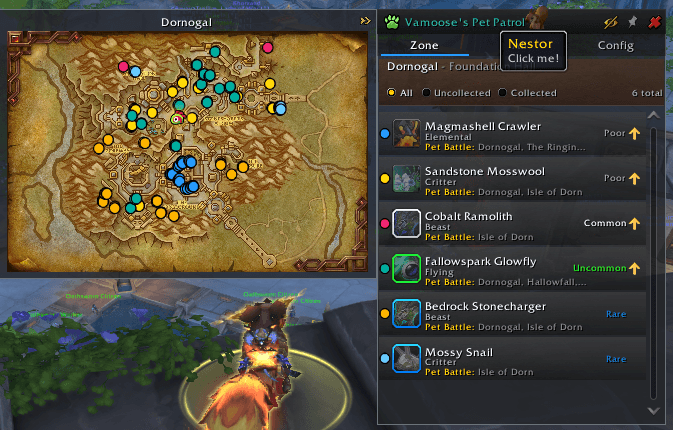
- **Pet List** -- All wild pets in your current zone with name, icon, type, and source
- **Pet Type Icons** -- Localized type glyph next to each row (Humanoid, Beast, Dragonkin, etc.)
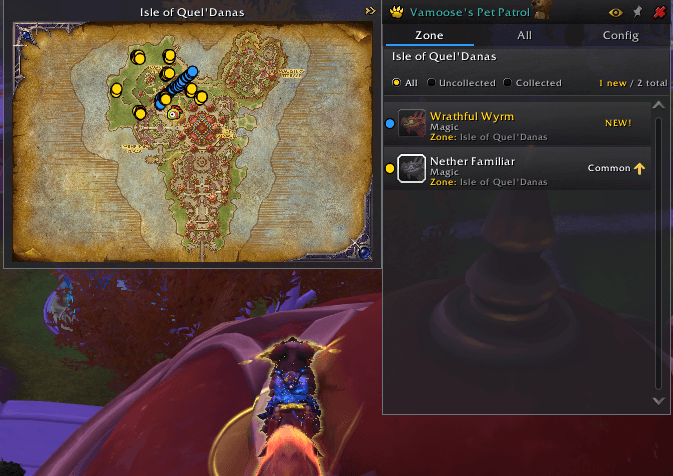
- **Collection Status** -- Gold "NEW" badge for uncollected pets, best-quality name for owned pets
- **Per-Copy Levels** -- Every owned copy's level shown beneath the status, each colored by its individual quality
- **Quality-Colored Names** -- Pet name colored by your best owned quality at a glance
- **Upgrade Arrow** -- Gold upward arrow on pets you own below Rare quality
- **Filters** -- Toggle between All, Uncollected, and Collected views
- **Count Display** -- "X new / Y total" showing how many pets you still need
- **Map Window** -- Open the zone map to see spawn pins and your current position
---
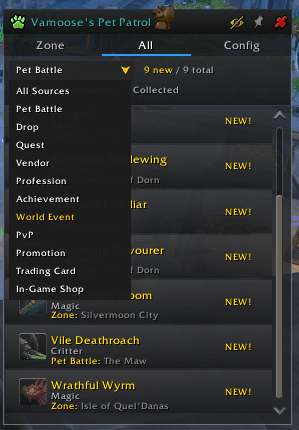
## All Pets Tab -- Browse Everything
**Every battle pet in the game, filtered down to the ones you care about.**
- **Name and Source Search** -- Type a partial pet name or source text to filter the full list as you type
- **Source Filter** -- Pet Battle, Drop, Quest, Vendor, Profession, Achievement, World Event, PvP, Promotion, Trading Card, In-Game Shop
- **Pet Family Filter** -- Any combination of the ten families, with check-all and uncheck-all
- **Expansion Filter** -- Narrow to one expansion, or to pets that belong to no expansion at all
- **Progress Filter** -- Needs upgrade, needs levelling, or fully maxed, so you can find the work left to do
- **Collection Filter** -- All, Uncollected, or Collected
- **Favourites** -- Show only species you have favourited a copy of
- **Battle Filter** -- Separate battle pets from companions
- **Sort** -- By name, quality, level or family
- **Counts** -- "X new / Y unique / Z owned", showing unique species and total copies separately
Filters combine, so "uncollected Beasts from Legion" is one menu away.
---
## Map Window -- Find Your Pets
**A standalone zone map with spawn coordinate pins, zoom, and three placement modes.**
- **Spawn Pins** -- Color-coded markers showing exactly where each pet spawns (data from Wowhead)
- **Per-Pet Colors** -- Each pet gets a unique color from a 20-hue colorblind-safe palette, matching the color blip on its list row
- **Pin Pulse** -- Click a pet row to highlight its pins on the map and dim everything else
- **Three Placement Modes** -- Attach the map to the left or right of the main window, or detach it as a free-floating window. Placement buttons live on the main window title bar (left arrow / eye / right arrow / detach).
- **Follow Player Mode** -- Toggle on the detached map and your blip stays centered while the map pans underneath you (minimap-style). Auto-zooms in when enabled.
- **Minimap-Style Player Arrow** -- Real directional arrow that rotates with your facing and stays a constant on-screen size at any zoom.
- **Sub-zone Fallback** -- Walking into a sub-area (e.g. Slayer's Rise inside Voidstorm) falls back to the parent zone's map and pins.
- **Independent Lifecycle** -- Detached map stays open when the main window closes (and stays open when you switch tabs); pinned map survives /reload and re-opens automatically.
- **Interior Zoom** -- Mouse wheel (centered on your cursor), +/-/Home buttons, click-drag to pan. Pins stay clickable at every zoom level. Zoom level is preserved across zone changes.
- **Explored Overlay** -- Fog of war removed from areas you've visited
- **Waypoints** -- Click any pin to set a native waypoint with super-track arrow; click the same pin again to clear it.
- **Chat Sharing** -- Shift-click a pin to share a clickable map link in chat
- **Pin Tooltips** -- Hover for pet name, quality, coordinates, and action hints
- **Combat-Safe** -- Auto-hides on combat, restores after.
- **Empty State** -- Friendly message with logo backdrop when no wild pets exist in the current zone
---
## World Map Integration
**Pets show up on Blizzard's world map (M).**
- **Spawn Pins on Zone View** -- Colored dots mark each pet's spawn coordinates in the active zone, matching the per-pet colors used in VPP's own map window.
- **Uncollected Counts on Continent View** -- Zoom out and each child zone gets an amber badge with the count of uncollected pets. Click a badge to drop into that zone.
- **Compartment Button** -- New icon sits next to Blizzard's own map filter buttons. Left-click opens VPP, right-click opens a filter menu (Show pins, All / Uncollected / Collected).
- **Pin Click Pulses the Main Window** -- Click any pin on the world map and the matching pet in VPP's main window pulses so you can see its details.
- **Auto-Follows Your Navigation** -- When the world map navigates to a new zone, VPP's Zone tab follows along.
---
## Sharing Spawns You Find
**Pets found where the shipped map has no pin are kept, drawn on your map, and offered for sending in.**
- **Every Way A Pet Turns Up** -- Looked at, fought, trapped, looted, or learned; a mouseover alone is enough, which is the only signal patch 12.1's click-to-capture pets give while still in the world
- **Only What Is New** -- The spot is checked against the shipped map first, so a spawn already pinned is never recorded
- **Recorded Once** -- Farming one spawn point for an evening writes one entry, not two hundred
- **Drawn On Your Own Map** -- Your finds appear as pins immediately, without a reload
- **Title Bar Blip** -- A marker beside the addon's name when you have something worth sharing
- **You Send It, Nothing Else Does** -- The share window shows you the exact text first; it leaves your computer only when you choose to post it
- **Curated Before It Ships** -- Submissions are read by a person before any of them reach other players
---
## Zone Change Alerts
**Get notified the moment you enter a zone with pets to collect.**
- **Chat Alert** -- Message showing uncollected and upgrade counts when you enter a zone
- **Sound Alert** -- Optional sound notification (toggle in config)
- **Uncollected Only** -- Optionally stay quiet in zones where you already have everything and only have upgrades left
- **Quiet At Login** -- The alert for the zone you log into waits until the login chatter has passed and your pet journal has loaded
---
## Window Features
- **Pin Button** -- Pin the window to keep it open through Esc and /reload
- **Nestor Mascot** -- Left-click for a quote with bounce animation, right-click to toggle Robo-Nestor
- **Map Placement Cluster** -- Detach / attach-left / eye / attach-right buttons grouped on the title bar
- **Quick Toggle from Detached Map** -- The small VPP logo on the detached map title bar opens or hides the main window
---
## Config Tab
- **Discord** -- Join link with one-click copy
- **Buy Me a Coffee** -- Support link
- **Alerts** -- Toggle zone change alerts, sound notifications, and a "uncollected only" filter so you don't get pinged in cleared zones
- **Nestor** -- Enable/disable companion quotes, chat-only mode option
- **22 Themes** -- Colorblind Safe, Housing, Blizzard UI, Catppuccin Mocha, Tokyonight, Rose Pine, Gruvbox, Solarized, Everforest, Kanagawa, Nord, Dracula, Nightfly, and more, in dark and light families
- **Minimap Button** -- Show/hide toggle
---
## Quick Start
Type **`/vpp`** to open the panel.
**Tabs:** Zone | All | Config
**Commands:**
- `/vpp` -- Toggle main panel
- `/vpp map` -- Toggle map window
- `/vpp map show` / `hide` -- Force show or hide the map
- `/vpp map reset` -- Reset map position, scale, and placement to defaults
- `/vpp scan` -- Force rebuild pet index
- `/vpp debug` -- Toggle debug mode
- `/vpp zone` -- Show current zone info
- `/vpp check <name>` -- Look up a pet by name or species ID
---
## Requirements
**Required:**
- World of Warcraft: Midnight (12.0.0+)
---
## More Addons by Vamoose
- **[Vamoose's Housing Decor Guide](https://www.curseforge.com/wow/addons/housing-decor-guide)** — Track, craft, preview, and acquire housing decorations across all professions
- **[Vamoose's Endeavors](https://www.curseforge.com/wow/addons/vamooses-endeavors)** — Track Housing Endeavor progress across all your characters
- **[Vamoose's Neighbors](https://www.curseforge.com/wow/addons/vamooses-neighbors)** — Neighborhood directory with plot owners, waypoints, and initiative tracking
- **[Vamoose's Dye Studio](https://www.curseforge.com/wow/addons/vamooses-dye-studio)** — Browse, preview, and manage housing dyes with custom palettes and live dyeing
- **[Vamoose's Companion](https://www.curseforge.com/wow/addons/vamooses-companions)** — A companion personality that reacts to your adventures with contextual commentary
- **[Vamoose's Guild Crafter](https://www.curseforge.com/wow/addons/vamooses-guild-crafter)** — Find which guildies can craft what you need
- **[LiteWQ](https://www.curseforge.com/wow/addons/litewq)** — Lightweight world quest tracker with reward icons, subzone rollup, and warband alt tracking
---
## Support & Feedback
Found a bug or have a suggestion? Please report on our Discord!
Discord: https://discord.gg/RWZaxJaHFP
Buy Me a Coffee: https://buymeacoffee.com/Vamoose
---
**Author:** Vamoose
**Version:** 2.1.0
**Game Version:** 12.0.0+ (Midnight)
---
*Also known as: pet tracker, battle pet finder, wild pet scanner, pet collection tracker, uncollected pets, pet patrol, wow pet addon*
Vamooses Pet Patrol Team

Owner