Forever Simple Skin
- By
Restyles Blizzard's own interface flat and compact: unit frames, nameplates, action bars, bags, tooltips and more, with GCD and mana rails and a combat timer.
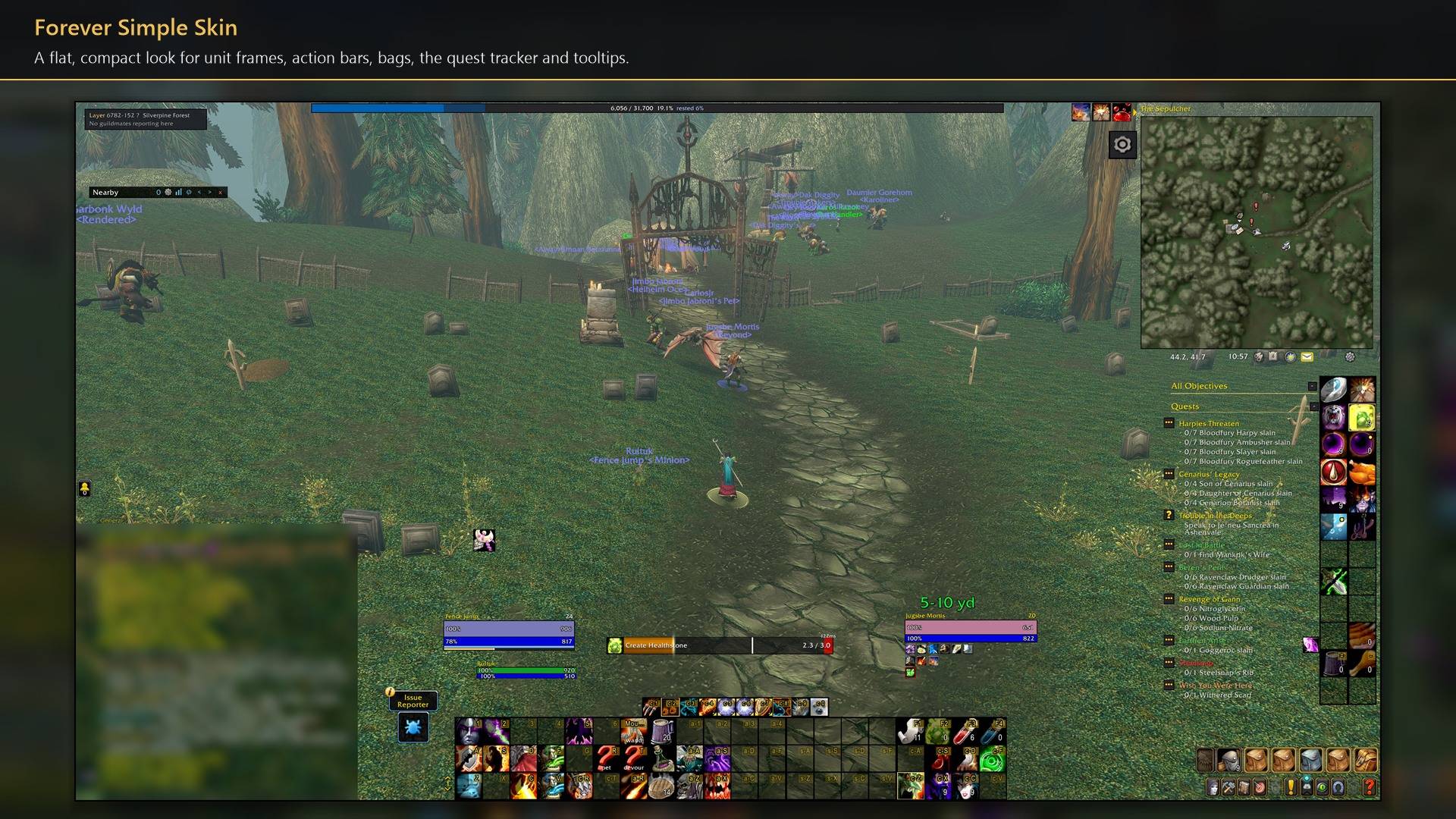
A flat, compact look for unit frames, action bars, bags, the quest tracker and tooltips.
Description
Forever Simple Skin restyles Blizzard's own interface in World of Warcraft: Forever into a flat, compact look: dark panels, black edges and gold highlights. It changes how Blizzard's frames look rather than replacing them, so they keep working as before. In game it is listed as Forever Skin.
What it restyles (each part has its own checkbox):
- Unit frames. Player, target, focus, pet and target of target: flat bars, no portraits, class-coloured health, a gold or silver band and badge for elite and rare targets, and your threat as a border (raid-style glow, a flat line, or Blizzard's own). Bars can be made longer and taller; on a longer mana bar, a pale band shows the mana your current cast will spend.
- Nameplates. Flat enemy and friendly plates with the level in its own box, a gold line round your target, threat colours, and a badge on party and raid members. Blizzard's own nameplate options sit on the same settings page.
- Action bars. Square action buttons with black edges; checked buttons get a gold edge. Key binding text can be restyled.
- XP bar, buffs, bags, quest tracker, world map, quest log, quest givers' and gossip windows, books and tooltips.
- Blizzard's windows, in five parts. Mail and merchants is on by default: the mailbox, merchants, the bank, trade, loot and loot rolls, the auction house and flight maps. Guild and friends, Character, Spells and professions (with a readable spellbook, and its Show passives, Use flyouts and Show all ranks options as ticks beside the tabs) and Menus and system are off by default; tick one to make its windows flat. Compact windows drops the empty band under each title and fits the quest, gossip, book, merchant, mail and character windows, the spellbook and the game menu to their content.
- Hide group manager keeps the party and raid tab at the top left out of the way.
Your timers on the player frame:
- GCD rail. A thin bar under your power bar that drains over the global cooldown, red over a spell lockout.
- Mana rail. Empties when a spell spends mana and fills over the five-second regeneration pause.
- Combat box on the name line, counting down to your likely drop out of combat (
~3.2,PvE,0).
These use only your own public events and the game's cooldown data. Your mana and the GCD time are hidden from addons in combat on Forever, so the rails let the game draw them rather than reading them.
Cast bar. Forever Simple Skin does not restyle the cast bar. For the flat, compact cast bar, install Forever Simple Cast as well.
Scale. Window scale (50% to 150%) sizes Blizzard's windows and bags, and UI size (50% to 200% of the size the game picks for your screen) sizes the whole interface. Both are kept for each screen size.
Every setting is in Options → AddOns → Forever Skin (or /fskin), in three pages (Forever Skin, Unit frames and Nameplates) with live samples pinned above the rows.
Works better with
These addons are optional. Install any of them alongside this one for more:
- Forever Simple Cast: the flat cast bar that matches this look. Forever Simple Skin leaves the cast bar alone, so you need Forever Simple Cast for it.
- Forever Simple Settings:
/fskinopens these options in its big, resizable window, even in combat, instead of the game's small Options window.
Forever Simple Skin Team