Forever Simple Cast
- By
Clean cast bars for you, your target, focus, pet and nameplates, with latency, a GCD spark and timer bars.
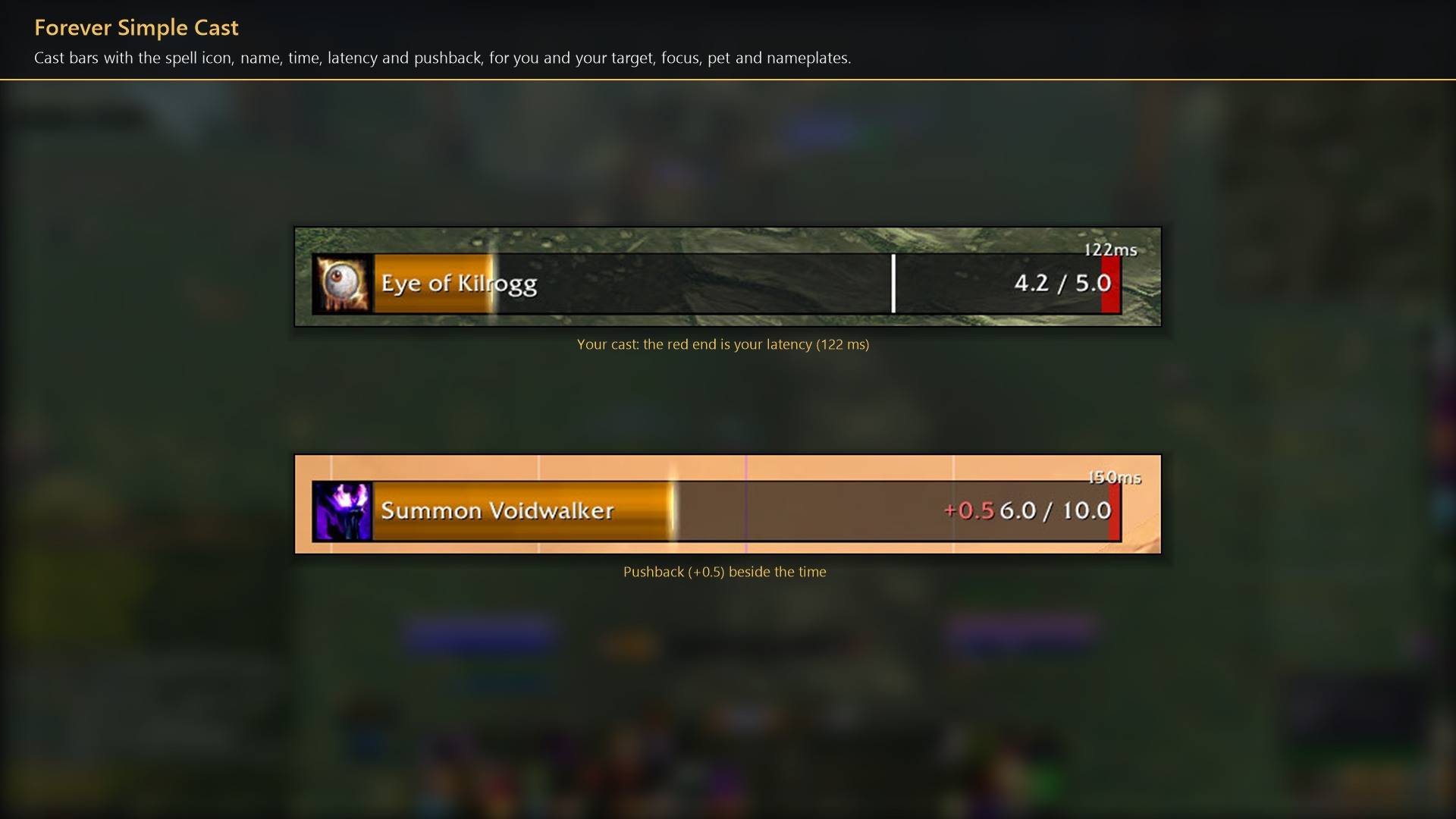
Cast bars with the spell icon, name, time, latency and pushback, for you and your target, focus, pet and nameplates.
Description
Forever Simple Cast replaces Blizzard's cast bars with flat, compact ones for you, your target, focus, pet and every enemy nameplate. Your own bar shows your latency, the global cooldown and any pushback, so you can start the next spell at the right moment. In game it is listed as Forever Cast.
Your cast bar
- Latency. The end of each cast is shaded by your latency, with an optional "123ms" label. Once the fill reaches it, you can queue the next spell.
- Global cooldown. A thin white line crosses the bar while the global cooldown runs, after instant spells too.
- Pushback. "+0.5" beside the time shows what a hit added to your cast; "-0.5" what it took off a channel.
- Interrupts and range. "Interrupted by <name>" or "Failed" when a cast stops, and a tint while your target is out of range.
- Crafting. Making several of one item shows one bar with a count, such as (3/10).
Target, focus, pet and nameplates
Matching bars. Target, focus and pet bars in the same style, and a bar on each enemy nameplate (friendly plates too, if you turn them on). Casts you cannot interrupt show grey with a shield.
Cast target. A nameplate bar names who the cast is aimed at, in class colour, and glows while it is aimed at you.
Forever hides enemy casts from addons: the bars still show them, but the addon cannot read them, so there is no sound or alert for a cast aimed at you.
Swing timer and timer bars
Swing timer (off by default). Wand, bow, gun and thrown shots run on your cast bar: an orange startup before the first shot, a fill until the next, and gold ticks where your spells come free. Melee swings are thin strips under the bar, main hand and off hand.

Timer bars. Breath, fatigue and feign death, plus your own countdowns with /fcast timer 10.
Parry haste and a queued Heroic Strike are not shown: Forever keeps the combat log from addons.
How to use it
- Settings are in Options → AddOns → Forever Cast (or
/fcast), on three pages: Forever Cast, Target, focus and pet, and Nameplate bars. /fcast unlockshows every bar so you can drag it;/fcast lockwhen you are done./fcast testplays a sample cast on each bar.- Blizzard's matching bars are hidden. Turn off Hide Blizzard's bar under any bar to keep Blizzard's.
Works better with
These addons are optional. Install any of them alongside this one for more:
- Forever Simple Settings:
/fcastopens these options in its big, resizable window, even in combat, instead of the game's small Options window.
Feedback
Bugs and ideas: leave a comment on this page with a screenshot or the steps that cause it, and your class. I play one character, so reports from other classes and situations help most.
Forever Simple Cast Team