Forever Simple Combat Text
- By
Beta: scrolling combat text in short, clear lines, with your spell's icon on your hits, three presets and lanes you can move.
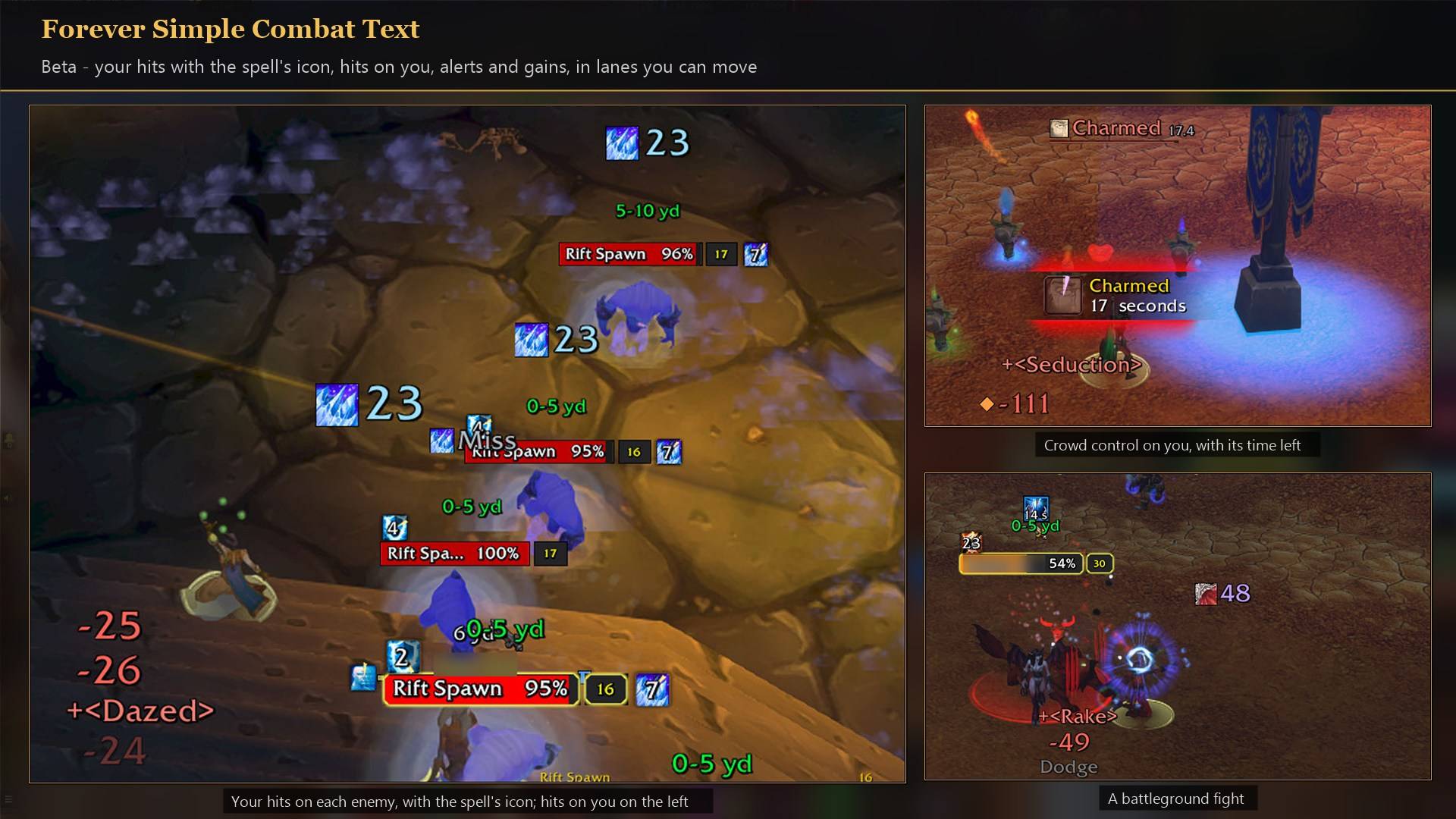
Your hits with their icons on each enemy, a Charm on you with its time left, and a battleground fight.
Description
Scrolling combat text for WoW Forever, in short, clear lines. Your hits with your spell's icon, hits on you, alerts and gains, each in its own lane that you can move. Pick one of three presets and you're done, or fine-tune every lane. To ensure accuracy, Combat Text pieces together hidden information: each hit is matched to a combat log line that lands in the same frame. Your hits stay yours, no teammates' numbers mixed in
This is a beta. It works, but it is not finished. The game hides from addons who made each hit, so this addon has to work out which hits are yours, and it can get that wrong. So far it has mostly been played with a warlock in battlegrounds, and only briefly with a mage in a dungeon. Everything else is a best guess, listed below. Expect frequent updates. Nothing here is final, and the rules will keep changing as better ways are found.
What it shows
- Your hits (right of you, rising): each hit with the icon of the spell that made it. Crits pop. A DoT is one line that counts up (
504 x3). Hits of one spell landing together join into one line (1535 x5). Misses and resists show as a short grey word. Your teammates' hits are left out. - Hits on you (left of you, falling): damage in red with a small diamond for magic, heals in green, a heal over time as one counting line.
- Alerts (above you): crowd control on you with its icon and time left, procs, cooldowns ready, interrupts you land, your killing blows, combat in and out, and an optional summary after a fight.
- Gains (bottom right): honor with the enemy's name, experience, and optionally reputation, money and loot.
- Combat log (optional lane): Blizzard's own combat log lines, shown whole.
Three presets
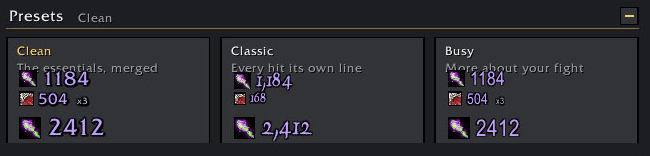
- Clean (new installs): the essentials, merged.
- Classic: every hit and tick on its own line, in the game's damage font, with numbers like 1,240.
- Busy: more to read. Spell names after the numbers, the fight summary, reputation, money and loot, and the Combat log lane.
A preset never moves your lanes. Undo puts back what it changed.
How it tells your hits from other people's
Addons in WoW Forever can't see who made a hit. They also can't read the combat log. What they can see is when one of Blizzard's combat log lines arrives, and for each thing you do, a line arrives at the same instant as the hit. A teammate's hit never gets one. From that and your own casts, swings, wand shots and DoT timing, the addon works out which hits are yours and which spell made each one.
For best results: keep Confirm your hits on (it is on by default). The combat log needs a few settings: while one is missing, a window at login lists them, and its Set these for me button sets them all in one click (My actions with Me and Pet, misses on), then asks you to reload. It also has Blizzard colour each combat log line by its kind (spell hit, DoT tick, swing, shot, miss, heal, interrupt, dispel), so a heal or interrupt of yours never makes a teammate's hit look like yours.
What works well (tested: warlock, battlegrounds)
- Your spells and DoTs with their icons, and ticks counted on one line.
- Your teammates' hits left out.
- Wand shots, your pet's spells, crowd control on you, Life Tap's mana.
What it can't do, and why
None of these can be fixed, because the game doesn't give addons the information:
- Partial resists: a partly resisted hit of yours shows only the amount that landed. The resisted amount is only in the combat log's own sentence, which the Combat log lane can show.
- Life Tap's health cost isn't reported, so it's taken from the spell's description. A talent that changes it will show the wrong number.
- Buffs from other players, in battlegrounds and in combat, show by name only, with no icon.
- Your pet in battlegrounds: the game hides which enemy your pet attacks, so its hits only show with My Pet in the combat log filter.
- The same DoT on several enemies can now and then put a tick under the wrong one of your DoT icons, because enemies' identities are hidden in battlegrounds. Amounts and timing keep this rare.
- Some hits of yours will be missing. A hit the addon can't explain is left out rather than shown as yours by mistake.
- Who hit you, and with what: the game hides this during a fight, so hits on you show the amount and school only.
- "HK: Private (1 Honor)", the big text, is drawn by the game, not by this addon. Blizzard's Honor Gains option (Options > Combat) seems to control it.
Not tried yet: best guesses
- Raids: when many players hit a boss at once, bolts of the same spell landing together can swap numbers.
- Melee classes and procs (poisons, seals, Windfury) show as yours with no icon. Druid forms are untested. Shaman totems' hits will most likely not show. Hunter pets should work like a warlock's pet, with My Pet in the filter.
- Dungeons, and game clients not in English. On those clients, spells are learned from your first casts instead of from their descriptions.
If you play one of these, your report helps more than anything else.
What it changes in your game
- Blizzard's numbers over enemies are turned off while the addon runs, so nothing shows twice. They're put back at every logout and /reload, so if you remove the addon they come back.
- Blizzard's combat text over you is hidden while the addon runs. Its switch (Options > Combat) has to be on for the game to send buff and honor notices. If you had it off, the addon turns it on at login and back off at every logout and /reload.
- Blizzard's combat log filter changes only when you press Set these for me: My actions with Me and Pet, your damage, misses, heals, interrupts, dispels and broken crowd control, and each line coloured by its kind. These are Blizzard's own settings for your whole account, so they stay if you remove the addon (your Combat Log tab keeps its colours); the Defaults button in Blizzard's combat log settings puts them all back.
- Set these for me also hides the What happened to me? button above the Combat Log, so a stray click can't switch the filter. The filter itself stays; tick Show Quick Button in its settings to bring the button back.
- Both Blizzard settings can be switched back on any time under Blizzard's own numbers on the settings page.
How to use it
- Open Options > AddOns > Forever Combat Text, or type
/fct. - Click a preset. A live preview runs a sample fight on the settings page. Click a lane in it to edit that lane.
- To move the lanes, click Unlock to move at the top of the settings page, or turn off Locked under All lanes. Drag a lane to move it, drag its corner dots to resize the text, and use its gear for that lane's look. Right-click locks them again.
Feedback
We appreciate all feedback and comments, and we regularly update and change our addons based on them.
Forever Simple Combat Text Team