Forever Simple Bank
- By
Your bank in lists: gear, consumables, trade goods and your own, with Deposit and Take for a whole list, search, Sort and every character's bank away from the banker.
Your bank in lists: deposit or take a whole list in one click, and see any character's bank anywhere.
Description
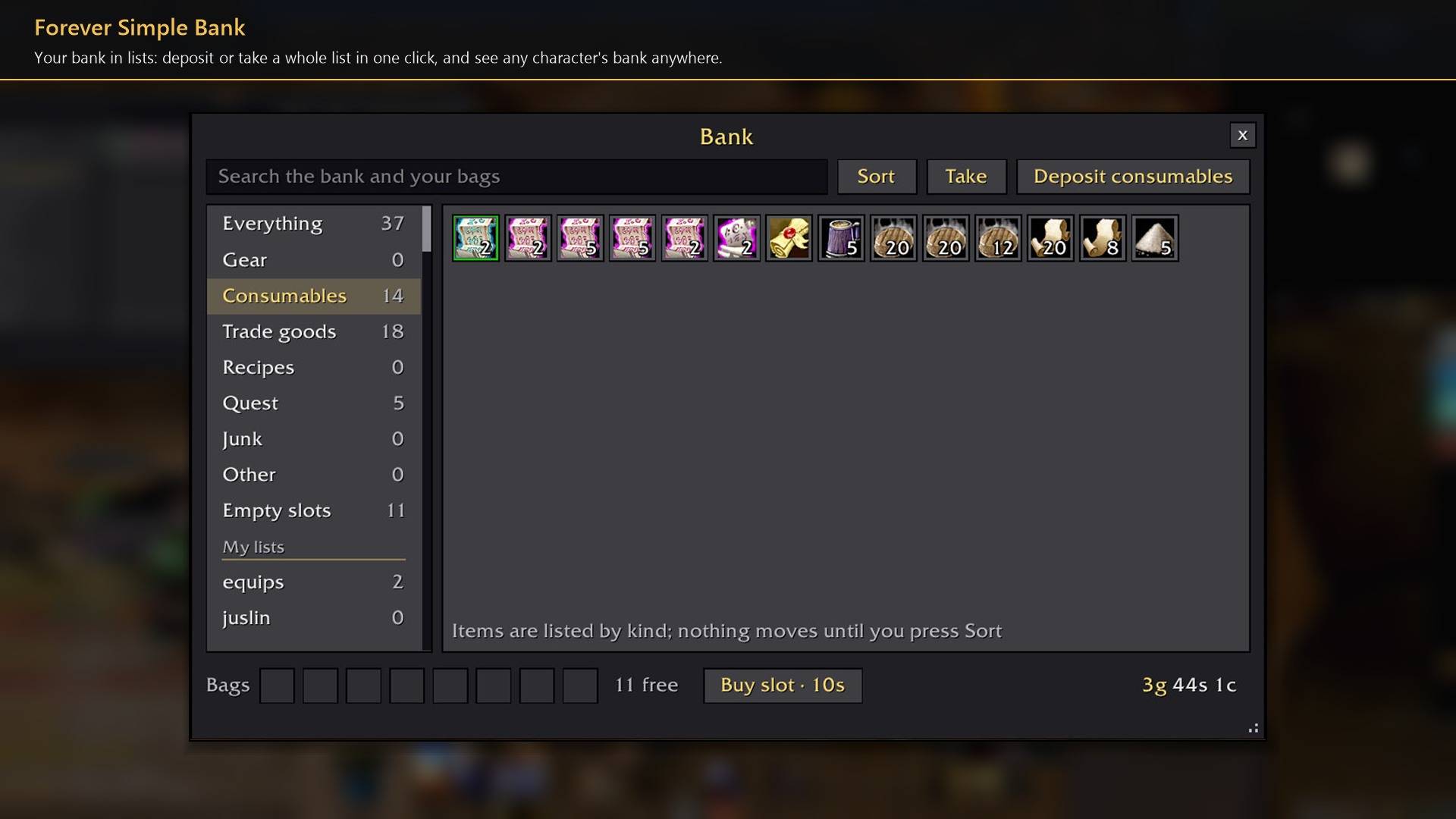
Forever Simple Bank replaces the bank window with one that sorts your bank into lists: gear, consumables, trade goods and lists of your own. Deposit or take a whole list in one click, and look at any character's bank away from the banker. In game it is listed as Forever Bank.
The window
Lists. Everything, Gear, Consumables, Trade goods, Recipes, Quest, Junk, Other and Empty slots, each with how many stacks the bank holds. Every item is on exactly one. Items are listed by kind, then type, quality and name; nothing moves until you press Sort.
Top row. A search box over the bank and your bags, Sort, Take (the list's items to your bags) and Deposit for the chosen list, or Deposit all on Everything.
Bottom row. Your bank bags, free slots, Buy slot with its price, and your money. Everything Blizzard's bank window does still works: click, drag, right-click, split and link items as usual.
Your own lists
Make a list with + New list, then drop items on its name, or Alt-click an item in the bank to tick the lists it belongs to. Lists are shared by every character on the account.
Deposit all moves trade goods, recipes and your own lists by default, never gear or consumables unless you mark them; right-click a list to change it. Moves go one stack at a time and only when there is room for the whole stack. They stop in combat or with a vendor, trade, mail or auction window open, so nothing is sold or sent by mistake.
Away from the banker
Each character's bank is kept as it was at their last visit. Open the window anywhere to browse and search it, or pick another character's bank. Nothing can be moved there.
How to use it
- Talk to a banker: the window opens in place of Blizzard's.
- Settings are in Options → AddOns → Forever Bank, or type
/fbank./fbank show, or a key binding under Key Bindings → AddOns, opens a remembered bank anywhere. - Drag the window's corner to size it; double-click the corner for its usual size.
Works better with
These addons are optional. Install any of them alongside this one for more:
- Forever Simple Skin: its rebuilt bank steps aside while Forever Simple Bank shows the bank, and its window scale leaves the bank alone, so the two work together.
Feedback
Bugs and ideas: leave a comment on this page with a screenshot or the steps that cause it, and your class. I play one character, so reports from other classes and situations help most.
Forever Simple Bank Team