ChatSpotlight
- By
Shows chat messages as notification cards at the top of your screen. For Retail and Forever
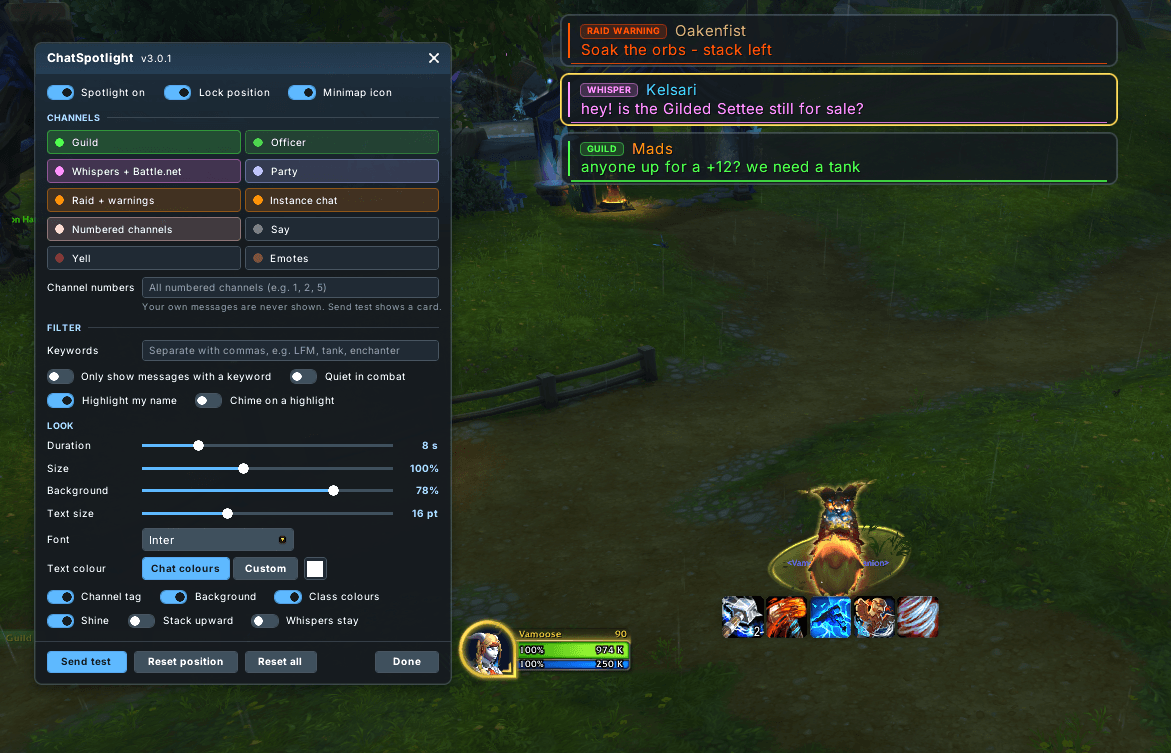
ChatSpotlight on Retail
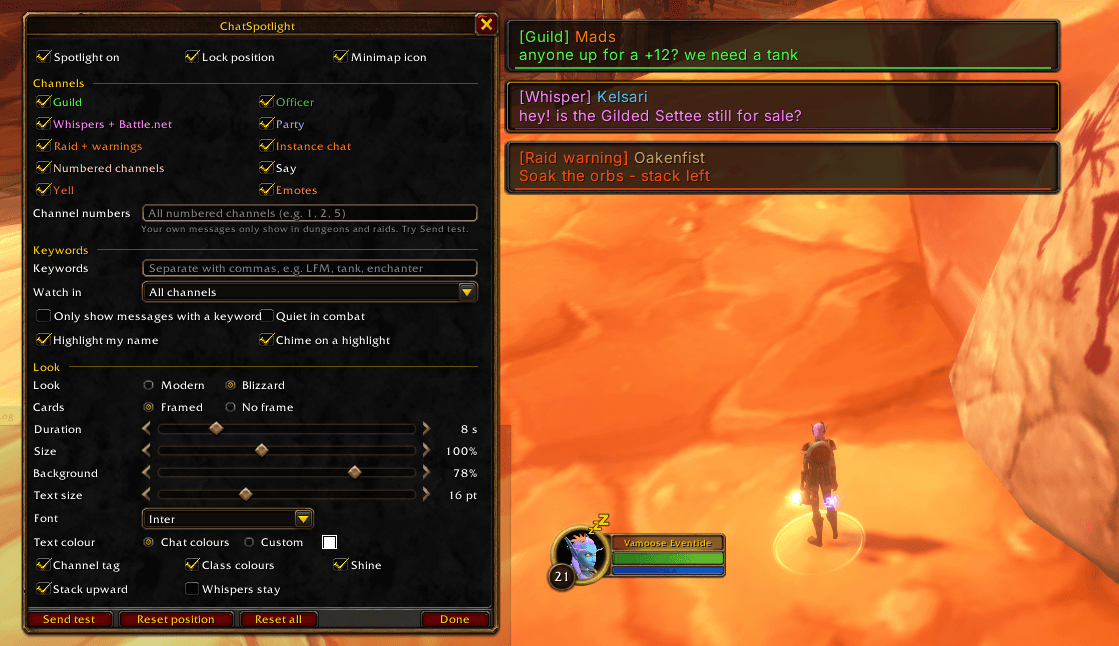
ChatSpotlight on Forever
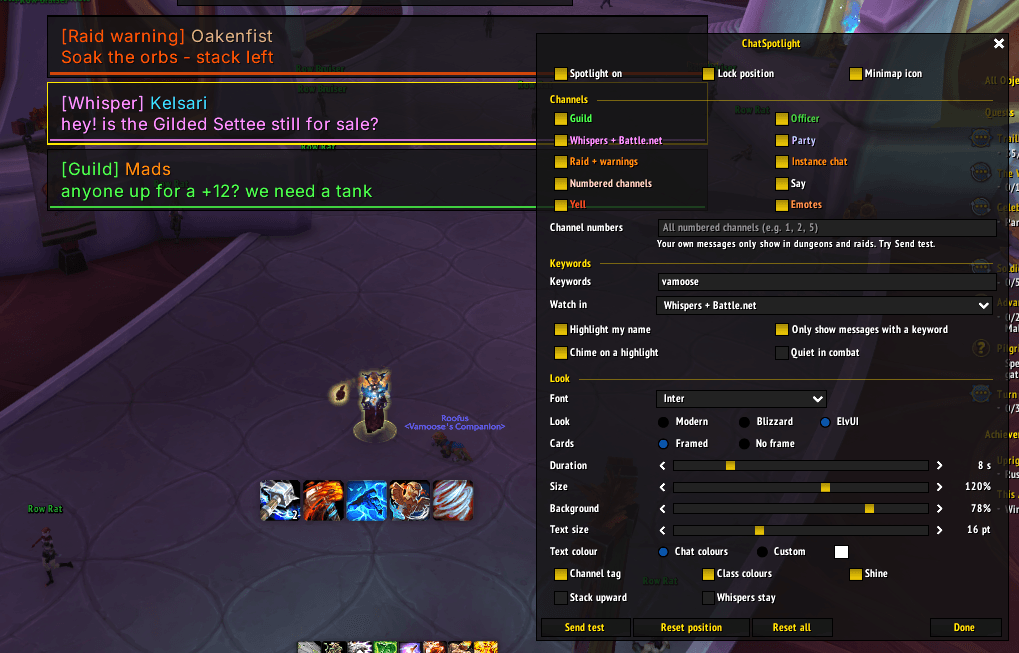
ElvUI skin
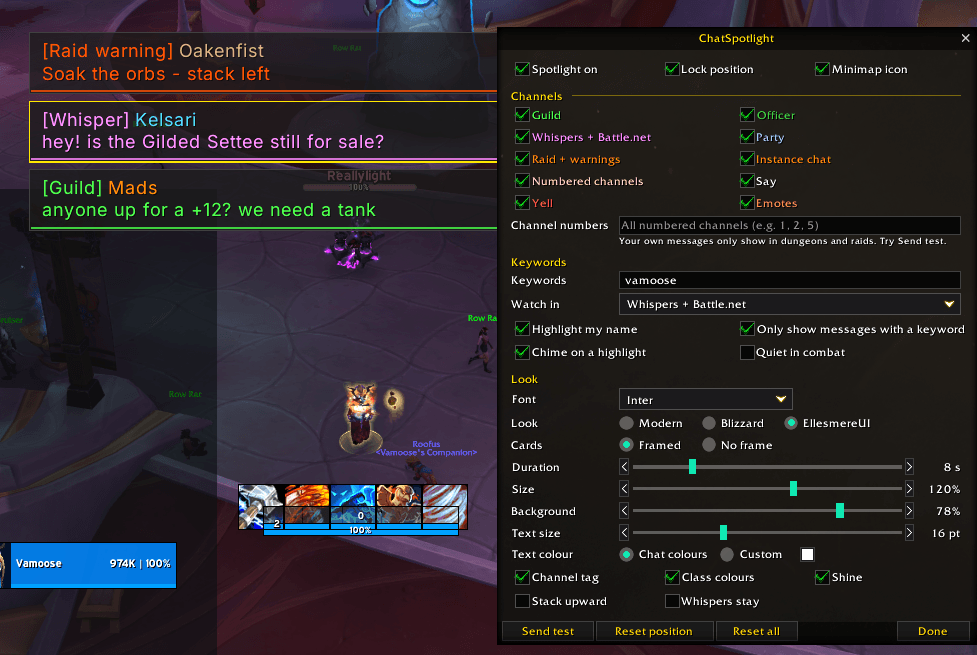
Ellesmere UI skin
Description
ChatSpotlight - for Retail and Forever
Shows the chat you choose as notification cards at the top of your screen.
A whisper, a guild line or a raid warning appears as a card above the action: the channel, who spoke and what they said. The card lifts away when its timer runs out. You pick which channels show, and the chat window keeps working as it always has.
How to Use
- Type
/csor click the minimap icon to open settings. - Under Channels, switch on the chat you want to see as cards. Guild, Officer, Whispers, Party, Raid and Instance chat start on.
- Press Send test to see a card. Your own messages are not shown, so typing in a channel yourself will not make one. Dungeons and raids are the exception (see below).
- The notifications start locked, so they let clicks and camera turns through. To move them, switch off Lock position, drag the move bar that appears by the cards (or any card), then lock again.
What's New in v3.2.0
- A second look: Blizzard. Pick Look in settings. Modern is ChatSpotlight's own look. Blizzard uses the game's own art: the settings window is the game's window and controls, and a card is the Battle.net toast.
- Cards with no frame. Pick Cards: Framed or No frame. No frame shows the words alone, centred and outlined, the way the game writes a raid warning. It works in both looks and takes the place of the Background switch.
- Keywords only where you want them. Under Keywords, Watch in lists the channel groups. Keywords only count in the ones you tick.
- The move bar shows whenever Lock position is off. It sits above the cards. Before, it only showed while no card was up.
- Fixed: after a dungeon or raid, every later card kept a fixed three-line height. Cards size to their message again.
Choose Your Channels
Ten groups, each with its own switch, shown in its chat colour:
- Guild, Officer, Whispers and Battle.net whispers
- Party, Raid and raid warnings, Instance chat
- Numbered channels (General, Trade, custom channels and communities)
- Say, Yell and Emotes
For numbered channels, list the numbers you want in Channel numbers ("1, 2, 5"), or leave the box empty for all of them.
Keywords and Highlights
- Keywords. Enter one or several, separated by commas: "LFM, tank, enchanter".
- Only show messages with a keyword turns the keywords into a filter. With it off, a message carrying a keyword is highlighted instead, with a gold ring and a double glow.
- Highlight my name. A message that names your character is highlighted.
- Chime on a highlight. A soft two-note sound when a highlighted message arrives.
- Watch in. Tick the channel groups your keywords count in. In a group that is not ticked a keyword does nothing. Highlight my name still works everywhere.
- Quiet in combat. While you fight, only whispers, highlights and raid warnings show. The rest is dropped, not held back for later.
- Keywords and Highlight my name do not apply to community chat. The game lets addons show a community message but not read its words, so every community message of a switched on channel shows.
The Cards
- Each card is as tall as its message, so long messages are not cut off. Up to four show at once.
- A card wears its channel's chat colour, the one you set in the game's chat settings. The sender's name is in their class colour.
- Raid markers typed as
{skull}or{star}show as their icons, as they do in the chat window. - Whispers stay keeps a whisper on screen until your mouse passes over it.
- Stack upward makes new cards push the older ones up instead of down.
Make It Yours
- Two looks: Modern, ChatSpotlight's own, and Blizzard, with the game's own window, controls and Battle.net toast.
- Cards Framed, or with No frame: the words alone, centred and outlined.
- Sliders for how long a card stays (2 to 30 seconds), its size, how solid its background is, and the text size.
- Nine fonts: Inter, Barlow, Lemon, Montserrat, Ubuntu, Ubuntu Condensed, Fredoka, Russo One and the game's own font.
- Text in the channel's chat colour, or one colour of your choice.
- Switches for the channel tag, class colours and the shine that crosses a new card.
- While the settings window is open, three sample cards show every change as you make it.
In Dungeons and Raids
In dungeons, raids, boss fights, Mythic+ runs and PvP matches, the game hides a message's words and sender from addons. ChatSpotlight still shows those messages on their cards. Keywords, highlights and class colours are not available there, so every message from a switched on channel shows.
The game also hides how long a message is. So every card there has room for three lines: a short message leaves some of it empty, and a longer one ends in "…".
It hides who sent a message too, so ChatSpotlight cannot tell which ones are yours. Your own messages show as cards there.
Commands
/csopens settings./cs helplists every command./cs testshows a test card./cs onand/cs offturn the spotlight on or off./cs lock,/cs unlockand/cs resetlock, unlock and put back the notifications./cs channel guild offswitches one channel group./cs keyword LFM, tanksets the keywords./cs look blizzardand/cs look modernswitch the look./cs frame offshows the cards with no frame./cs watch guild offstops keywords counting in one channel group.- Minimap icon: click for settings, right-click to turn the spotlight on or off.
/cs minimap offhides it.
Version: 3.2.0 Game Version: 12.1.5 (Midnight) and WoW: Forever
Credit for the original idea to Madailein Hatter who created the original, unreleased version and has kindly given their permission for this being released by myself under ARR.
The fonts ship with their licence files: Inter, Barlow, Lemon, Montserrat, Fredoka and Russo One under the SIL Open Font License, Ubuntu and Ubuntu Condensed under the Ubuntu Font Licence.
More Addons by Vamoose
- Vamoose's Housing Decor Guide — Track, craft, preview, and acquire housing decorations across all professions
- Vamoose's Endeavors — Track Housing Endeavor progress across all your characters
- Vamoose's Neighbors — Neighborhood directory with plot owners, waypoints, and initiative tracking
- Vamoose's Dye Studio — Browse, preview, and manage housing dyes with custom palettes and live dyeing
- Vamoose's Companion — A companion personality that reacts to your adventures with contextual commentary
- Vamoose's Pet Patrol — Find uncollected wild battle pets in your current zone
- Vamoose's Guild Crafter — Find which guildies can craft what you need
- LiteWQ — A lightweight world quest tracker that lives on your map
Keywords: chat, notification, notifications, toast, alert, whisper, guild chat, officer chat, raid warning, party chat, instance chat, trade chat, community chat, keyword, highlight, mention, chat filter, chatspotlight
ChatSpotlight Team

Owner