Proto Core
- By
Shared code for the Proto addons (LFG + Chat, ServiceShop, Threat, Tools, Tongues): Proto Home, one minimap button, shared settings and pop-ups.
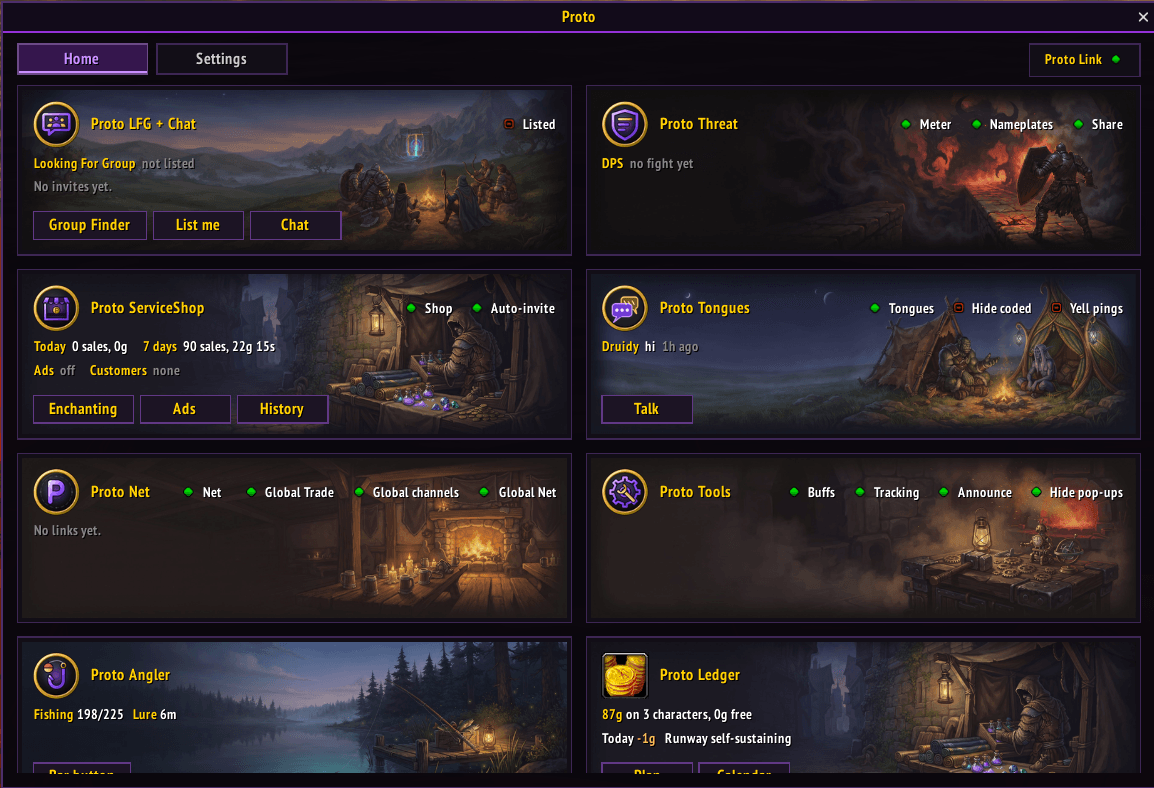
Proto Home (Proto Purple).png
Description
Proto Core
The Proto Suite
 |
| Proto Suite every Proto addon in one download |
 |  |  |  |  |  |
| Core shared libraries | LFG + Chat group finder, chat filter | ServiceShop sell your services | Threat threat meters | UI chat, frames, bags | Map world map, dungeons |
 |  |  |  |  |  |
| Tools buffs, tracking, more | BG Timers battleground timers | Tongues talk cross-faction | Angler one-click fishing | Games play with friends | Auras your buff groups |
As we move into Forever release I will be updating these addons regularly, with a focus on fixing errors, finalizing features and ensuring full compatibility with the in-game API.
The shared code of the Proto addons: Proto LFG + Chat, Proto ServiceShop, Proto Threat, Proto Tools, Proto BG Timers, Proto Tongues, Proto Angler, Proto Games, Proto UI, Proto Auras and Proto Map. No need to install it yourself: the CurseForge app adds it with them.
New in 1.3.25
- Battle.net friends with Proto: checked each time you log in; type /proto friends to see them
Features
- Proto Home: one window with a tile for each Proto addon; click a dot to switch a feature on or off, click the tile to open it. Left-click the minimap button (or type /proto home)
- All settings in one place: the Settings tab at the top, grouped by topic (or right-click the minimap button)
- Notifications your way: pop-up, chat line and sound for each kind (Settings > Notifications)
- Peon Mode: "Ready to work!" when your shop opens, "Me busy, leave me alone!" when it closes, "Work work!" for pop-ups (Settings > Notifications)
- One spot for pop-ups and meters: drag it where you like with Move (Settings > Notifications)
- Themes, text size and window size: Classic, Proto Drake, Proto Purple, Proto Green, Proto Blue and Proto Red; bigger text and a bigger window (Settings > General > Style)
- Switch Proto addons on and off without leaving the game (Settings > General > Proto addons)
- Your settings kept safe: every Proto addon's settings survive updates and reinstalls
- Find other Proto users, Battle.net friends on the other faction or realm too: hover a player to see "Proto user" and their version, and get a notice when a new version is out (Settings > Proto Link)
- Battle.net friends with Proto: checked each time you log in. Type /proto friends to see who
- Threat sharing: your threat goes to your group's Proto Threat meters, where the game hides it (Settings > Proto Link, not in boss fights)
- Proto Link connects only when you have a Proto addon that uses it (LFG + Chat, ServiceShop, Threat, Tongues, Games, Auras), and stays off with just Proto Tools, UI, Map, Angler or BG Timers. Untick it to keep it off (Settings > Proto Link)
- Boss fights: chat lines and messages wait until the fight ends, then go
- Get realm: right-click a player to see their realm and the name to whisper them by
- Every Proto addon's settings in Esc > Options > AddOns too
- Type /proto (or /pro, /pt) for every Proto command: /proto v for versions, /proto theme, /proto settings
- Keep Proto Core and Proto Core [Shared Libraries] ticked in your AddOns list
Left-click the minimap button: a tile for each Proto addon. Click a dot to switch it on or off, click the tile to open it.
Proto Core Team