Proto Angler
- By
One-click fishing: Left click to apply bait, cast, reel. Right click to re-cast. Uses soft targeting where possible to remove bobber cursor aim.
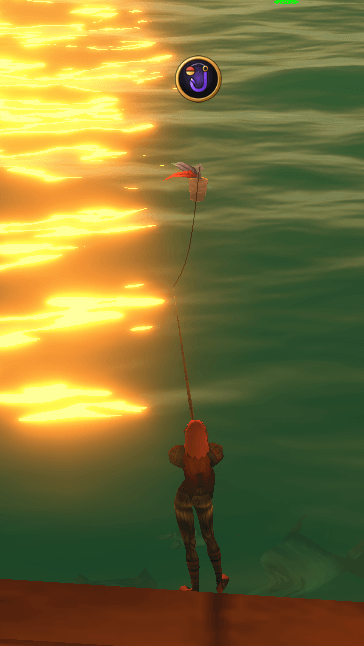
Screenshot 2026-10-11 012111.png
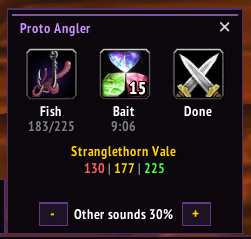
Angler button dragged onto bars opens this. Fishing rod auto-equips. Left click to apply bait/fish.
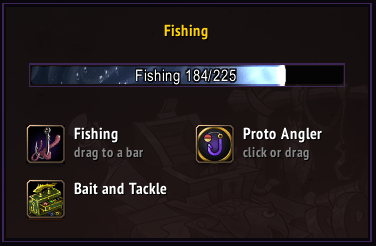
How fishing looks inside ServiceShop.
Description
Proto Angler
The Proto Suite
 Core shared libraries |  LFG + Chat group finder, chat filter |  ServiceShop sell your services |  Threat threat meters |  UI chat, frames, bags |
 Tools buffs, tracking, more |  Tongues talk cross-faction |  Angler one-click fishing |  Games play with friends |
New: Proto UI has been released. Beta: chat window, minimap, unit, party and raid frames, nameplates, and bags in the Proto look.
New: Proto Games has been released. Deathroll, Chess, Rock Paper Scissors and Gamba with other players.
New: Proto Tongues has been released. Talk to the other faction. Everyone else hears lore-speak.
Early days: more to come. Feedback, ideas and bug reports are all welcome, and a screenshot of any Lua error helps a lot.
Fishing in one click. Press the Proto Angler button: your fishing pole goes on from your bags, your weapons are remembered, and a small Proto panel opens with Fish, Bait and Done. Needs Proto Core (the CurseForge app adds it).
Known issues / Improvements
- Proto Angler: the game only sees your bobber within about 10 yards (a Forever bug: it ignores the range setting). Cast further and Proto Angler plays a short sound: left-click the bobber itself to reel in, or tap right-click to cast again.
- Tip: run ~20 yards out and fish back toward the shore. Your casts land closer and almost always in reach.
- Proto Angler: switching to your fishing gear set automatically when you start fishing is planned
- Proto Angler: better support for casting where you choose, for floating crates and fish pools, is planned
New in 0.0.7
- Fish bar button: no more action bar error while fishing
Get started
- Have a fishing pole in your bags
- Left-click the minimap button for Proto Home, then click the Proto Angler tile: your pole goes on and the panel opens
- Drag Open/close button from the tile to a bar, and Fish from the panel too: next time it's one press
- Face the water and left-click anywhere: it baits your pole, casts, then reels in when you click again after the splash
- Tap right-click to cast again. Press your Open/close button (or Done) for your weapons back
Fish without the fiddling
- Open and close with one button: drag it from Proto Home's Angler tile (or ServiceShop's Fishing panel). Press it for your pole on, again for your weapons back
- Fish bar button: drag Fish from the panel to your bar. It baits your pole when it needs it, else casts
- Left-click anywhere in the world: baits your pole when it needs it, casts, and reels in while your line is out. It never casts again on its own
- Tap right-click in the world to cast again at once, no wait. Spam it at a fish pool. Hold right-click to steer as usual
- Cast too far for the game to see your bobber? A short sound plays: left-click the bobber itself to reel in (pick the sound or turn it off: Settings > Tools > Proto Angler)
- Look around: hold Shift and drag with either mouse button
- Done puts your weapons back on; a fight does it for you at once
Bait and skill at a glance
- Bait shows the lure's time left and glows when your pole needs one; right-click it to pick another lure (only ones your skill can use)
- Your zone's fishing skill under the buttons, coloured by yours
- Auto-loot while fishing: turn it on in Settings > Tools > Proto Angler (used when your own auto-loot is off)
Hear your bite
- Effects full, other sounds lower while your line is out (set how low on the panel), heard from your character, even in the background
- Everything goes back the way you had it when you stop
Type /proto angler. Part of the Proto family: Proto LFG + Chat, Proto ServiceShop, Proto Threat, Proto Tools (with Proto Games), Proto Tongues.
Proto Angler Team