ElvUI Eltruism
- By
An ElvUI Plugin containing many features not available in ElvUI alongside DPS/Tank/Healer profiles and settings for other addons

Description
 Premium ElvUI Plugin & Complete Interface Suite for World of Warcraft



About
Eltruism is a feature-rich ElvUI plugin that extends ElvUI with extensive customizations, signature gradients, combat voice alerts, and tailored interface profiles for World of Warcraft.
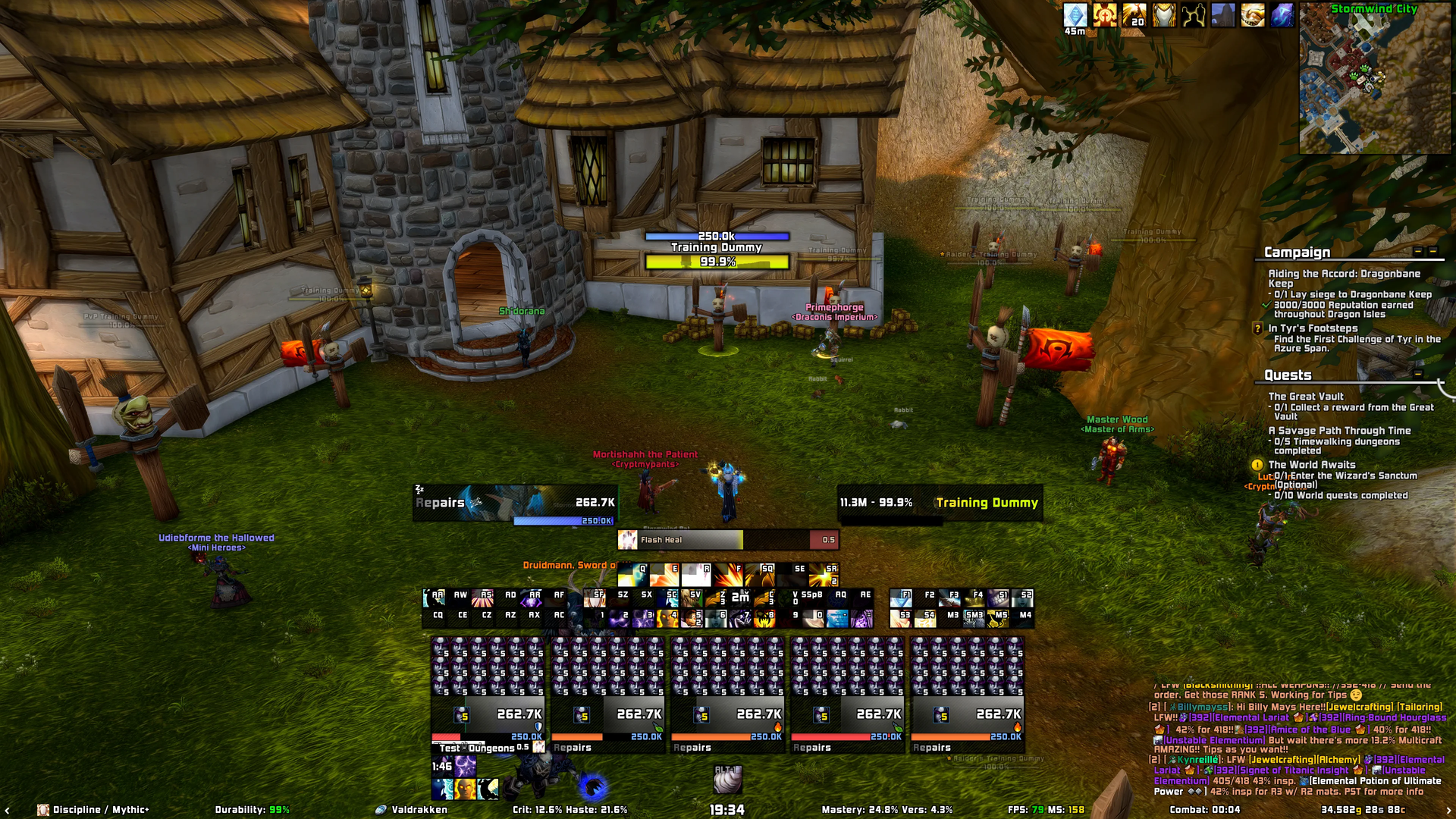
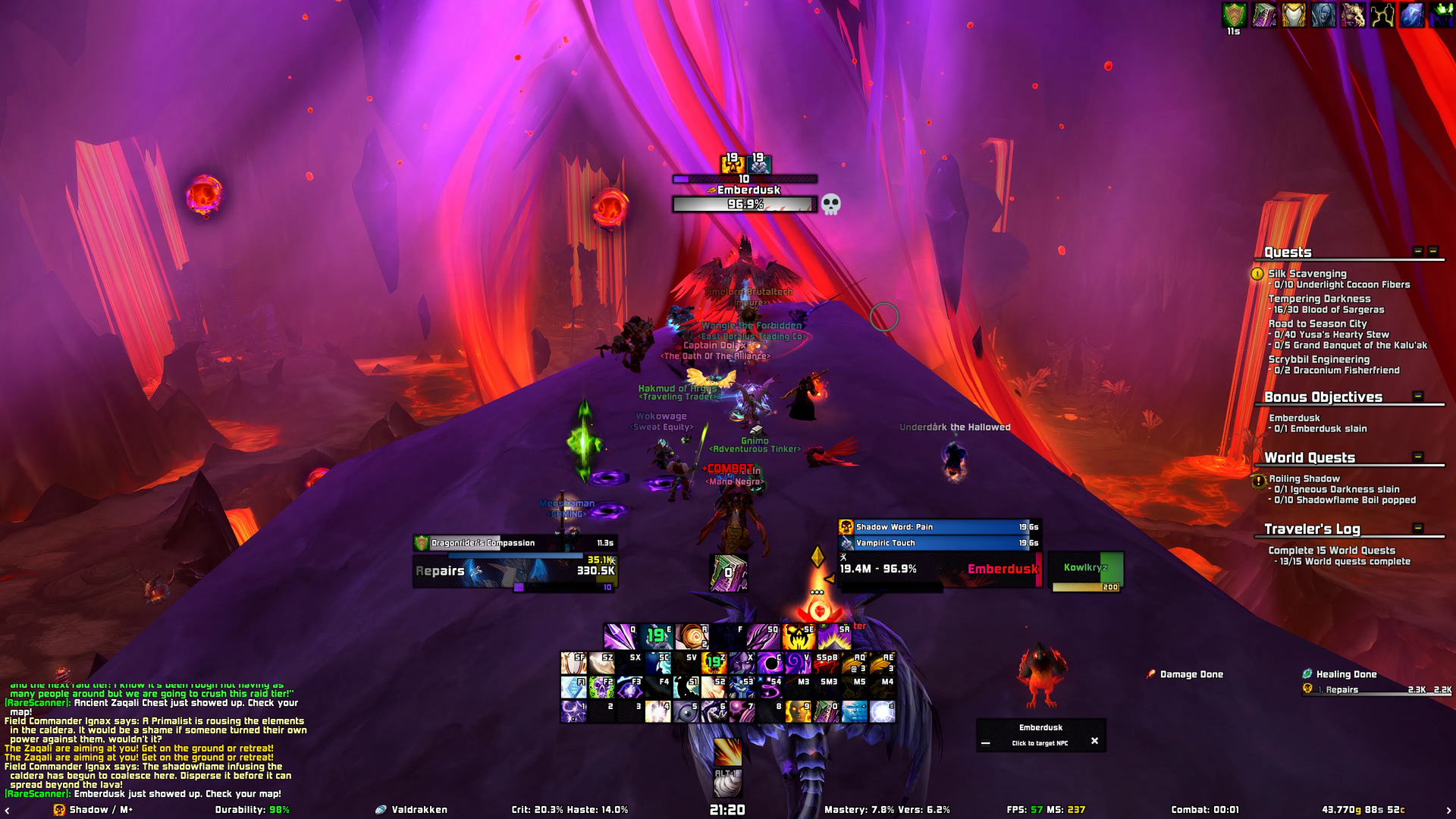
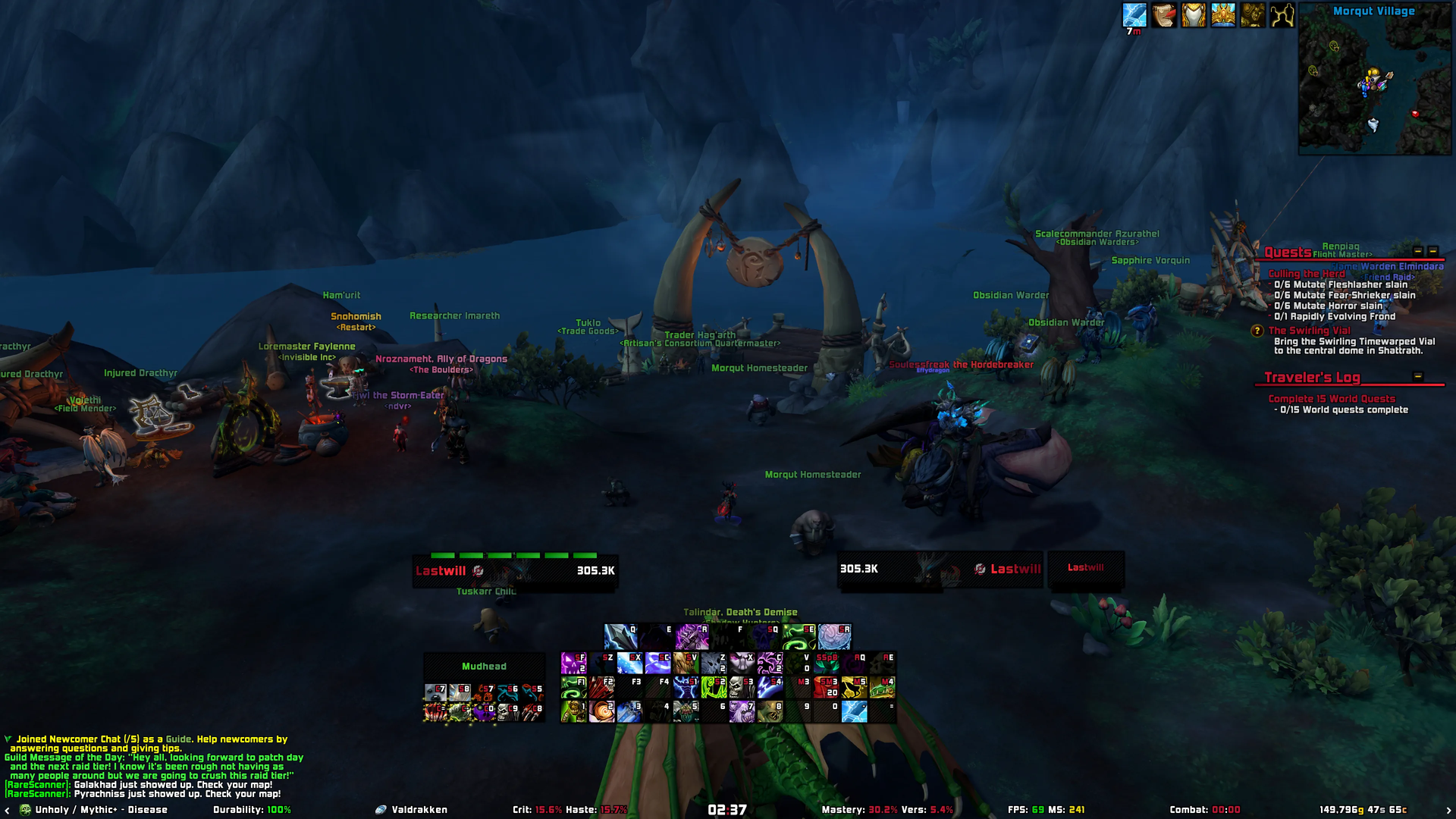
Both the DPS/Tank profile and the Healer profile are handcrafted for 16:9 displays and thoroughly tested across 1080p, 1440p, 4K, and Ultrawide resolutions.
Every single feature in Eltruism is 100% modular and can be toggled on or off to match your personal preference.
Important: Eltruism is an ElvUI plugin and requires ElvUI to function.
Features
- Dual Tailored Profiles: Dedicated DPS/Tank and Healer layouts with pixel-perfect unitframes, actionbars, and raid anchors.
- Signature Gradients: Silky smooth color gradients across Unitframes, Blizzard Raid Frames, Nameplates, and Aurabars with Lua-cached performance.
- Audio & TTS Voice Alerts: Text-To-Speech announcements for offensive/defensive cooldowns, interrupts, and low health/mana warnings.
- Dynamic Nameplates: Dynamic height scaling, threat-colored borders, integrated power bars, and debuff highlighting.
- Cursor HUD: Rotating HUD rings anchored to your cursor indicating cast time progress, GCD, and cooldown timers.
- Actionbars & Glows: Customizable spell activation and proc glow animations with bespoke speeds, plus Shaman totem tracker glows in Classic.
- Sleek Themes & Skins: Soft shadows, dark & light themes, custom class textures, role icons, and reskinned Character Panel, Quests, and companion AddOns.
- Transparent Unitframe Health: Quickly toggle sleek transparent unitframe health backgrounds via
/eltruism transparent. - Navigation & Waypoints: Enhanced
/waycommand with real-time distance calculations, ETA arrival estimation, and navigation arrow tracking. - Instant Fast Loot & Wishlist: True instant auto-looting with zero window lag, movable LootText alerts, junk vendor automation, and personal loot wishlist tracking.
- Chat Enhancements: Inline item icons in chat links, smooth chat fade, and the
!keysshortcut to share your Mythic+ dungeon keystone. - Combat & AFK Immersion: Contextual combat music playlists, relaxing AFK screen with 3D character models and music, and bespoke mail arrival sounds.
- Unified Castbars: Unified player, target, and focus castbars with dedicated interrupt protection shields and timer tags.
- Multi-Expansion & Modular: Actively maintained for Retail, MoP, Wrath, Classic Era, and WoW Forever.
Screenshots
Click any preview image to open the full-resolution 4K screenshot.
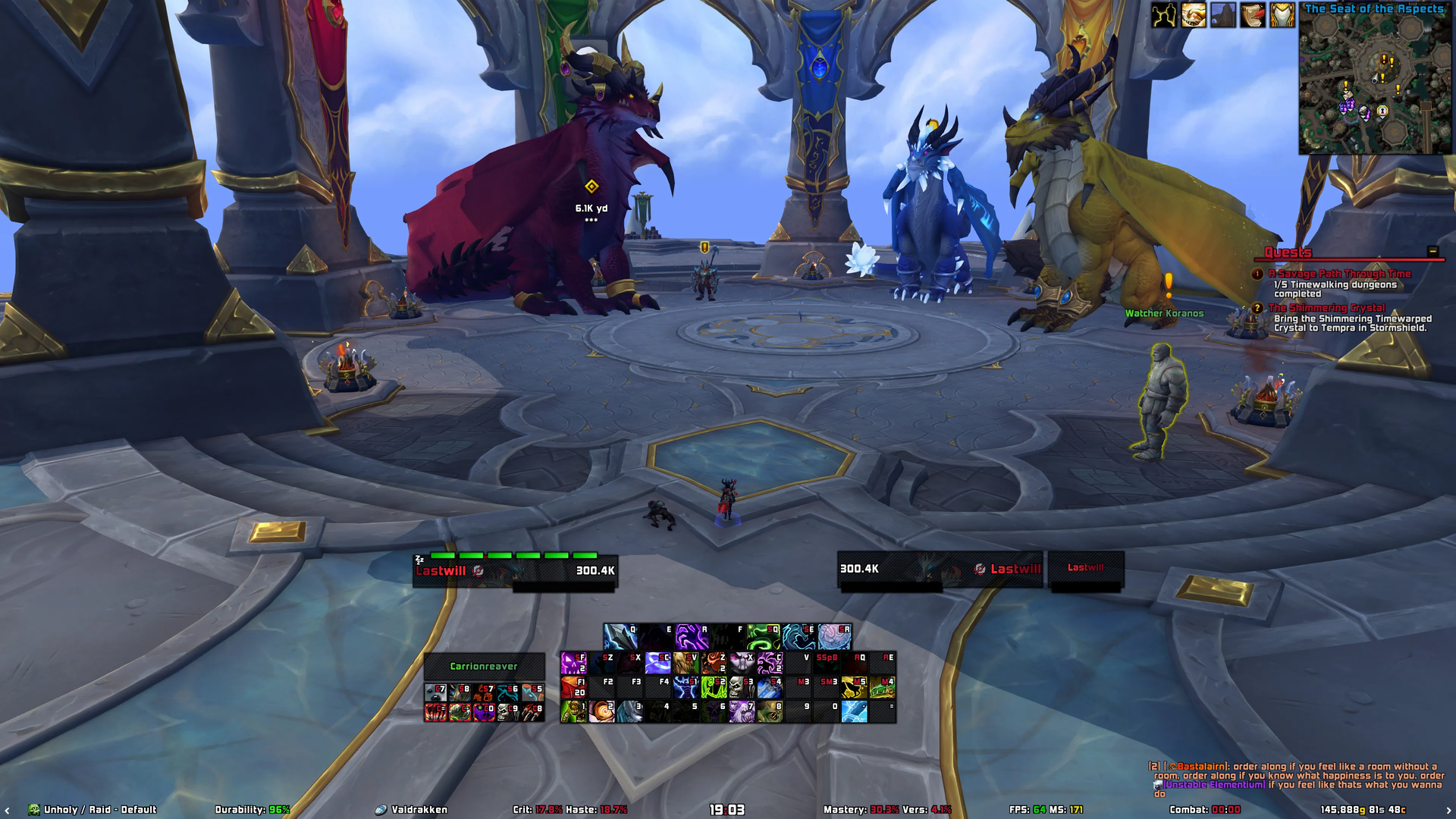
DPS & Tank Profile
Streamlined combat layout with centered actionbars, dynamic resource trackers, Details! skinning, and non-intrusive raid anchors.

Healer Profile
Optimized central raid frames with gradient health bars, debuff prioritization, out-of-range fading, and dedicated mana monitors.

Themes & Skins
Modern soft shadows, character panel enhancements, quest dialogue restyling, transparent unitframe health, and bespoke borders.

Dynamic Nameplates & Castbars
Gradient nameplates with dynamic height, threat-colored borders, integrated power bars, aura glows, and unified interrupt castbars.

Addon Profiles
The Eltruism installer includes tailored profiles for the following companion addons:
- Details! Damage Meter
- BigWigs
- Capping
- Deadly Boss Mods (DBM)
- DynamicCam
- Immersion
- Questie
- Gladdy
- Nameplate Scrolling Combat Text
- WarpDeplete
- ElvUI Floating Combat Text
Installation
- Install ElvUI: Download and extract the latest version of ElvUI into your World of Warcraft
_retail_/Interface/AddOns(or classic equivalent) folder. - Download Eltruism: Install Eltruism via the CurseForge App, Wago App, or manually from GitHub Releases.
- Run In-Game Installer: Launch World of Warcraft. The setup installer will greet you automatically, or you can open it at any time by typing
/eltruismin chat.
Chat Commands
All primary configuration and utilities can be accessed via /eltruism:
General & Setup
| Command | Action |
|---|---|
/eltruism (or /eltruism config / /eltruism options) |
Opens the Eltruism configuration options menu |
/eltruism setup (or /eltruism install / /eltruism installer) |
Opens the Eltruism setup installer |
/eltruism update |
Resets/updates Eltruism settings to Eltreum's official defaults |
/eltruism autoupdate |
Toggles automatic updating of Eltruism settings when updating versions |
/eltruism elvuiskin |
Toggles the Eltruism ElvUI skin template |
/eltruism weakauras |
Toggles ActionBars, UnitFrames, and Powers layout to be similar to WeakAuras |
/eltruism paging [1-9] |
Swaps Actionbar paging between Bar 1 and Bar 4, or switches to a specific bar |
Visuals & Themes
| Command | Action |
|---|---|
/eltruism transparent |
Toggles unitframes transparent health mode on/off |
/eltruism color |
Toggles unitframes between light and dark modes |
/eltruism gradient |
Toggles unitframe and interface gradient mode |
/eltruism chat |
Toggles chat window between dark and transparent modes |
/eltruism background |
Toggles unitframe background between grey and black |
/eltruism autoadjust |
Toggles borders automatically adjusting the layout for DPS & Healer profiles |
/eltruism togglemodels |
Toggles 3D portrait character models on/off |
Gameplay & Convenience
| Command | Action |
|---|---|
/eltruism detailshide |
Toggles automatically hiding Details! damage meter out of combat |
/way <x> <y> [title] (or /waypoint) |
Sets a map waypoint coordinate with distance, ETA, and arrow navigation |
/eway <x> <y> [title] (or /ewaypoint) |
Sets a map waypoint (used when TomTom is detected to avoid command conflicts) |
!keys (or !key) |
Links your active Mythic+ or Delve keystone to party, guild, or raid chat |
Performance & Utilities
| Command | Action |
|---|---|
/eltruism performance |
Optimizes performance by applying CVars and disabling heavy functions |
/eltruism performancecvars |
Applies CVars to optimize client performance and framerates |
/eltruism encountercheck |
Toggles disabling non-essential functions during boss encounters |
/eltruismdebug on / off |
Toggles debug mode (disables third-party addons and enables Lua script errors) |
/eltruism screenshotcomparison |
Automatically captures sequential screenshots across Native, 720p, 1080p, 1440p, and 4K |
Credits
Eltruism was originally based on LuckyoneUI. Credits and sincere gratitude to Luckyone for allowing its use and inspiration.
ElvUI Eltruism Team

Owner