


KeepOrSell
- By
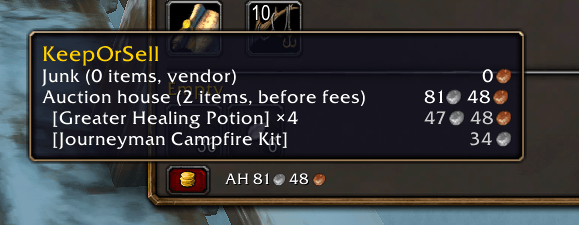
Overview at the bottom of Baganator
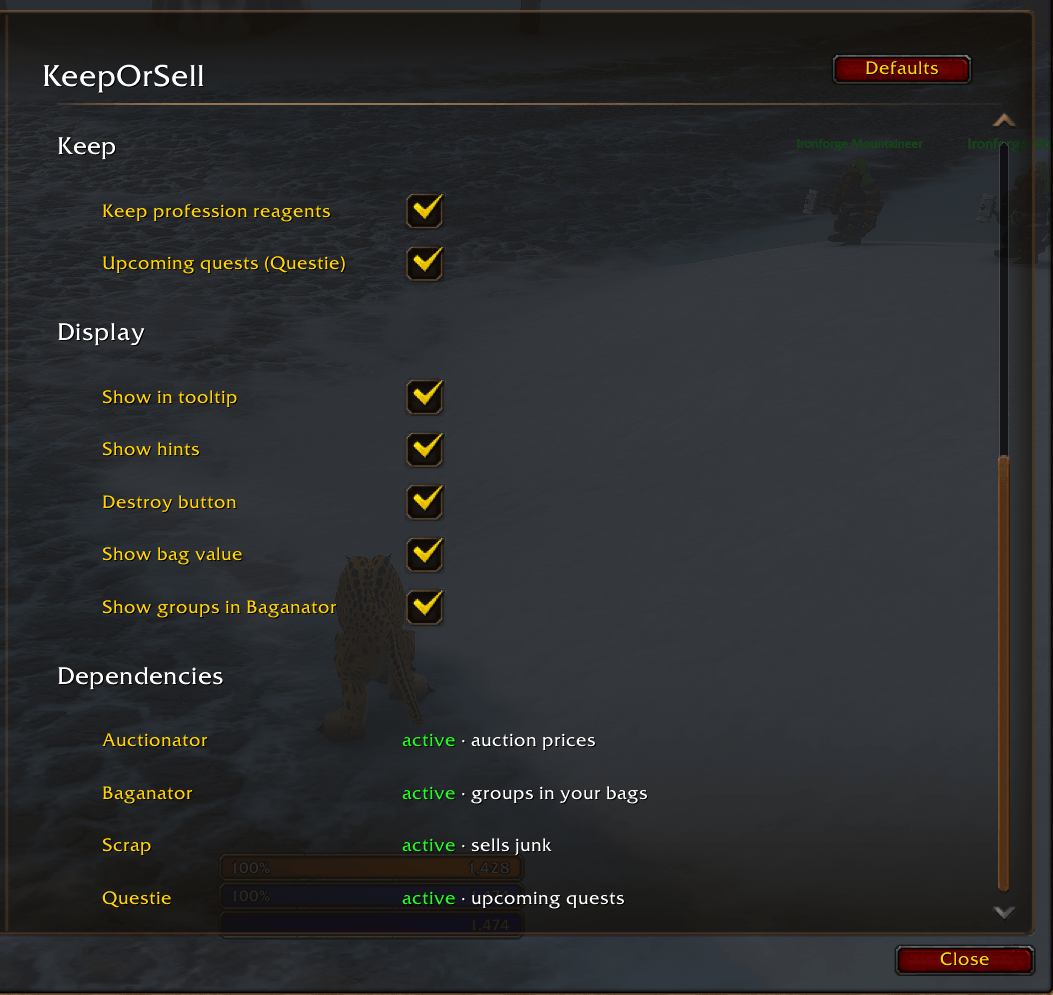
Some of the options in the blizazrd options panel
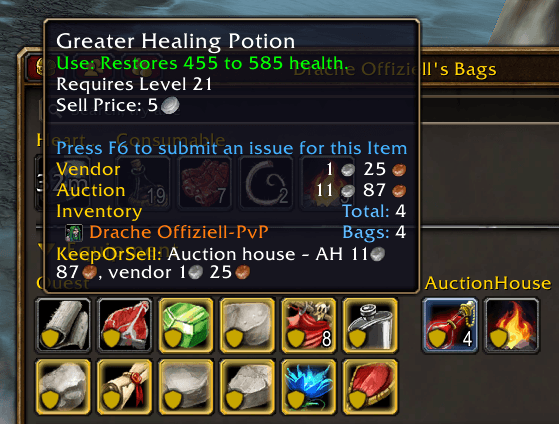
Tooltip showing why the item was classified to be sold in the auction house
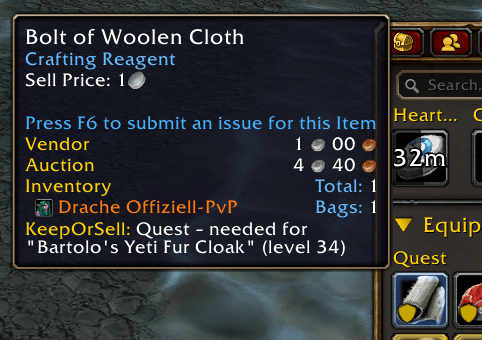
Tooltip showing the reagent is needed for a future quest
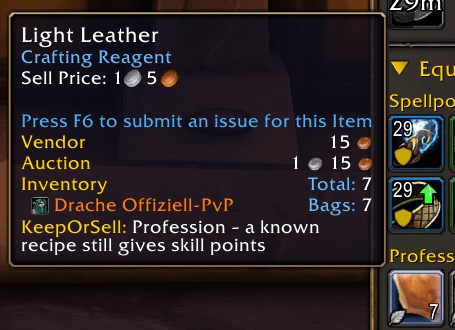
Tooltip showing that you can still gain skill points using this material
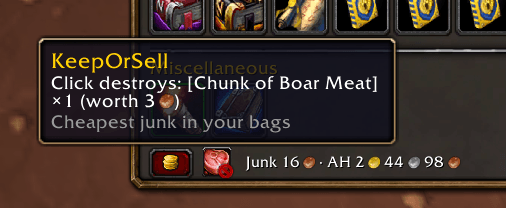
A button to destroy the cheapest item that was auto classified as junk
Description
KeepOrSell
Ever stood at a vendor wondering if that weird item in your bag is worth something? KeepOrSell sorts your bags for you. It tells you what to keep, what to put on the auction house and what's just junk.
Good for new players, and for everyone who's tired of hovering over every single item.
What it does
Your bag items end up in four groups:
- Quest: stuff a quest still needs. Keep it.
- Profession: materials for your recipes that still give skill points, plus recipes you can still learn. Keep it.
- AuctionHouse: sells for at least twice the vendor price on the AH. Put it up for sale.
- Junk: grey items, cheap trade goods nobody needs, gear your class can't ever wear, recipes you already know. Scrap sells it at the next vendor.
Hover over any item and the tooltip tells you which group it's in and why, for example "Auction house: AH 1g 20s, vendor 15s".
Not sure about an item? Then it stays. No auction price means no junk. And green or better gear you could wear never counts as junk.
A few extras
- Destroy button: bags full and no vendor around? Click it and the cheapest junk in your bags is gone. Hover it to see what's next. It never touches rare or better items. If your bags are full while looting and the loot is worth more, the button lights up.
- Bag value: a small line shows what your junk and your auction items are worth, e.g. "Junk 1g 20s · AH 15g".
- Hints: if KeepOrSell needs something from you (like a fresh AH scan), a little button shows up in your bag window.
- Price sharing: in a group, everyone with KeepOrSell keeps each other's auction prices fresh. Whoever has the newer price shares it.
What you need
- Baganator: shows the groups in your bags (category view)
- Auctionator: for prices. Scan the auction house once, otherwise there's nothing to compare.
- Scrap (optional): sells your junk automatically
- Questie (optional): without it, only quests in your log count. With it, KeepOrSell also keeps items for quests you haven't picked up yet (within 5 levels of you), and quest items from quests you're done with become junk.
Getting started
- Install it via the CurseForge app or drop it into
Interface/AddOns. - Scan the auction house once with Auctionator.
- Open each of your profession windows once, so KeepOrSell knows your recipes.
That's it. The groups show up in Baganator inside the equipment sets category. Want them somewhere else? Move that category in Baganator (Bags → cog → Categories).
Options
Esc → Options → AddOns → KeepOrSell, or just type /kos.
You can change how much more the AH price has to be (default 2×), set a minimum profit, ignore old prices (default: older than 7 days) and turn each part on or off: junk rules, profession materials, Questie, tooltip, hints, destroy button, bag value, price sharing. Options that need an addon you don't have are greyed out, and at the bottom you can see which of the addons are installed.
If you mark something as "not junk" in Scrap, KeepOrSell won't argue.
Deutsch
Schon mal beim Händler gestanden und dich gefragt, ob das komische Item in der Tasche was wert ist? KeepOrSell sortiert deine Taschen für dich: was du behältst, was ins Auktionshaus kann und was einfach Schrott ist.
Die vier Gruppen:
- Quest: brauchst du noch für eine Quest. Behalten.
- Beruf: Material für Rezepte, die noch Skillpunkte geben, und Rezepte, die du noch lernen kannst. Behalten.
- Auktionshaus: bringt im AH mindestens das Doppelte vom Händlerpreis. Reinstellen.
- Schrott: graues Zeug, billige Handwerkswaren, Ausrüstung, die deine Klasse nie tragen kann, Rezepte, die du schon kennst. Scrap verkauft das beim nächsten Händler.
Fahr mit der Maus über ein Item, und der Tooltip sagt dir, wo es hingehört und warum. Im Zweifel bleibt ein Item in der Tasche: Ohne Auktionspreis wird nichts zu Schrott, und grüne oder bessere Ausrüstung, die du tragen kannst, sowieso nie.
Extras: Ein Knopf im Taschenfenster zerstört mit jedem Klick den billigsten Schrott, falls die Taschen voll sind und kein Händler in der Nähe ist (nie seltene oder bessere Items). Sind die Taschen beim Looten voll und die Beute ist mehr wert, leuchtet er. Daneben siehst du, was dein Schrott und deine AH-Items wert sind. In der Gruppe teilen sich alle mit KeepOrSell gegenseitig die frischeren Auktionspreise.
Du brauchst: Baganator und Auctionator (einmal das AH scannen). Scrap und Questie sind optional.
Loslegen: installieren, einmal das AH mit Auctionator scannen, jedes Berufsfenster einmal öffnen. Fertig. Einstellungen gibt's unter Esc → Optionen → AddOns → KeepOrSell oder mit /kos.
License
GPL-3.0-or-later · Download: https://www.curseforge.com/wow/addons/keeporsell · Source & issues: https://github.com/svengabr/KeepOrSell
KeepOrSell Team
