Finddon: Find NPCs, Vendors & Goods
- By
NPC finder for WoW Forever: the nearest trainer, vendor, repair, flight master, innkeeper, bank, auction house, mailbox, cooking fire, anvil, forge or rare, or the vendor that sells what you need, with 3D pictures, an arrow and a map pin.
Description
Finddon
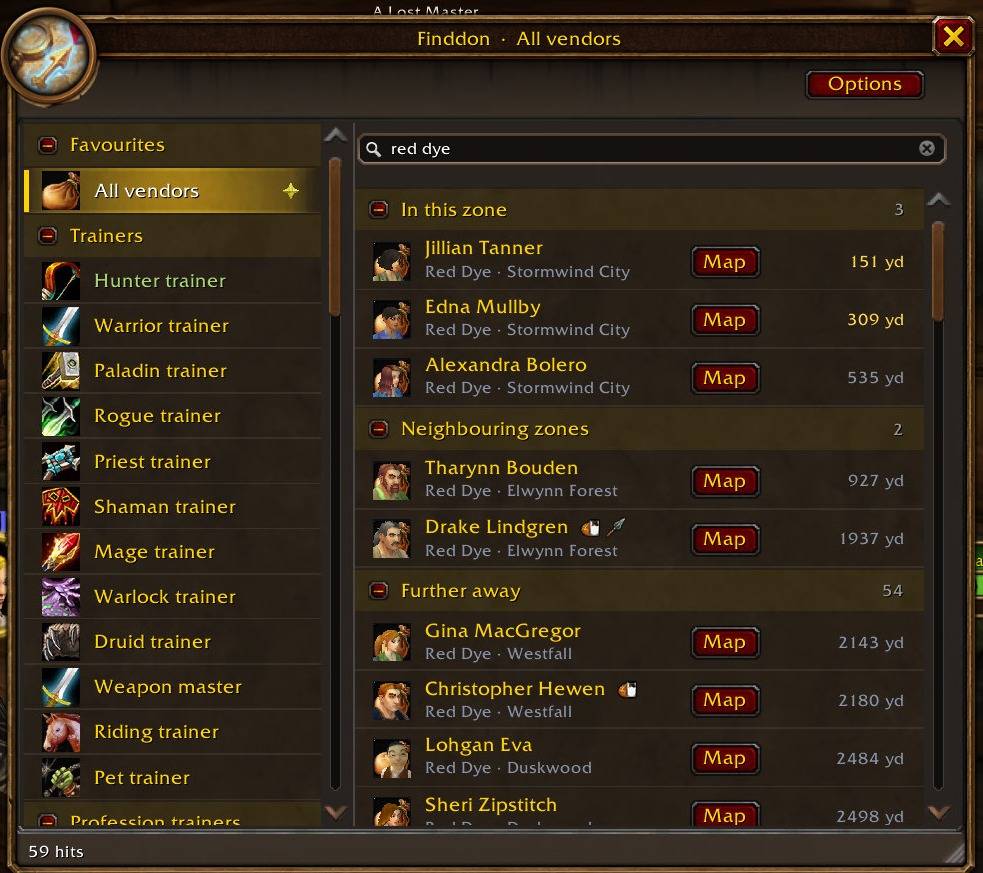
Finddon is an NPC search for World of Warcraft: Forever. Where is the next repair vendor, your class trainer, a reagent vendor or the flight master? Pick a role or type a name or what you want to buy, and Finddon lists the NPCs nearest first, each with its 3D picture. One click sets an arrow and a map pin.
Needs DonMap
DonMap is the map layer of the Don addons that draws the arrow and the pins. The CurseForge app installs it together with Finddon. If you install by hand, put the folders Finddon and DonMap in Interface\AddOns.
Quick start
Install, log in, type /fd or click the Finddon button at the minimap. Pick a role or type a name or an item a vendor sells, then click a hit. The window looks like the game's own.
Key features
- Search by role: class trainers (your own class first), profession trainers, weapon masters, riding and pet trainers, vendors, repair, reagents, food and drink, ammunition, innkeepers, banks, auction houses, flight masters, stable masters, transmog NPCs and rares. The services carry the symbols of the game's own minimap search.
- What a trainer teaches: every profession trainer says which skill range it really teaches and from which skill and level you can learn it ("Skill 150-225, learn at 125, level 20"). For First Aid, Cooking and Fishing the vendors of the Expert books and the givers of the Artisan quests are in the list too, and so are the specialization trainers.
- Places: mailboxes, anvils, forges and cooking fires (campfire, fireplace, brazier, stove, cauldron) are roles of their own. Special crafting places inside a dungeon, such as the Black Anvil and Black Forge in Blackrock Depths or the Alchemy Lab, lead you to the dungeon's entrance.
- Search by name or title: type a part of a name or a title such as "Weaponsmith". Every NPC with a function is in: quest NPCs and everyone else you can talk to, also as the roles "Quest NPCs" and "Other NPCs".
- Search by goods: type what you want to buy ("thread", "apple", "recipe") and you get the nearest vendors that sell it, with the item in the row and limited supply marked. When you open a vendor's window, Finddon learns what it really sells and uses that from then on. The group "Goods" lists vendors by drinks, meat, fish, fruit, bread, cheese, mushrooms (what a hunter's pet eats), trade goods, recipes and bags.
- What a vendor sells: click a vendor and a narrow window opens beside the list with all its goods: the game's icon and tooltip, the price, limited supply marked, "Already known" for recipes you have, a red icon for what your character cannot use. Shift-click links an item in chat, Ctrl-click tries it on.- Nearby: with no role and no search text picked, the list shows the nearest NPC of each of your favourite roles; without favourites it shows the nearest inn, bank, flight master, repair vendor and mailbox.
- Nearby: with no role and no search text picked, the list shows the nearest NPC of each of your favourite roles; without favourites it shows the nearest inn, bank, flight master, repair vendor and mailbox.
- The game's look: the search window uses the game's own frame, buttons, search box and lists, so Finddon sits in your interface like a part of the game. Prefer the Don look of the other Don addons? Pick it under Options > General, Window style. The options sit in the game's settings (Options > AddOns > Finddon).
- Nearest first: the list comes in three parts, "In this zone", "Neighbouring zones" and "Further away", each to fold. Every hit shows its zone and the distance from where you stand, green when near; small symbols show what else an NPC does. Your own faction and neutral NPCs, the other faction as an option.
- NPC pictures: every hit shows the NPC's 3D model; as an option a large turning preview with title and zone appears while the mouse is on a hit. WoW Forever's new NPCs may have none.
- Arrow and pin: click a hit and the direction arrow points the way, with a round pin on the world map and the minimap. A right click or arriving drops them again.
- Show on map: the button "Map" in every row sets arrow and pin and opens the world map on that zone.
- Favourites: right-click a role to keep it at the top of the list; your own class trainer stands in your class colour.
- From the chat:
/fd repairlists repair vendors,/fd threadthe vendors that sell thread,/fd go innkeepersets the arrow to the nearest innkeeper at once. - Nine languages: English, German, French, Spanish (Spain and Latin America), Brazilian Portuguese, Russian, Korean and Traditional Chinese. Roles and interface are translated; NPC names are English in this version, item names are searched in English and in your game's language.
About 3,800 NPCs, more than 1,400 places and 2,200 items of the vendors, including WoW Forever's new vendors and trainers.
Commands
/fd(or/finddon) show or hide the window, also from the minimap button/fd <text>search by role, name, title or goods/fd go <text>arrow to the nearest hit/fd map <text>arrow, pin and the world map of the nearest hit/fd cleardrop the arrow and the pin/fd optionsoptions/fd diagreport for bug reports,/fd diag chatin the chat
Data sources
NPC roles, places, the vendors' goods, mailboxes, anvils, forges and cooking fires from CMaNGOS classic-db (GPL v3), put on the maps of the WoW Forever client.
Data from ForeverDB.net: WoW Forever's vendors, their goods and trainers and where players saw them.
Also by DonCoohd
- Questdon: quest helper for WoW Forever and Classic Era
- Guildon: Map & Members: your guildmates on the world map and minimap, a member list with classes and alts
- Guildon: Crafts & Recipes: who in your guild can craft what, a wish list with orders, mail and trade help
- Geardon: item level on every slot, in bags and tooltips and for any player
- Dropdon: dungeon and raid loot, filtered to what you can use
- Luredon: fishing helper for WoW Forever
- Vitaldon: health and power text on Blizzard's unit frames
- DonData and DonMap: the quest database and the map layer shared by the Don addons
Deutsch: NPC-Suche für WoW Forever: der nächste Lehrer, Händler, Reparierer, Flugmeister, Gastwirt, die nächste Bank oder das nächste Auktionshaus, mit Richtungspfeil und Kartenpin. Braucht DonMap (installiert die CurseForge-App mit). Fenster ein und aus: /fd.
Português (Brasil): Busca de PNJs para WoW Forever: o instrutor, vendedor, reparador, mestre de voo, estalajadeiro, banco ou casa de leilões mais próximo, com seta de direção e marcador no mapa. Precisa de DonMap (o aplicativo do CurseForge instala junto). Mostrar ou ocultar a janela: /fd.
Español: Buscador de PNJ para WoW Forever: el instructor, vendedor, reparador, maestro de vuelo, posadero, banco o casa de subastas más cercano, con flecha de dirección y marcador en el mapa. Necesita DonMap (la aplicación de CurseForge lo instala). Mostrar u ocultar la ventana: /fd.
Français : Recherche de PNJ pour WoW Forever : le maître, marchand, réparateur, maître de vol, aubergiste, la banque ou l'hôtel des ventes le plus proche, avec flèche de direction et repère sur la carte. Nécessite DonMap (l'application CurseForge l'installe aussi). Afficher ou masquer la fenêtre : /fd.
Русский: Поиск NPC для WoW Forever: ближайший наставник, торговец, ремонт, распорядитель полётов, хозяин таверны, банк или аукцион, со стрелкой-указателем и меткой на карте. Нужен DonMap (приложение CurseForge установит его вместе). Показать или скрыть окно: /fd.
한국어: WoW Forever용 NPC 검색 애드온입니다. 가장 가까운 기술 교관, 상인, 수리 상인, 비행 조련사, 여관주인, 은행, 경매장을 찾아 방향 화살표와 지도 핀으로 안내합니다. DonMap이 필요합니다(CurseForge 앱이 함께 설치). 창 열기와 닫기: /fd.
繁體中文: WoW Forever NPC 搜尋:找出最近的訓練師、商人、修理商、飛行管理員、旅店老闆、銀行或拍賣場,並以方向箭頭與地圖標記帶你前往。需要 DonMap(CurseForge 應用程式會一併安裝)。顯示或隱藏視窗:/fd。
Finddon: Find NPCs, Vendors & Goods Team

Owner