Voltor Forever Addon Kit
- By
All of TheVoltor's WoW Forever addons in one download, with one window to enable, disable and configure each of them.
kit-window.jpg
Description
Voltor Forever Addon Kit is every addon I have published for World of Warcraft: Forever in a single download, plus one window to manage them all.

Free and always will be. If it helps you, you can buy me a coffee.
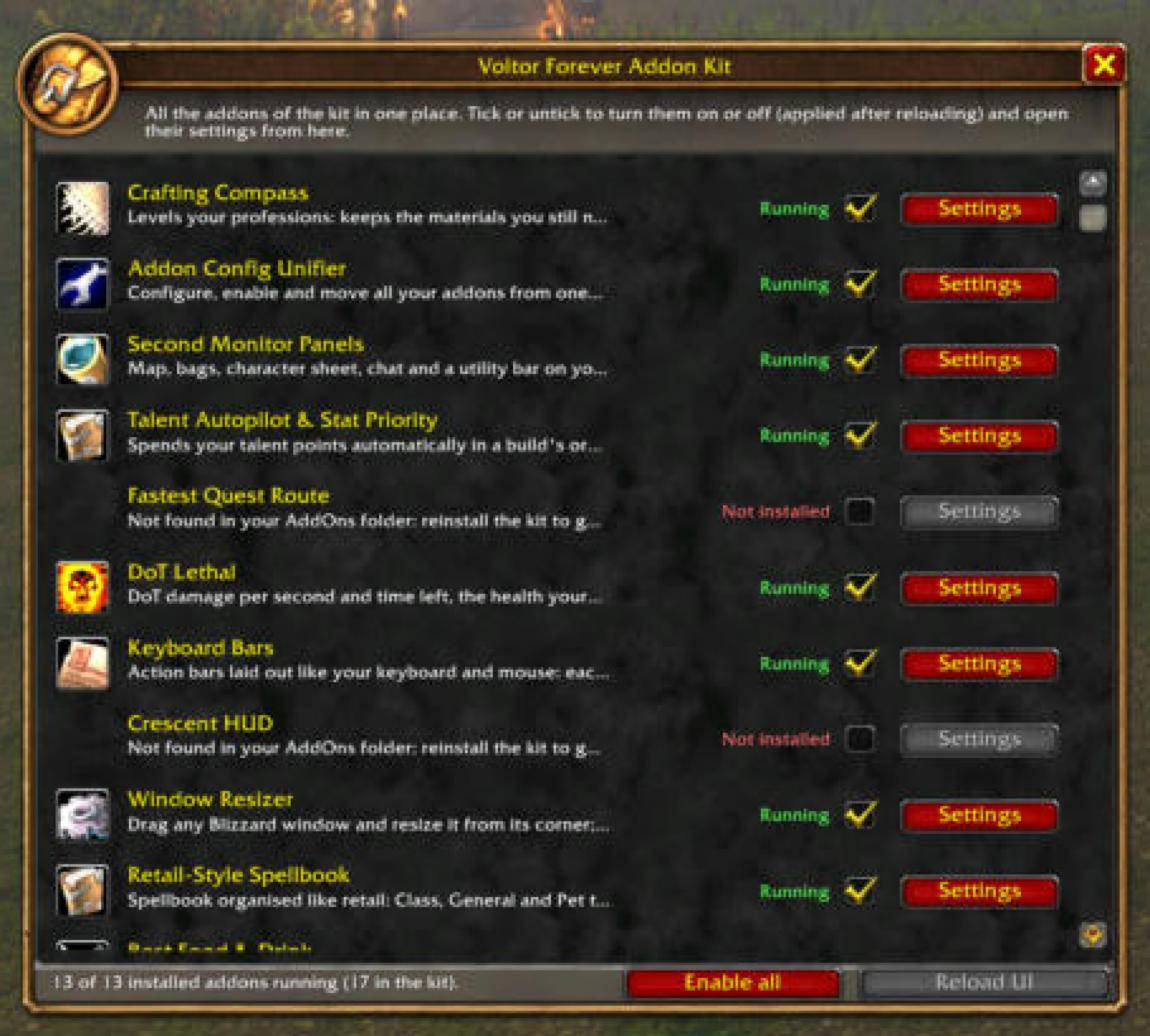
One window for all of them
Type /vkit (or click the kit in the addon button next to the minimap, or Esc → Options → AddOns → Voltor Forever Addon Kit):
- Every addon of the kit with its icon, short description and status: running, off, on/off after reload or not installed.
- Tick or untick to turn an addon on or off for all your characters. Changes apply when you reload; the Reload UI button lights up when there is something to apply, and Enable all turns everything back on.
- Settings opens that addon's own options page directly.
Every addon keeps its own settings and commands, exactly as in its own project.
What is inside
| Addon | What it does |
|---|---|
| Crafting Compass | Levels your professions: keeps the materials you still need and follows the Icy Veins leveling guides step by step. |
| Addon Config Unifier | Configure, enable and move all your addons from one window, grouped by nameplates, frames, bars, bags, chat, combat and more. |
| Second Monitor Panels | Map, bags, character sheet, chat and a utility bar on your second monitor. |
| Talent Autopilot & Stat Priority | Spends your talent points automatically in a build's order and shows stat priority on items and the character sheet. |
| Fastest Quest Route | Suggests the fastest order to do your quests (pick up, objectives, turn in), using Questie's database. |
| DoT Lethal | DoT damage per second and time left, the health your target will lose to them, and a skull if they kill it. |
| Keyboard Bars | Action bars laid out like your keyboard and mouse: each physical key shows what it casts, with Shift/Ctrl/Alt layers. |
| Crescent HUD | A clean HUD: thin health and power arcs around your character that fade when idle. |
| Window Resizer | Drag any Blizzard window and resize it from its corner; each window remembers its place and size. |
| Retail-Style Spellbook | Spellbook organised like retail: Class, General and Pet tabs with a header per school, search and hide passives. |
| Best Food & Drink | Two macros that always use your best food and your best drink, updated automatically. |
| Dungeon XP Meter | XP per hour inside each dungeon versus outside, per session and with saved history. |
| LFG Quick Whisper | One-click whispers from the Group Finder, with your class, level and role. |
| Raid Prep Check | Pre-raid checklist: consumables in your bags, active buffs and resistances. |
| Streamer Shield | One-click streamer mode that hides Real ID and BattleTag names from your friends list, toasts and chat. |
| Hardcore Watch | Keeps the Hardcore death messages you see, and alerts you about guildmates, friends and your zone. |
| Mouse Button Icons | Shows a mouse icon instead of "Mouse Button 4/5" on your action bar keybinds. |
Don't want one of them? Untick it in the kit window and reload: it stays installed but does not load.
Important: kit or separate addons, not both
The kit installs the same folders as the separate projects. If you install the kit, remove the separate versions of these addons from the CurseForge app first, so two projects don't update the same folders. Your settings are kept: they belong to each addon, not to the project you installed it from.
Updates
When one of the addons gets a new version, the kit gets a new version with it. If you only use one or two addons, the separate projects (linked above) get updates first.
Bugs and ideas
Leave a comment with the output of /vkit debug, or comment on the project of the addon that misbehaves.
Español. Todos mis addons de WoW: Forever en una sola descarga, con una ventana (/vkit) que los lista, los activa o desactiva y abre los ajustes de cada uno. Si instalas el kit, quita antes las versiones sueltas de estos addons en la app de CurseForge.
Voltor Forever Addon Kit Team