Second Monitor Panels
- By
Map, quest tracker, bags, character sheet, chat and a utility bar on your second monitor (or a tablet or phone), live and clickable, while the 3D world stays on your main one. Made for WoW Forever.
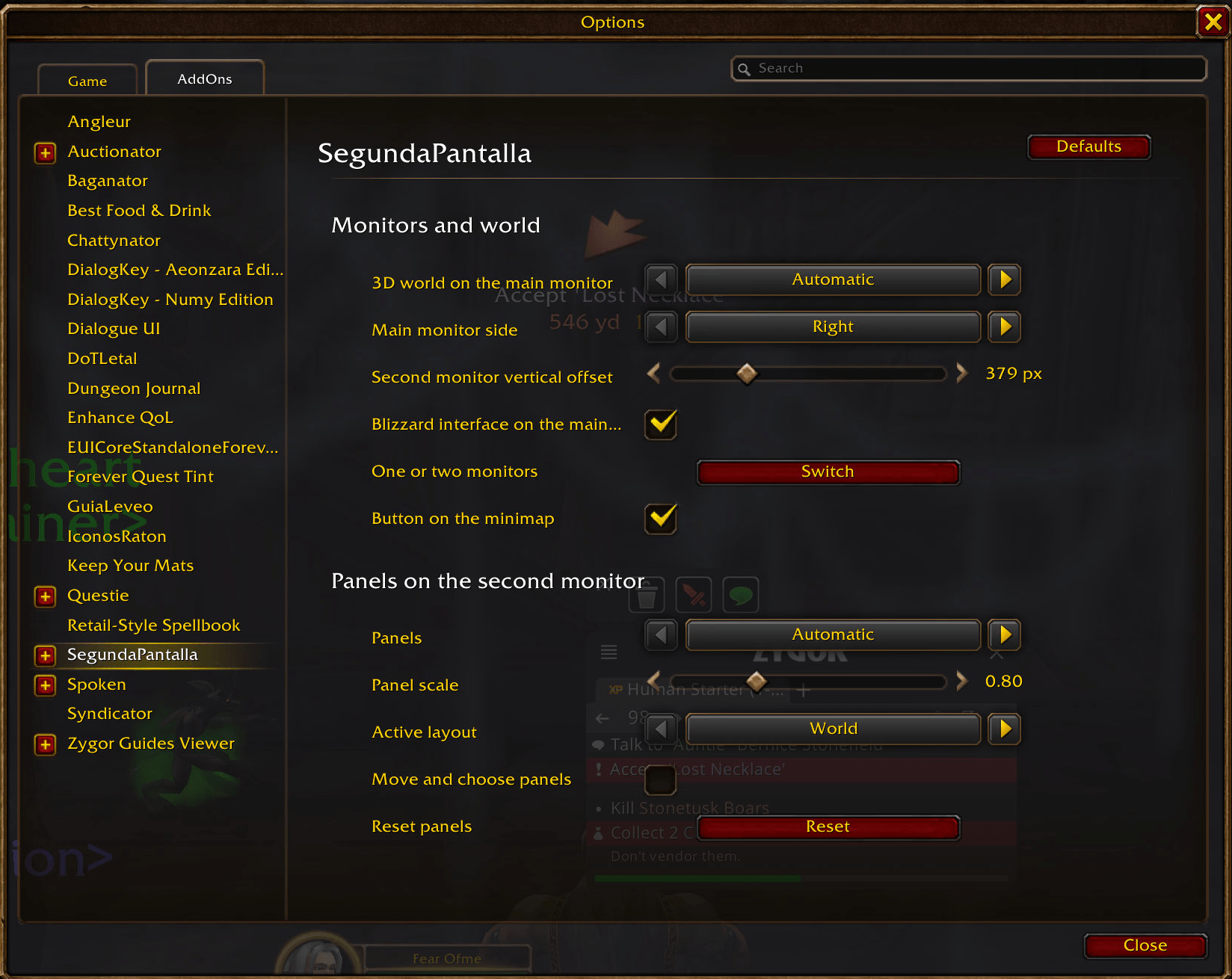
options.png
Description
Second Monitor Panels (folder: SegundaPantalla) turns your second monitor into part of your UI: zone map, quest tracker, bags, character sheet, chat and a utility bar — real game UI, clickable and live — while the 3D world and Blizzard's HUD stay on your main monitor.
Made for World of Warcraft: Forever (Interface 16001). It also loads on Retail 12.1.

Free and always will be. If it helps you, you can buy me a coffee.
Free and always will be. If it helps you, you can buy me a coffee.
How it works
An addon cannot open windows outside the game. The game window is stretched over both monitors and the addon keeps the 3D world and Blizzard's HUD on your main monitor, while its panels live on the part of the window that falls on your second monitor.Panels
- Zone map with your position, quests and flight masters; the mouse wheel zooms and follows you.
- Quest tracker: Blizzard's own objective tracker, moved into its panel.
- Bags: all bags in one fixed grid, search, gold, free slots, sort and sell junk.
- Character sheet: equipment with item level and durability, optional 3D model and stats.
- Chat: Blizzard's main chat window with its tabs and edit box.
- Utility bar: 12 free slots plus automatic buttons — random favourite mount, hearthstone, best food, drink, bandage and healing potion in your bags, and your professions.
- Progress: level, XP per hour, time to level, rested XP, quests and gold this session.
- Damage meter: Blizzard's built-in meter in its own panel.
- Inventory of your characters: item tooltips show how many you have and where (bags, bank, alts).
/sp.
New in 1.2.0: use a tablet or phone as your second monitor
No second monitor? Your tablet or phone can be one. Tick Tablet or phone as second monitor in the options and the addon switches to the new Tablet layout: four big panels you can tap (map, bags, utility bar and quests), with bigger text and buttons. Step by step:- Make the tablet or phone a Windows monitor. An addon cannot send anything outside the game, so Windows has to see the device as a real monitor. The free app spacedesk does it (free for private, non-commercial use): install the spacedesk driver on your PC (Windows 10/11) and the spacedesk app on your Android or iOS device (or use its browser viewer).
- Connect them. Same Wi-Fi as the PC (or a USB cable), open the app on the device and tap your PC. Use the device in landscape.
- Place it. Windows Settings > System > Display: choose Extend these displays and drag the device to the left or right of your main monitor, aligned at the top.
- Stretch the game window over both screens. In the game, Options > Graphics > Display Mode: Windowed. Drag the window to the left edge of the left screen and drag its corner until it covers both screens.
- Turn on tablet mode. Options > AddOns > SegundaPantalla > Tablet or phone as second monitor (or
/sp tablet). If the panels look too big or too small, adjust Panel scale (now up to 2.5). Untick it to get your previous layout and scale back.
Ways to use it
- One screen: type
/sp panels alwaysand the panels appear as a column on the left of your screen. - Two monitors side by side: set the game to Windowed mode and stretch the window over both monitors ("Windowed (Fullscreen)" cannot span two monitors). Then
/sp monitorsshows what the game reports and/sp monitors auto(or/sp monitors <width>x<height> <width>x<height> left|right) tells the addon where each monitor is. The author uses a small Windows launcher that does the stretching automatically; it is not distributed on CurseForge because it is not an addon. - A tablet or phone as the second monitor: see the steps above.
Commands
/spoptions ·/sp debugdiagnostics for bug reports/sp unlock//sp lockmove and resize panels ·/sp reset panels/sp layout world | instance | video | tablet/sp tablettablet or phone mode on/off/sp panels auto | always | never/sp monitors·/sp monitors auto/sp windows onopens vendor, NPC dialog, quest and mailbox windows on the second monitor
Known limitations
- Not yet tested in a Forever session. On Retail 12.1.5 the panels, the stretched window, bags, character sheet, map, chat, quest tracker, damage meter and tooltips were tested out of combat. Combat and dungeons have not been tested yet. The manual two-monitor setup (stretching the window by hand) has not been tested either.
- Do not save Edit Mode changes while the window is stretched: positions would be saved shifted. The addon warns you when you open Edit Mode.
- Stretching the window costs some frame rate (about 6% in the author's test).
- Only two monitors side by side.
- Tablet or phone mode has not been tried yet with a real device: touch, latency and frame rate depend on spacedesk and your Wi-Fi (a USB cable is usually smoother).
- Combat data is restricted in this client: some stats may freeze in combat and update when it ends.
/sp debug and BugSack are welcome.Second Monitor Panels Team