Nokkan's UnitFrames
- By
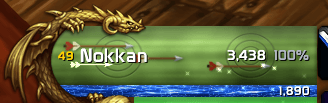
Smooth, animated unit frames for **you, your pet, your target, its target and your party**, in the same clean style as every Nokkan addon, with party frames that show at a glance who has a debuff you can remove.
Nokkan's Unit Frames
Smooth, animated unit frames for you, your pet and its target, your target and its target, your party, your raid and bosses, in the same clean style as every Nokkan addon, with party frames that show at a glance who has a debuff you can remove, and cast bars dressed in each spell's element.


Features
Eight frames, each on its own page
- Player, Pet, Pet's Target, Target, Target of Target, Party, Raid and Bosses
- A switch beside each page's title turns that frame on or off completely; the game's own frame is hidden while ours is on (and comes back after a /reload when you switch ours off)
- Width, height (with - and + for one at a time), power bar on or off and its height, and scale
- No empty power bar for monsters that have no mana, rage or energy
- Exact X and Y position, with - and + to move a frame one pixel at a time
- Health text: none, percent, current, current and percent, current / max, current / max · percent, or health lost; numbers short (3K) or in full (3,000)
- Names with or without a player's surname
- Power text: the same choices as the health text (none, percent, current, current and percent, current / max, current / max · percent, or missing)
- Place every text: position (corners, edges, middle, above or below the frame), nudge, size, colour (white, class, accent, gold, grey, level difference) and outline, for the name, health, power and level
- Heals and shields on every frame (each its own switches): heals on the way after the health, yours bright and everyone else's softer; damage shields pale after them, with a bright line when one runs past full health; heal absorbs dark red over the end of the health
- Health colour: class, friend or foe, plain green, or by health left
- Bar textures: the addon's own, the game's, and any other addon shares (LibSharedMedia), picked from a list with previews; for every frame in Options, or each frame its own (player, target, party, raid…: its page, Textures)
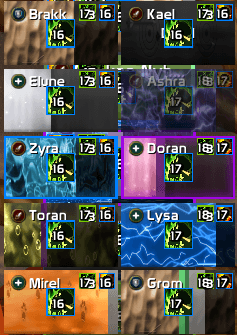
- Painted textures that keep their own colours: every cast bar element (fire, frost, arcane, lightning, the hunt…) for health, and paintings for mana, rage, energy and focus
- Class: each player's health in their class's look, in Blizzard's class colour (a mage in mage blue, a paladin in pink, a hunter the hunt, a warlock souls); monsters in quiet red, amber or green as they're hostile, neutral or friendly
- Power: each power bar in its power's painting
- Animated textures (each frame its own switch, off to start with; the raid's 10, 25 and 40-man settings each theirs): the paintings come alive, with a glow flowing through them and life inside: bubbles rising and popping in poison, water and mana, embers drifting out of fire and rage, sparkles in frost, arrows through the hunt (raid frames only flow, to stay light)
- Bar brightness: bars a little darker by default, so the texts on them read well
- Borders: on or off, 1 to 4 thick, dark, class, accent or other colours
- Elite dragon, as on the game's own target frame: a gold dragon round elite monsters (the tougher ones made for groups, and bosses), a silver one round rare monsters (special named ones that turn up now and then); or one on all the time, gold or silver, just for looks (for your own frame, say)
- Elite dragon nudge, to slide its curl just right onto the frame
- Portrait (either end) and level for you and your target; levels in the game's difficulty colours (grey to red by how hard the unit is for you), a skull when the game won't tell
- Small icons, each on its own switch and placed where you like (any corner or edge): leader crown, raid mark, combat swords and resting Zzz, and the role on party and raid frames
- Copy settings from another frame: size, texts, look, border, icons or auras, the parts you choose
- Click a frame to target, right-click for the unit's menu; works with click-casting addons
Cast bars in their element
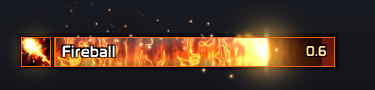
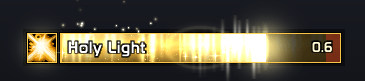
- Your cast bar and your target's, each spell in its own element: fire with rising flames and embers, frost with ice facets and falling shards, arcane with a sigil turning on its edge and motes circling it, nature with vines and drifting leaves, shadow with smoke, holy with light rays, fel fire (warlocks' class look), lightning that crackles and arcs, water with rippling caustics and bubbles, poison that bubbles and drips, steel that throws sparks, the hunt (hunters: target rings and arrows flying along it) and souls (warlocks: soul streams and glowing soul shards)
- Every texture painted for the addon, flowing as the bar fills; a glowing, flickering edge that burns brighter near the end
- A finale for every look as a cast lands: fire explodes, frost shatters into falling shards, arcane implodes into a nova, nature blooms, shadow collapses into the void, holy raises a pillar of light, lightning strikes three times, water throws up a wave and a crown of spray, poison splatters, souls are harvested, steel rings like an anvil, and a volley of arrows rains down on the hunt
- An interrupted cast shakes, greys and reddens, and says why
- Theme: by spell (Fireball in fire, Frostbolt in frost, Aimed Shot in the hunt…), by your class for everything, one element for every cast, or plain in your bar texture; mounts, items (a sleeping bag, a hearthstone) and crafting stay plain
- Spells are told apart by their icon, so it works in every language
- Your target's bar turns steel grey while its cast can't be interrupted; enemies only if you like
- Your latency as a red stretch at the end of your bar; time left, or left out of the whole
- Particles: subtle, full or wild (nearly three times as many, bigger and faster, the edge pulsing out bursts of its element, every finale crashing in twice), or off; the finale and the shake each on their own switch
- Width, height, scale, icon, name and time, for each bar; the game's own cast bar is hidden while yours is on
- Moves, snaps and attaches like the frames (drop it beside your frame and it moves with it); click its box for its quick settings
- Makes room: set right above or below a frame, that frame's buffs and debuffs on that side (and the target's combo points, your class power) glide out past it
- A live preview on the Cast Bars page plays cast after cast: every element while your theme is By spell, every class's look while it's By class, with a button for each to see it
- Works with the game's hidden combat values: the game itself runs the bar when an enemy's cast is hidden
Smooth everywhere
- Health and power glide to their new value, at a pace you choose (slow enough for mana and energy to flow in between their ticks)
- The health a hit takes away flashes, then fades, so you see how big each hit was
- Frames pop in when their unit appears and fade out when it leaves; a new target dips in instead of snapping
- Colours ease when they change; the elite dragon fades and grows in
- Auras pop in, shrink away when they end, and the rest glide along to close the gap
- Bar effects, set for each frame on its own page, each optional and each power its own: sparkles drifting up through mana, embers rising out of rage, a shimmer as energy ticks back, focus breathing softly, and a spark at the end of any refilling power bar; for health, a red glow breathing while it's low, a green spark as it's healed, and soft motes drifting up
- Eating and drinking: a soft shine runs along the health bar of anyone eating, and the mana bar of anyone drinking
- Every animation follows the Animation speed and Reduce animations options
Party frames
- Class-coloured health, incoming heals and damage shields after it
- Role, leader, raid mark, ready check, and an icon while a resurrection or summon is on its way
- Members out of range fade back (how far is your choice)
- Your current target gets an outline, a frame brightens under the mouse, and an aggro edge in the threat colours shows who has the monsters' attention (yellow: about to pull, orange: has it loosely, red: has it)
- Show yourself as the first frame, stack them down or across, hide them in raids
- Party pets: a slim frame under each member who has a pet (hunters' beasts, warlocks' demons), as wide as the party's frames
- Power bars for everyone, casters or healers only
- Order: as the game has it, or by role (tanks, healers, damage, in the order you like), with you first, last or in the order
- Heal colours (for healers, off by default): while one of your heals over time is on a member, their frame takes its colour, so you see who still needs it
Raid frames
- Built on the game's own raid header: members sorted by group (1 to 8), kept sorted as people join, leave or swap groups, even in combat
- Everything the party frames have: class colours, heals and shields, range fade, roles, ready checks, aggro colours, debuffs by type, removable debuffs lit, boss debuffs, heal colours, highlights, bar effects
- Their own size, horizontal and vertical spacing, groups side by side or stacked
- Sorted by role inside each group (tanks, healers, damage, or the order you like), or each role in columns of its own
- The party frames step aside in a raid while raid frames are on; Blizzard's raid frames are hidden (their raid tools stay)
- Settings by raid size: 25-man and 40-man raids can have settings of their own (size, layout, texts, look, place); the raid swaps to them the moment the 11th or 26th member joins, and back as they leave
- Unlock and Preview show a made-up raid of 10, 25 or 40, solo or not, in that size's settings (the tabs at the top of the Raid page, or on the raid's box, pick it); while unlocked, the raid's box fits the groups shown
Debuffs, buffs and dispels
- Debuffs and buffs on every frame, where you want them: below, above, left or right of the frame, or inside it in a corner or the middle
- Whose: all, only yours, only the ones you can remove, crowd control; buffs: all, yours, or ones you can purge or steal
- Party and raid frames show only your own buffs (heals over time, shields), so healers see who still needs them
- Yours first, yours a size bigger, everyone else's greyed, set for debuffs and buffs apart; the time left as a sweep (with or without its bright edge) and in seconds
- Each debuff's border in its type's colour: Magic blue, Curse purple, Disease brown, Poison green
- Boss debuffs on party and raid frames in a place of their own, bigger (in the middle by default), never shown twice
- A party member with a debuff you can remove shows it in any mix of ways you switch on: a coloured border, a softly breathing glow, their whole health bar in its colour, and the debuff's own icon big at the frame's left side; pick which types count
- Works with the game's hidden combat values: the colours come from the game itself
- Combo points for rogues and druids along the top of the target (switchable)
- Class power bar on your frame (above or below it): combo points, Holy Power, Chi, Soul Shards, Arcane Charges, Essence or Runes, each point a pip that fills smoothly and flares when you're full; runes fill as they recharge
- Pet happiness for hunters: three pips under the pet's frame light up to its mood (red, yellow, green), with its name beside them; an unhappy pet's pips breathe, and a hover shows its damage
Moving and previewing
- Unlock puts a snug box over every frame and steps the settings window aside: drag a box anywhere
- Frames snap: to the middle of the screen, beside the addon's other frames (a gap of your choosing apart) or lined up with their edges, to the game's own frames if you want (every action bar, the Cooldown Manager's bars, the minimap, chat; Bartender, Dominos and ElvUI bars too), and to an optional grid (its size is yours)
- The game's frame being snapped to is outlined and named ("Action Bar 1", "Essential Cooldowns"…)
- Attached frames move together: drop a frame right beside another and it's attached (a green dot on its box); drag the one it's attached to and it comes along; drag it away on its own to set it free
- Hold Shift while dragging to place freely; right-click a box to open the settings window on that frame's page (frames stay unlocked); Shift-right-click puts the frame back
- Click a box for that frame's settings right beside it: shown, size and position (with - and +), power bar, health text and colour, name, border, debuffs, buffs and a reset; a click anywhere else closes it
- One Lock, high in the middle of the screen, with the grid's switch and size beside it
- Preview fills every frame with made-up units, a whole party with debuffs to dispel included
- Never in combat: a fight locks everything and puts the samples away
Profiles
- Whole sets of settings saved by name: every frame, the raid's sizes, the cast bars, textures, snapping
- Each character uses its own (new characters start on Default); switching swaps everything at once
- New (fresh or a copy of the one in use), copy another's settings in, rename, reset, delete (resetting and deleting ask you to click twice)
- Export a profile as a short line of text to share, and Import someone else's: read as settings only, nothing in it is ever run
- The minimap button, the settings window's place and the animation speed stay yours on every profile
And
- A guided tour the first time you open the window
- A new version alert: when a guild or group member has a newer version, you're told once in chat and the window's header shows it
- Minimap button (can be hidden), and an entry in the game's Options > AddOns
Settings
Type /nuf, click the minimap button, or open Options > AddOns > Nokkan's Unit Frames. Each frame has its own page in the sidebar, with its on / off switch beside the title, and the cast bars have theirs (Cast Bars); the open page lists its sections under it (click one to jump there). Click a section's heading to fold it away.
Commands
- /nuf or /nokkansunitframes: open or close the settings window
- /nuf lock: unlock the frames to move them, or lock them again
- /nuf preview: show made-up units in every frame, or put them away
- /nuf reset: put every frame back in its first place
More Addons
If you liked this addon, check out my other ones, you might like them too:
- Nokkan's WhatChuWant: Shows in unit tooltips who in your group is targeting that player or NPC, plus their item level and mount.
- Nokkan's Consumables Tracker: A lightweight addon that visually reminds you when you’re running low on important consumables, only when it actually matters.
- Nokkan's StealthIO: Immersive screen darkening effect when entering stealth-like abilities even if you are not a rogue. All relevant classes / races are accounted for. Poison tracker/reminder for rogues.
- Nokkan's Graphics: A list of all the Graphic Options. Includes all the Options and CVar configurable
- Nokkan's Loot Filter: Automatically rolls Need, Greed, Transmog or Pass on the loot pop-ups you don't want to click in raids and dungeons, and keeps a history of every roll you make.
- Nokkan's Group Finder: Everyone looking for a dungeon or raid, from chat, the game's Group Finder and other players running the addon, in one window.
- Nokkan's Locales: Translations for every Nokkan addon in one download. Only your game's language loads; without it, everything stays in English.
- Nokkan's Spells and Buffs: A small, draggable bar of clickable buff reminders: it shows the buffs you're missing or about to lose, and a click casts them.
Nokkan's UnitFrames Team