Nokkan's Spells and Buffs
- By
A small, draggable bar of clickable buff reminders: it shows the buffs you're missing or about to lose, and a click casts them (or asks the player who can). It also puts the new spells and ranks you learn on your action bars for you.

nsb5.png

nsb6.png
nsb4.png
nsb8.png
nsb7.png
Description
Nokkan's Spells and Buffs
A small, draggable bar of clickable buff reminders: it shows the buffs you're missing or about to lose, and a click casts them (or asks the player who can). It also keeps an eye on your reagents, and puts the new spells and ranks you learn on your action bars for you.
Playing in another language? Also install Nokkan's Locales: it puts this addon in German, French, Spanish, Italian, Portuguese, Russian, Korean and Chinese. Without it, everything shows in English.
Features
Your own buffs
- Every class's self buffs: Aspects, Mage and Warlock armors, Paladin auras, Inner Fire, Lightning Shield, Omen of Clarity, Trueshot Aura, Righteous Fury, Shaman weapon imbues
- Buffs that replace each other (Aspects, armors, auras, weapon imbues) only ask for one: whichever you have up is fine
- Newer versions win: once you know Ice Armor or Demon Armor, you're no longer asked for Frost Armor or Demon Skin
- Click the icon to cast it on yourself
Your experience bar
- A shaded experience bar with soft rounded corners, laid over the game's (which it hides; or keep both), with your level at its left and the numbers on it. The empty part is dark and a bright line marks where you stand. Resize it by dragging its corner while it's unlocked. Hidden at the top level
- Finished quests: a fill of its own colour (gold, or one you pick) past your experience shows what the quests you've finished will give when you hand them in, so you can see at any time how close they take you to the next level. Turn on tracked quests to add, in another colour, what the quests on your tracker will give once done. Hover the bar for the totals, your rested experience and how much is left to level
- Rested experience: your rested pool as a teal stretch past your experience, to where it ends. Like the game's, the bar is blue while you're rested and turns purple once it's used up
- Gains glide in smoothly with a spark on the bar's edge and sparkles (handing in a quest is a treat); a level up fills the bar, bursts and starts over
- Your pet's bars latch onto it. Move it with Unlock (right-click puts it back); everything is on the Experience page
Consumables (any class)
- Well Fed: a reminder when you're not Well Fed or it's about to run out, with the buff foods in your bags as small icons under it (found by their "Well Fed" tooltip; hover one for its tooltip): click one to eat it, or the reminder itself to eat your best
- Cozy Sleeping Bag: while the bag is in your bags, a reminder 5 minutes before its buff runs out (or when it's missing); click it to use the bag. Log out without lying in it and a warning, with the logout countdown, tells you you'd miss its inn-like rested experience, with a button that stops the logout and lays out your sleeping bag
- Camp Benefits: a reminder when it's missing, and a reminder and a warning in the middle of the screen (with the raid warning sound) 5 minutes before it runs out; click it to light your campfire kit where you stand, or, with none in your bags, to make one from Cooking
- Each switched on or off on My Buffs, under Consumables
Your pet (Hunters)
- Call Pet and Revive Pet when your pet isn't out: the game can't tell whether it died or was sent away, so you pick. Revive Pet alone when it's out but dead
- Feed Pet when it isn't happy, in one click: drag your pet's food from your bags onto its list on the Pet page (what it eats glows in your bags while the page is open; food it doesn't eat is turned away), put it in the order you like, and the top one is fed
- Autocast per place: choose which pet abilities autocast in the world, dungeons, raids, battlegrounds and arenas; when you get there and it doesn't match, one click on the bar sets them all (Growl starts off in dungeons and raids). Each ability shows its Focus cost; hover it for what it does
- Pet experience bar: your pet's level and experience in a rounded purple bar that glides and sparkles as it fills, latched to your experience bar (this addon's, Blizzard's, Dominos' or ElvUI's): on top of it when yours is at the bottom of the screen, under it when yours is at the top. The training points its next level brings show on it. Beside it, a gold training bar: the points your pet has to spend and its loyalty in six boxes (Rebellious to Best Friend), which sets how many points each level brings, and whether it's growing. Turn the training bar off and the points sit at the end of the experience bar instead. Click for Inspect Pet or Pet Training. If your UI's experience bar isn't found, move it with Unlock (right-click puts it back). Each is switched on the Pet page
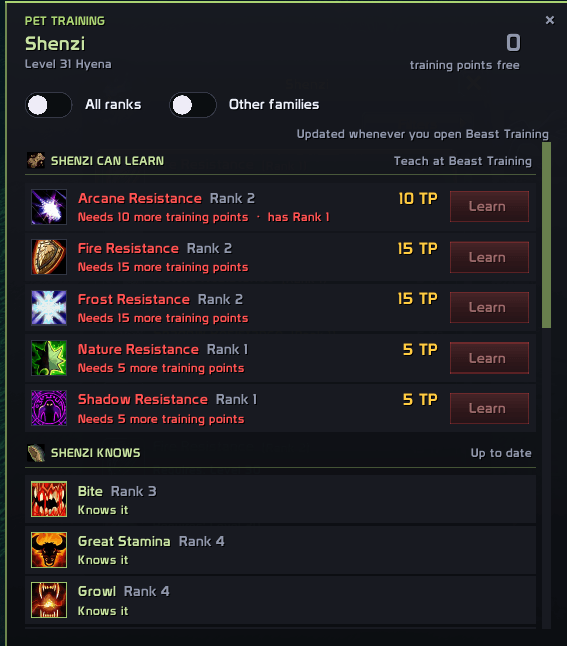
- Pet Training: what your pet can be taught, in plain sections: what it can learn from you (green when it can take it now, red with the reason when not, and a Learn button that teaches it, opening Beast Training if needed), what it knows, what's still to find for its family (click one: TomTom waypoints on the three nearest beasts that teach it, or without TomTom a list to pick the beast, its zone and level, for the map pin), and, if you like, your other abilities for other families. Its free training points at the top, All ranks to see every rank, and hover a rank to compare it with the one before. Open it from the button beside your pet's portrait (it shows the free points and glows when there are some), your pet's right-click menu, Inspect Pet, the pet XP bar (right-click) or
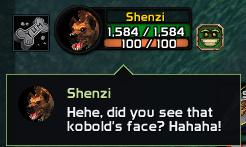
/nsb training; it sits beside Inspect Pet when that's open. With Nokkan's Class Quotes, your pet says so in a bubble when it earns new points: click it to open Pet Training - Beast scanner: when a tameable beast nearby teaches a pet ability rank you haven't learned, it gets a bobbing arrow over its nameplate, a sound plays, and a banner shows its turning 3D model, level and what it teaches (and whether your pet can use it). Click the banner to target it, mark it with a {star}, ping it and set a TomTom waypoint (if you have TomTom). Hovering any tameable beast shows what it teaches (new ranks in green). By default the scanner only looks for ranks your active pet can use; on the Pet page you can widen it to your stabled pets or every pet ability. The banner can't be clicked in combat, so it steps aside when a fight starts and comes back after (or, if you choose, combat closes it). Its Snooze button stops it telling you about an ability you don't want (undo it on the Pet page, under Training). Move the banner with Unlock; each switch is on the Pet page
- Pet bar tooltips: hover an ability on your pet bar to see it beside its next rank (what changes, in red and green) and how to get it: teach it, tame a beast, or a pet trainer
- Forever's pet families: every family's own ability (the hyena's Tendon Rip, the fox's Trickster's Dance, the bear's Swipe…) is known, with the pet level of each rank
- Inspect Pet: right-click your pet's portrait and pick Inspect Pet (or type
/nsb inspect) for a panel with everything about it: its 3D model (drag to turn it, mouse wheel to zoom), level and experience, health and Focus, happiness and the damage it gives, loyalty, training points, what it eats and the food Feed Pet gives it next, its stats and resistances, and its abilities with their ranks (hover one for what it does), plus, faded, the ones its family can learn that it doesn't have yet (a green + when you can teach it)
Your demon (Warlocks)
- Inspect your demon the same way: right-click its portrait and pick Inspect Pet for its model, health, mana, stats, resistances and abilities
Ammo (Hunters)
- Arrows or bullets, whichever your ranged weapon fires, show up once you're below your own limit, with the count under the icon
- Click to equip better-stocked ammo from your bags, or at a vendor to open the quiver prompt below
- Out of ammo? Click it for a TomTom waypoint (or, without TomTom, the map pin) on the nearest vendor of your faction that sells arrows or bullets your level can use, wherever you are (needs Questie)
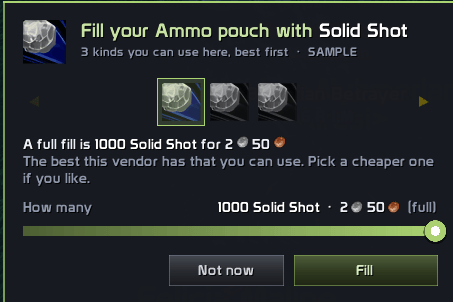
- At a vendor, offers to fill your quiver or ammo pouch (by its own name) in one click: it picks the best ammo there you can use, and shows the others as icons to choose a cheaper kind (hover one to see the item). Never more than fits or than you can afford
- Wrong ammo warning: at an ammo vendor, a box beside it (and a chat line) tells you when your quiver or ammo pouch, or the ammo in your ammo slot, doesn't suit your ranged weapon (a bow with an ammo pouch, a gun with a quiver), so you don't buy ammo you can't fire
- Drag How many to buy just some, one vendor batch at a time. If better ammo for your level is sold elsewhere, the prompt says so before you fill up
- Click the reminder to put it away: it comes back every 30 arrows or bullets you use (your choice), and always at 0
Reagents (Mages, Druids, Paladins)
- Arcane Powder, Runes of Teleportation and Portals, Light Feathers; Wild Berries / Wild Thornroot and Rebirth's seeds (always the one your highest rank takes); Symbols of Kings and Divinity
- Each counts once you know a spell that takes it. Choose how many of each to carry: the reminder shows below a quarter of that, with the count under the icon
- At a vendor, offers to restock every reagent you're short of in one click, back up to your amount: switch off any you don't want first. Never more than you can afford
- Click the reminder to put it away until you've used half of what's left (and at 0); at a vendor it opens the restock prompt
Buffs from your group
- When a Priest, Mage, Druid, Paladin or Warrior is in your group, alive and in range, and you're missing their buff, it shows up
- Their level counts: you're only offered to ask someone high enough level to have learned the buff (a level 10 paladin is asked for Might, not Kings)
- One click targets them, the other asks them for it (choose which button)
- Ask in a whisper, or in raid, party or say chat; "Raid, Party or Say" picks the right one for wherever you are
- Write your own messages:
%sbecomes the buff,%nthe player's name (e.g. "%n, could I get %s, please?") - Blessings: one per paladin, in the order you drag them into: the first paladin nearby is asked for your top blessing, a second paladin for the next (druids cast both Mark and Thorns, so they're simply asked for what's missing)
- Paladin auras: with a paladin nearby and no paladin aura on you, you're asked for the top aura in the order you drag them into (Devotion by default)
- A small dot in their class colour shows whose buff it is
- Say thanks: when another player's buff lands on you, you /thank them, strangers in the world included (once every two minutes per player at most; after combat if you're fighting). Heals, shields and auras don't count. Works alongside OneForAll's own thanks without doubling up
Buff your group (Priests, Mages, Druids, Paladins)
- Your buffs that group members in range are missing, one icon per buff with how many need it
- Click to cast it on whoever needs it most (missing first, then the one running out soonest), you included: one icon covers you and your group; out of range, offline or dead members are skipped, and range is checked again the moment you click
- Not enough mana? The icon turns blue, like the game's action buttons, until you can cast it again
- Arcane Intellect skips warriors and rogues
- Paladins choose which blessing each class gets (or Automatic: Kings, then Might for fighters, Wisdom for casters)
Tracking
- Find Minerals, Find Herbs, Find Fish, Find Treasure (dwarves), and Hunter / Paladin / Warlock / Druid tracking, once learned
- Reminds you when none of your tracking is on (after dying, for example)
New spells announced
- Learn a spell the bar tracks and a pop-up shows its icon (hover it for the spell), its name and an On / Off switch for its reminder
- Move it anywhere with Unlock (which shows a sample), or turn it off
New spells and ranks on your action bars
- Learn a new rank of a spell and it replaces the old rank on your action bars, in the same slot (after combat, if you learn it in combat)
- Learn a spell for the first time and it goes in the first empty slot: action bar 1 first, then 2, 3 and on (hidden bars and passive spells are skipped)
- Watch it fly there: the spell's icon flies from where you clicked Train to its button the moment you click, trailing glowing dots and sparkles in your class's colour, and lands in a burst of sparkles
- The buttons that changed glow softly, with what changed above them, until you hover them. Hovering one opens a panel just above it: for a new rank, the old rank beside the new one, with only what changed marked (the old numbers struck out in red, the new ones in green); for a new spell, its text
- Macros are never touched, and if a spell is on your bars at several ranks only the highest is replaced, so a low rank kept on purpose stays
- Turn either off on the New Spells page
New version alert
- When a guild or group member has a newer version, a line in chat and a note at the top of the settings window tell you, until you update
- Your copy quietly shares its version with your guild and group, so they hear about updates too (turn the alert off on the Options page)
In your language
- German, French, Spanish, Italian, Portuguese, Russian, Korean and Chinese, with Nokkan's Locales installed (a separate download that holds the translations of every Nokkan addon; only your game's language loads)
- Without it, everything shows in English
You choose what you need
- A switch for every buff, saved per class: a warrior doesn't need Blessing of Wisdom or Arcane Intellect, and the defaults already know that
- New spells switch themselves on as you learn them (unless you've turned them off); ones you haven't learned yet, or that belong to another race, are locked
The bar
- The whole addon wears your class's colour: the settings window, the move boxes, the announcement and the glows
- Missing buffs glow red, ones about to run out glow amber with a countdown
- The global cooldown sweeps across the icons after a cast, just like your action bars (and a spell's own cooldown, too)
- Choose how early it warns you (short buffs like Battle Shout warn at a third of their length at most)
- Per buff, too: give any of your buffs that runs out its own "Remind before it runs out" time, for the buff on you (My Buffs) and on your group (Buff Your Group): 5 minutes before Frost Armor fades, 30 seconds before Arcane Intellect does on your party
- Icons pop in, shrink away once cast, and slide over to make room
- Pick how icons appear (Pop, Fade, Rise, Drop, Slide, Zoom), leave (Shrink, Fade, Sink, Float away, Burst) and idle (Bounce, Float, Pulse, Sway, Breathe); changing one plays it on the bar so you can see it
- Drag it anywhere, and let it grow from the middle, right, left, up or down
- Snaps to the centre of the screen while you drag (optional; hold Shift to place it freely)
- Hide it while resting, while mounted, or when you're not in a group
- Optional sound when a new reminder shows up: pick one of WoW's own sounds or any LibSharedMedia sound (SharedMedia packs, WeakAuras, DBM…), with a searchable list and a Play button
- For between fights: the bar hides when combat starts (nothing on it can be clicked in a fight) and comes back, up to date, as soon as it ends
Made for WoW: Forever.
Settings
Open with /nsb, the minimap button, the addon compartment, or Options → AddOns.
The settings window has a page for each part: My Buffs, Pet (hunters), From Your Group, Buff Your Group, New Spells, Tracking, Bar, Experience and Options. Click a section's heading to fold it away; the sidebar lists the open page's sections, and clicking one scrolls straight to it. Pick the buffs you want, choose what happens when you learn a spell (the announcement, and new spells and ranks put on your action bars), choose how and where you ask for buffs and write your messages, choose blessings per class, move the bar and the new-spell announcement (Unlock at the top: drag, right-click to reset, Lock; it shows sample icons while you set things up), see a sample of everything the addon shows with Preview (the bar, the new-spell announcement, the glow of a new rank on your action bars, the fill-your-quiver prompt for hunters and the restock-your-reagents prompt for mages, druids and paladins; nothing is cast, swapped or bought), change the icon size, spacing and warning time, and set the animation speed or turn animations off. A short tutorial shows you around the first time you open it, and you can take it again from the Options page (at the bottom of the sidebar).
Commands
/nsb: open settings (also/nokkansspellsandbuffs)/nsb lock: unlock or lock the bar, the new-spell announcement and the experience bars, to move them/nsb preview: show or hide a sample of everything the addon puts on screen/nsb inspect: open the Inspect Pet panel for the pet or demon you have out/nsb training: hunters: open or close the Pet Training window/nsb reset: put the bar back in its starting spot/nsb debug: show in chat each icon arriving or leaving, and why (for bug reports)/nsb pet: hunters: show in chat what the game says about your pet (its abilities, food, happiness), for bug reports
More Addons
If you liked this addon, check out my other ones, you might like them too:
- Nokkan's WhatChuWant: Shows in unit tooltips who in your group is targeting that player or NPC, plus their item level and mount.
- Nokkan's Consumables Tracker: A lightweight addon that visually reminds you when you’re running low on important consumables, only when it actually matters.
- Nokkan's StealthIO: Immersive screen darkening effect when entering stealth-like abilities even if you are not a rogue. All relevant classes / races are accounted for. Poison tracker/reminder for rogues.
- Nokkan's Graphics: A list of all the Graphic Options. Includes all the Options and CVar configurable
- Nokkan's Loot Filter: Automatically rolls Need, Greed, Transmog or Pass on the loot pop-ups you don't want to click in raids and dungeons, and keeps a history of every roll you make.
- Nokkan's Group Finder: Everyone looking for a dungeon or raid, from chat, the game's Group Finder and other players running the addon, in one window.
- Nokkan's Locales: Translations for every Nokkan addon in one download. Only your game's language loads; without it, everything stays in English.
- Nokkan's Class Quotes: A companion for every class that speaks up now and then: an Arcane Familiar, a naaru, the Wild Gods, the Elemental Lords, your ancestors, your own shadow, and your pet or demon.
Nokkan's Spells and Buffs Team