Nokkan's Group Finder
- By
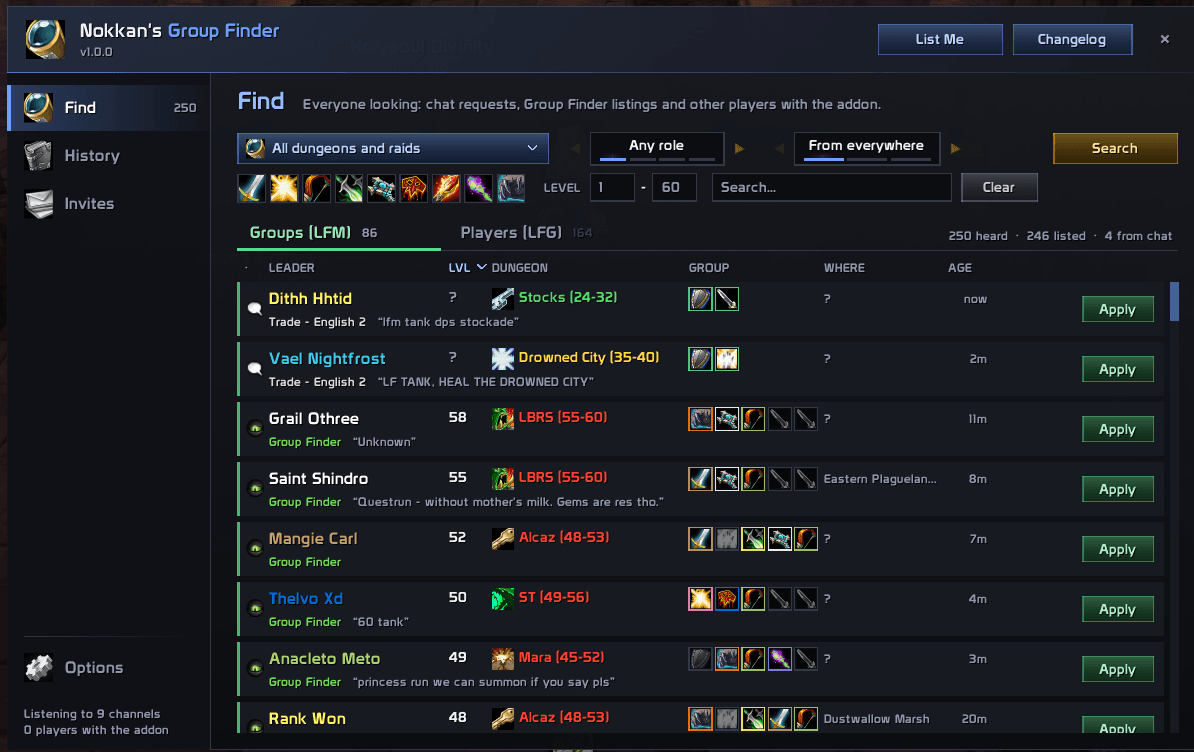
Everyone looking for a dungeon or raid, from chat, the game's Group Finder and other players running the addon, in one window you can filter and sort, with one-click Apply and Invite, and List Me to put yourself in the Group Finder.
ngf1.png
Description
Nokkan's Group Finder
Everyone looking for a dungeon or raid, from chat, the game's Group Finder and other players running the addon, in one window you can filter and sort, with one-click Apply and Invite, and List Me to put yourself in the Group Finder.
Features
Everyone looking, in one list
- Groups (LFM) and Players (LFG) on their own tabs, in tidy columns: leader or player, level, dungeon, group, talents, roles, where they are and how long ago
- Click any column's title to sort by it, again to turn the order round
- The Group Finder's own eye (turning, as on its minimap button) marks a listing from the game's Group Finder, a white speech bubble a request typed in chat; the line under each row starts with where it's from (Group Finder in green, or the chat channel), then their message
- A listed player who also asks in chat makes one row, with their message on it
- Group Finder listings stay while they're listed; chat requests leave after 20 minutes (or the time you choose)
- Opening the window searches the Group Finder; click Search to look again (each click searches the next category, Dungeons first)
Reads chat the way players write
- Every channel you're in, plus /say, /yell and guild chat if you like
- Understands
LF1M WC need heals,lfg twc,LF tank SM cath,LF2M strat UD,lfm dm east, and misspellings likeweling cavernsormaradon - Ignores what isn't a dungeon request: layer requests, selling and buying, guild recruiting and the like
Filters
- Dungeons: one or several at once (a wing counts for its dungeon: SM shows every wing's), or the ones that suit your level; the ones right for your level (green, yellow, orange) come first, then the others (grey and red) apart, dungeons and raids each on their own, searchable by what players call them (wc, sfk, brd)
- Role: groups needing a tank, healer or damage, and players who can play it
- From: everything, only Group Finder listings, or only requests typed in chat
- Type: dungeons and raids, dungeons only or raids only
- Classes: click to show only the classes you pick (and groups with or asking for one); right-click to hide a class, and every group that has one in it
- Level range, and a search box for names, messages, zones and dungeons
- A sound when a new listing arrives for the dungeons you picked: the one the game plays when someone signs up to your group (optional)
Groups at a glance
- Each group's five places, tank, healer, damage, damage, damage, fill as players join; a second tank or healer, or a fourth damage dealer, takes another place and shows as what they play
- A request from chat shows only the roles it asks for (none when it doesn't say), since chat doesn't tell who's already in the group
- Hover a group for every member's name, level, class, talents and where they are (as far as the game says)
- Optionally each member's talent tree icon instead of the role icons
Requests from far away
- Copies of the addon talk to each other over a hidden channel: someone in Orgrimmar sees a Wailing Caverns group in chat, and you hear about it in the Barrens
- Quiet by design: a request is passed on once, by whoever sees it first; guild chat is never passed on
- Log in to a full list: the requests of the last minutes you keep (your Keep chat requests for) come from one other player with the addon, the one who has the most, quietly and once per session
- Players with the addon share their level, where they are and their talents (points per tree: 14-2-0, with each tree's name); the game tells no one else's
List Me
- Lists you in the game's Group Finder for the dungeons you picked, as the roles you choose (only the ones your class can play), with an optional note
- While you're listed the button turns green and shows the Group Finder's turning eye
- Other players with the addon see you too, with your level, talents and where you are; a group lists its members as well
- Change it or stop any time from the same button
Channels looked after
- LookingForGroup, World and the addon's own channel are joined at every login, kept out of your chat windows so they don't spam you (one you turned on in a chat tab yourself stays as it is)
- Leave one during a session and the finder offers a Join button
Our own panel for each listing
- Hover a row for everything known: level, class and talents (three trees side by side), where they are, the dungeons with their levels, the roles and classes asked for, the group's members, the message itself, and when and where it was sent
Apply and Invite
- Apply whispers a group's leader your message, greeting them by name with your class, level and role filled in; Shift-click to write your own
- Invite brings a player into your group and whispers them why
- Right-click a row to whisper them, look them up with /who, remove the listing (it comes back if they post again) or hide the player
- Write your own messages in the settings
Players you've played with
- Everyone you group with is remembered: a star marks them in the list, and their panel shows how many times you played together, the last dungeon and whether you finished it
History and Invites
- History: the groups you joined through the finder, and every dungeon run with who you went with and whether you finished it
- Invites: the players you invited from the finder, and whether they joined
Every WoW: Forever dungeon
- Including Hall of Thanes, Ruins of Lordaeron, Excavation Site: Wetlands, City of Dalaran, The Drowned City, Krol'dok Stronghold, Alcaz Prison, Blackmaw Hold and Shaper's Terrace, with Forever's level ranges; any the Group Finder adds later show up by themselves
And
- A tab on the game's own Looking For Group window, above Create Listing, opens the finder
- The finder window can be resized from its bottom right corner (right-click the corner for its first size), and remembers its size and place
- A minimap button (it can be hidden), a quick tour the first time the window opens, and smooth animations throughout (slower, faster or off)
- New version alert: you're told when someone in your guild or group has a newer version
Settings
The settings are the finder's Options page: click Options at the bottom of its sidebar, right-click the minimap button, or type /ngf options. They're also listed in the game's Options > AddOns.
- Listings, Groups, Alerts, Reading chat: how long chat requests stay, hiding unknown levels, hidden players, talent icons in groups, the new-listing sound, and reading /say, /yell and guild chat
- Messages: what Apply and Invite send (a class with only one role, such as a hunter, doesn't name it)
- Minimap, Animations, Updates, Help, History: the minimap button, animations, the new version alert, the tour, and clearing your history
Commands
/ngfor/nokkansgroupfinder: open or close the finder/ngf options: open the finder on its Options page (again to close it)/ngf tour: take the tour again/ngf unhide: show everyone you hid again/ngf talents: show the talents the addon reads for you (what other players with the addon see)
More Addons
If you liked this addon, check out my other ones, you might like them too:
- Nokkan's WhatChuWant: Shows in unit tooltips who in your group is targeting that player or NPC, plus their item level and mount.
- Nokkan's Consumables Tracker: A lightweight addon that visually reminds you when you’re running low on important consumables, only when it actually matters.
- Nokkan's StealthIO: Immersive screen darkening effect when entering stealth-like abilities even if you are not a rogue. All relevant classes / races are accounted for. Poison tracker/reminder for rogues.
- Nokkan's Graphics: A list of all the Graphic Options. Includes all the Options and CVar configurable
- Nokkan's AutoNeed: Automatically handles loot roll pop-ups in raids and dungeons. I know you are bored and sigh each time a Housing Decor shows up.
Nokkan's Group Finder Team