Nokkan's Loot Filter
- By
Automatically handles loot roll pop-ups in raids and dungeons. I know you are bored and sigh each time a Housing Decor shows up.
nan_panel.png
auto_need_player.png
Description
Nokkan's Loot Filter
Stop clicking loot popups. Never miss a roll again.
Nokkan's Loot Filter rolls Need, Greed, Transmog or Pass for you on group loot in dungeons and raids. You choose what happens for each type of item. It also keeps a full history of your rolls, so you can see what you won, what you lost and who beat you.
✨ Features
🎲 Auto-rolling by category
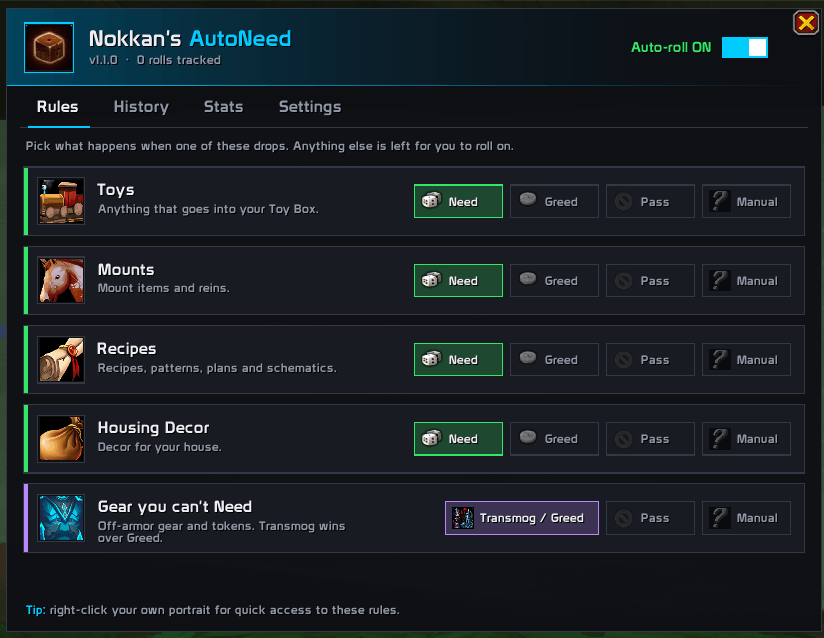
Pick a rule for each category. Anything else is left for you to roll yourself.
- Toys: Need / Greed / Pass / Manual
- Mounts: Need / Greed / Pass / Manual
- Recipes (patterns, plans, schematics): Need / Greed / Pass / Manual
- Housing Decor: Need / Greed / Pass / Manual
- Gear you can't Need (off-armor gear and tier tokens): Transmog-or-Greed / Pass / Manual
How the rules work:
- Need drops to Greed when the game won't let you Need.
- Transmog is used whenever it's offered, because it beats Greed.
- Gear you can Need is never rolled for you. Upgrades are always your call.
📜 Roll history and results
- Every roll is recorded, both the ones the addon makes and the ones you click yourself.
- See your number, the winner (in class color), their roll and the result: Won, Lost, Outranked, All Passed or Expired.
- Outranked tells you when someone won on a higher tier (Need beats Transmog beats Greed), so you never got a number.
- Filter by All / Won / Auto / Manual / Expired. Shift-click an item to link it in chat.
- Each character keeps its own history (last 200 rolls).
📊 Stats
- Rolls tracked, items won, win rate, average roll, best roll and expired rolls.
- A breakdown bar showing how often you Need, Transmog, Greed, Disenchant or Pass.
🛟 Never miss a roll
- Fixes Blizzard's 4-popup limit. When more than 4 items drop at once, the extra rolls normally get no popup and quietly time out. Nokkan's Loot Filter brings them back as popups free up, starting with the most urgent.
- Expired roll warnings tell you when a roll ran out before you picked anything.
- The minimap badge counts the rolls still waiting for your click and pulses until you deal with them.
🏆 Win celebration
- A win toast shows the item and your roll, with the legendary loot sound.
- The minimap button lights up with a gold burst.
🔒 Safe by design
- Bonus rolls are never touched. They cost you currency, so they're always your decision.
- Combat-safe: rolls that start mid-fight are made as soon as combat ends.
- An adjustable delay (0–5 seconds) before each auto-roll.
🖥️ Interface
Main window (/nlf): a clean, modern window with four tabs: Rules, History, Stats and Settings. Includes a one-click master on/off switch.
Minimap button
- Left-click: open the window
- Shift-click: jump to roll history
- Right-click: turn auto-rolling on or off
- Drag: move it around the minimap
- Status dot: green when auto-rolling is on, red when it's off
- Tooltip: this session's rolls and wins, plus your last roll's result
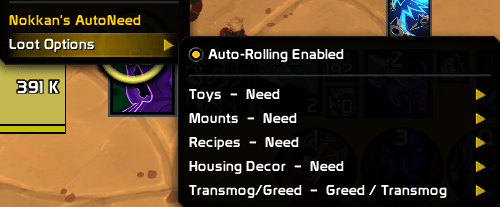
Quick access: right-click your own portrait and choose Loot Options to change rules without opening anything.
You can also open it from the addon compartment or ESC → Options → AddOns.
⌨️ Slash commands
| Command | What it does |
|---|---|
/nlf |
Open or close the window |
/nlf toggle |
Turn auto-rolling on or off |
/nlf status |
Show your current settings |
/nlf toys <need/greed/pass/none> |
Set the toy rule |
/nlf mounts <need/greed/pass/none> |
Set the mount rule |
/nlf recipes <need/greed/pass/none> |
Set the recipe rule |
/nlf housing <need/greed/pass/none> |
Set the housing decor rule |
/nlf transmog <greedtransmog/pass/none> |
Set the rule for gear you can't Need |
/nlf delay <0-5> |
Seconds to wait before rolling |
/nlf minimap |
Show or hide the minimap button |
/nlf history [n] |
Print your last n rolls in chat |
/nlf history clear |
Clear this character's history |
/nlf help |
List all commands |
⚙️ Default rules
| Category | Default |
|---|---|
| Toys | Need |
| Mounts | Need |
| Recipes | Pass |
| Housing Decor | Need |
| Gear you can't Need | Transmog / Greed |
✅ Compatibility
- Retail and WoW: Forever. Housing Decor appears only where the game supports it.
- No library dependencies.
Questions, bugs or ideas? Leave a comment. Feedback is very welcome!
Nokkan's Loot Filter Team