Nokkan's Auction
- By
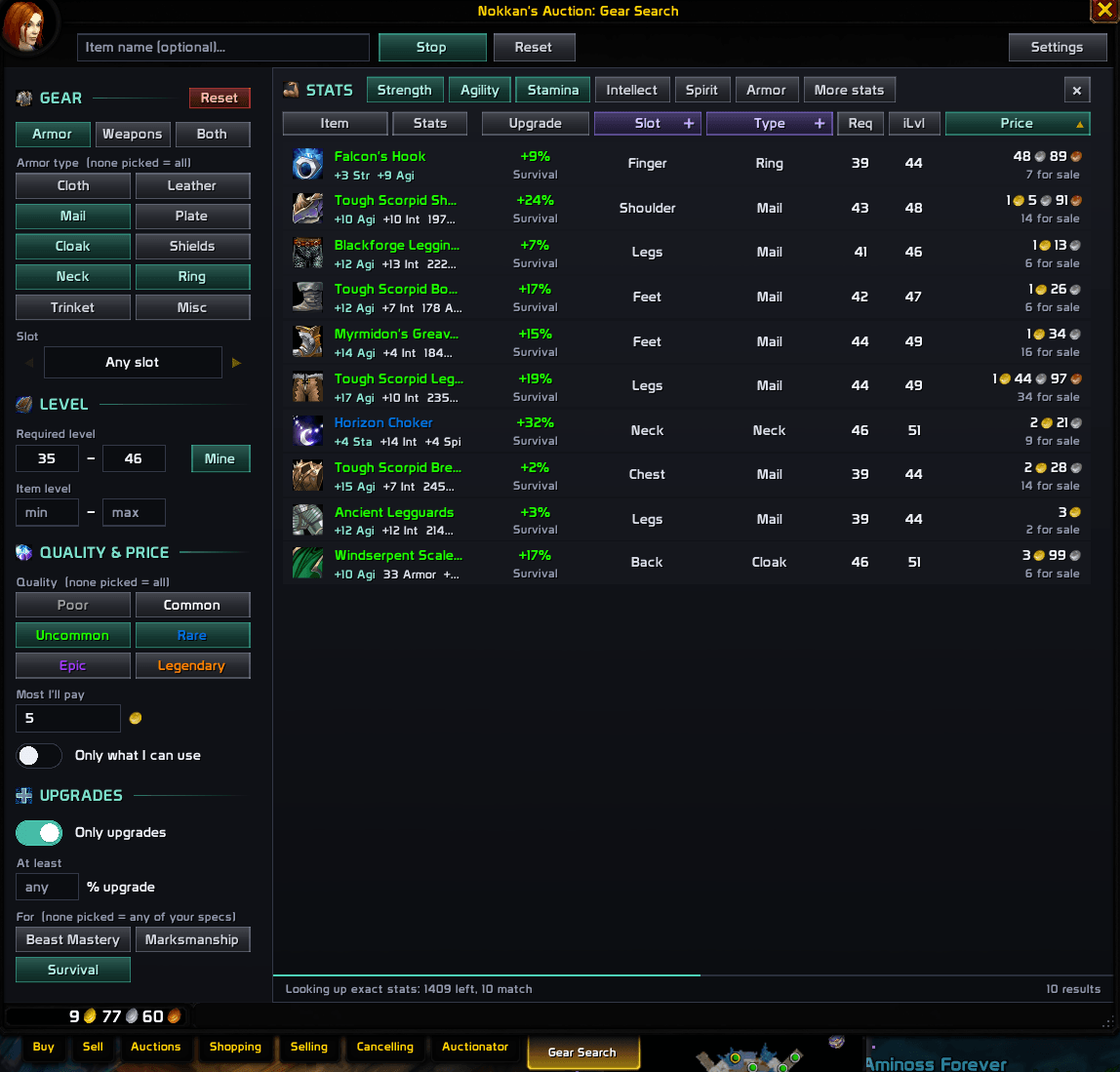
A Gear Search tab in the Auction House: find armour and weapons by their stats, armour type, slot, level and price, and buy them right there.
nah.png
Description
Nokkan's Auction
A Gear Search tab in the Auction House: find armour and weapons by their stats, armour type, slot, level and price, and buy them right there.
Features
Gear Search tab
- A tab at the bottom of the Auction House, beside Buy, Sell and Auctions (and Auctionator's tabs), that switches the Auction House to its own page.
- Search by name, or leave the name empty and search by the filters alone.
Filters
- Armour or weapons, or both.
- Armour type: Cloth, Leather, Mail, Plate, Cloak, Shield, Neck, Ring, Trinket and Misc (held in off-hand, relics). Pick several, or none for all.
- Weapon type, grouped into One-Hand, Two-Hand, Ranged and Other, with an All button for each group. Pick several, or none for all.
- Slot: head, chest, legs, finger, trinket, one-hand, two-hand and every other slot. Only the slots that fit the types picked are offered (Mail has no neck).
- Required level and item level ranges, with a Mine button to stop at your own level.
- Quality: any mix of Poor, Common, Uncommon, Rare, Epic and Legendary (none picked = all).
- The most you'll pay, and only what I can use.
- Reset (top right of the filters) puts them all back to the start; your stats and search text stay.
Upgrades (with Pawn)
- Only upgrades: shows only what Pawn calls an upgrade over what you're wearing.
- Pick which of your specs count (e.g. Survival for a hunter), or none for any of them.
- At least ___ %: only upgrades that big or bigger (empty = any upgrade).
- Pawn doesn't score trinkets, so with Only upgrades on they're still shown, marked "not scored", for you to judge.
- An Upgrade column shows by how much and for which spec (+6%, Marksmanship); click its header to put the biggest first.
- Needs the Pawn addon; without it the filter stays off.
Stats, always in sight
- A stats bar across the top of the results: Strength, Agility, Stamina, Intellect, Spirit and Armor.
- More stats opens the rest your game has (critical strike, hit, haste, spell power, defense...).
- Click a stat once to want it, twice to require it (gold), a third time (or right-click) to drop it. Results have every required stat and at least one wanted one: Strength and Agility wanted, Stamina required finds (Strength or Agility) and Stamina.
- × clears them.
Results
- Columns for the item and its stats (wanted ones lit, required ones in gold), Slot, Type (Mail, Plate, Swords, Bows...), required level, item level and the cheapest price, with how many are for sale.
- Click a column header to sort by it; click again to reverse.
- Slot and Type filter like a spreadsheet: click the header, then pick which slots or types to show (as many as you like), each with how many results have it. The list filters at once, no new search.
- Exact stats: items with random suffixes ("of the Bear") show that suffix's real stats, so only copies that really have your stats show.
- Fast: the Auction House is only asked for the slot, types and qualities you picked, results show as they arrive, and every item on a page starts loading at once.
- Change only stats, upgrades, price or item level (or the slot and quality after a search for any) and the last results are re-checked at once, without asking the Auction House again. Shift-click Search to ask again.
- When the order changes, the rows glide to their new places.
- Shift-click links an item in chat, Ctrl-click tries it on.
A bigger Auction House
- The Auction House grows while Gear Search is open (1040 x 660) and goes back to its usual size on Blizzard's own tabs.
- Drag the grip in its bottom right corner to pick your own size; right-click resets it.
Buying
- Click a result: a panel slides up with every copy on the Auction House, its exact stats, time left and price.
- Buy (or Bid for copies with no buyout) right from the tab. It asks for a second click first (you can turn that off).
- Once you've bought, the listings close and the result's price moves to the next cheapest copy (or it leaves the list when none are left).
- Blizzard's view opens the item in the Auction House's own Buy page. Your results stay on the tab.
Light on your game
- Nothing is built until you open the tab, the search only runs while the Auction House is open, and it never asks faster than the Auction House allows.
And
- Minimap button (you can hide it), a short guided tour, and a new version alert when a guild or group member has a newer version.
- On a game that isn't in English, a note points you to Nokkan's Locales for the translation.
Settings
Open the settings window with /nah, the minimap button, the Settings button on the Gear Search tab, or Options > AddOns > Nokkan's Auction.
- Gear Search: open the Auction House on Gear Search, window size, remember your filters, exact stats, show stats on results, sort order, confirm before buying.
- Options: minimap button, the tour, new version alerts, animations.
Commands
- /nah or /nokkansauction: opens the settings window.
- /nah reset: puts the Gear Search filters back to the start.
- /nah language [code]: shows the language message (e.g.
/nah language deDE).
More Addons
If you liked this addon, check out my other ones, you might like them too:
- Nokkan's Spells and Buffs: A clickable bar of the buffs you're missing or about to lose, reagents, and new spells and ranks flown onto your action bars.
- Nokkan's WhatChuWant: Shows in unit tooltips who in your group is targeting that player or NPC, plus their item level and mount.
- Nokkan's Consumables Tracker: A lightweight addon that visually reminds you when you’re running low on important consumables, only when it actually matters.
- Nokkan's StealthIO: Immersive screen darkening effect when entering stealth-like abilities even if you are not a rogue. All relevant classes / races are accounted for. Poison tracker/reminder for rogues.
- Nokkan's Graphics: A list of all the Graphic Options. Includes all the Options and CVar configurable
- Nokkan's Loot Filter: Automatically rolls Need, Greed, Transmog or Pass on the loot pop-ups you don't want to click in raids and dungeons, and keeps a history of every roll you make.
- Nokkan's Group Finder: Everyone looking for a dungeon or raid, from chat, the game's Group Finder and other players running the addon, in one window.
- Nokkan's Locales: Translations for every Nokkan addon in one download. Only your game's language loads; without it, everything stays in English.
- Nokkan's Class Quotes: A companion for every class that speaks up now and then: an Arcane Familiar, a naaru, the Wild Gods, the Elemental Lords, your ancestors, your own shadow, and your pet or demon.
Nokkan's Auction Team