promotional bannermobile promotional banner

ClickCopyChat

Click a chat line's timestamp or a web link to copy it, copy whole chat windows, short channel and group tags, flexible timestamps, a chat box that keeps focus, and sent messages kept after /reload. Classic Era, WoW Forever and Retail.
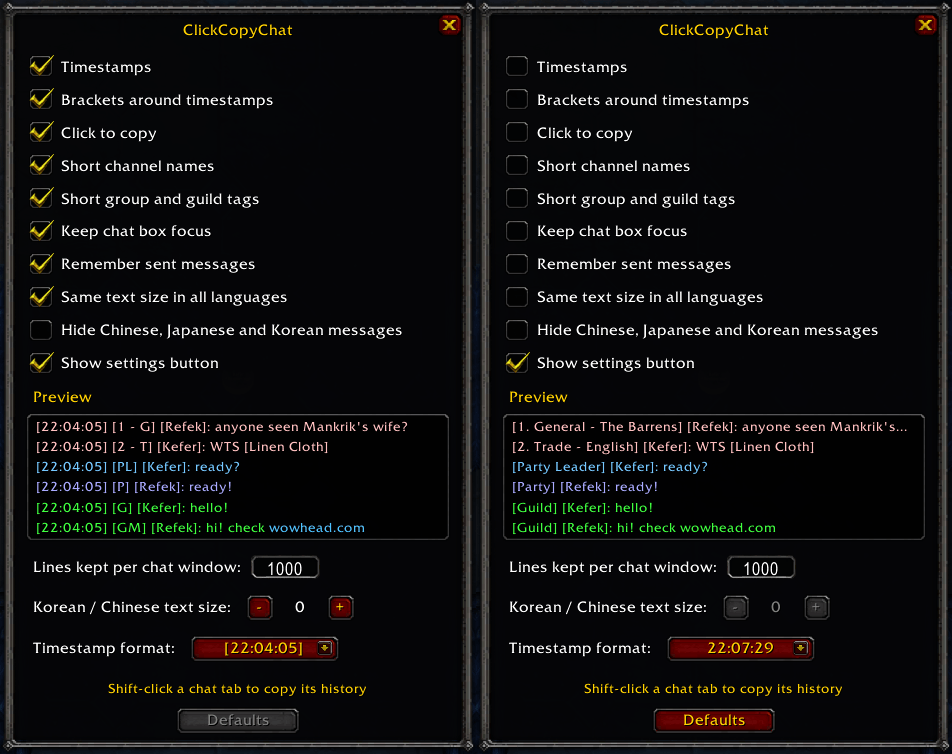
Left: default settings. Right: every option off, as Blizzard shows it. The preview shows how chat lines look with your settings as you change them. Open it with the CCC button or /ccc.
Left: default settings. Right: every option off, as Blizzard shows it. The preview shows how chat lines look with your settings as you change them. Open it with the CCC button or /ccc.

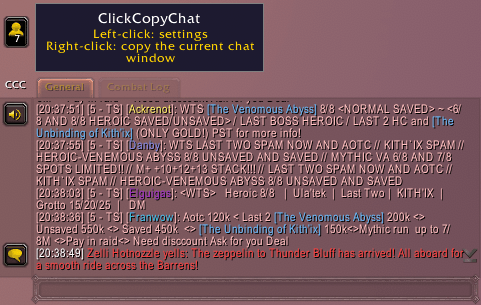
Every line gets a timestamp you can click to copy it, and channel names shrink to their number and initials ([5 - TS]). The CCC button left of the first chat tab: left-click for settings, right-click to copy the window.
Every line gets a timestamp you can click to copy it, and channel names shrink to their number and initials ([5 - TS]). The CCC button left of the first chat tab: left-click for settings, right-click to copy the window.

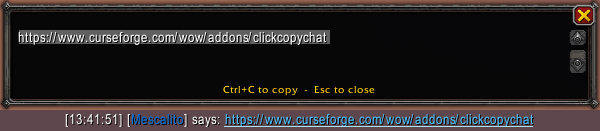
Web links in chat become clickable. Click one to get just the address, ready for Ctrl+C.

Web links in chat become clickable. Click one to get just the address, ready for Ctrl+C.

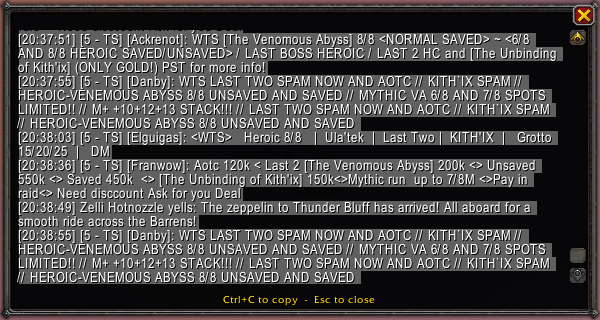
Click a line’s timestamp (or [+] with timestamps off) and the whole line opens selected. Ctrl+C copies it and closes the window.
Click a line’s timestamp (or [+] with timestamps off) and the whole line opens selected. Ctrl+C copies it and closes the window.

Shift-click a chat tab, right-click the CCC button or type /ccc copy to to get the window’s history in a copy box, up to 1000 lines by default. Chinese, Japanese and Korean show as ? there but copy as the real text.  Select only what you wanna copy.

Shift-click a chat tab, right-click the CCC button or type /ccc copy to to get the window’s history in a copy box, up to 1000 lines by default. Chinese, Japanese and Korean show as ? there but copy as the real text. Select only what you wanna copy.
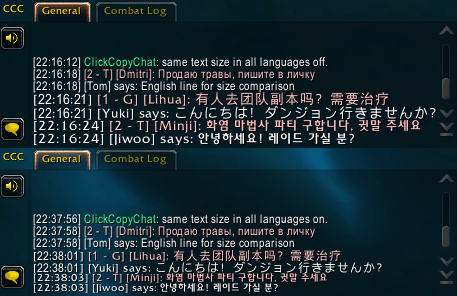
Top: off. Korean, Chinese, Japanese and Russian lines ignore the chat font size and show at a different size. Bottom: on. Every line follows the chat window's font size.
Top: off. Korean, Chinese, Japanese and Russian lines ignore the chat font size and show at a different size. Bottom: on. Every line follows the chat window's font size.

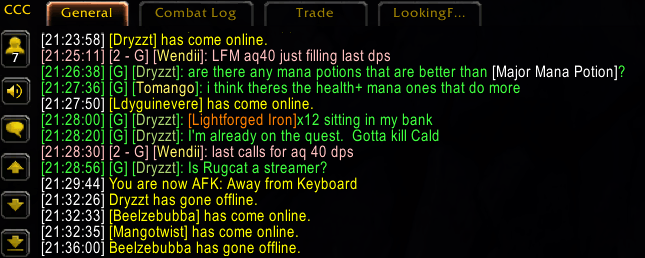
Everyday chat: short tags like [G] and [2 - G] (Guild and General chats), and timestamps in your choice of 24-hour or 12-hour format, with or without seconds and brackets.

Everyday chat: short tags like [G] and [2 - G] (Guild and General chats), and timestamps in your choice of 24-hour or 12-hour format, with or without seconds and brackets.

Description

ClickCopyChat makes WoW chat easier to copy and read. Works on Classic Era, WoW Forever and Retail.

Features

  • Click to copy: click a line's timestamp to copy the line, or click a web link to copy just the link. Hovering one highlights it and, until your first copy, shows a hint saying what a click does.
  • Copy a whole chat window: Shift-click its tab, right-click the CCC button, or /ccc copy.
  • Timestamps: 24-hour or 12-hour, with or without seconds and brackets.
  • Short tags: [1. General - Orgrimmar] becomes [1 - G], and [Party], [Raid], [Guild] become [P], [R], [G]. The guild master shows as [GM].
  • Chat box keeps focus: clicking elsewhere doesn't lose what you're typing.
  • Sent messages remembered: Alt+Up / Alt+Down work in every chat box, whisper tabs included, and the list survives /reload.
  • Same text size in all languages: Korean, Chinese and Russian lines match the rest of the chat.
  • Optional: hide Chinese, Japanese and Korean messages in public chat.
  • Guild & Communities: clickable timestamps there too.

Settings

Click the CCC button left of the first chat tab, or type /ccc. Every option is also a command: /ccc links|time|brackets|channels|groups|focus|sent|fonts|cjk|button on|off, and /ccc max <n> for lines kept.

Notes

On WoW Forever and Retail, settings only affect new chat lines, and the chat windows keep their default length.

ClickCopyChat Team

profile avatar
Owner
  • 6
    Projects
  • 482
    Downloads

More from trovskView all

  • EnhancedTooltips project image

    EnhancedTooltips

    Tooltips that follow your cursor, with class, reaction and reputation colors, pet owners, Rare/Elite/Boss tags, Target/Targeted by/Cast by lines, buff/debuff type colors, spell coefficients and optional IDs. Classic Era and WoW Forever, any language.

    • 154
    • November 3, 2026
  • TrueColorPicker project image

    TrueColorPicker

    Adds R/G/B, hex and alpha entry boxes plus Copy, Paste, Class and Restore buttons to WoW's default color picker, inside the same window. Type exact values instead of dragging the wheel. For Classic Era / Season of Discovery 1.15.9.

    • 189
    • November 3, 2026
  • ChromaCast project image

    ChromaCast

    A cast bar colored by spell school, with gradients for multi-school spells, spell icon, channel ticks, spell queue and latency zones, and a red Interrupted/Failed state. Fully adjustable in game. For Classic Era and WoW Forever.

    • 20
    • November 3, 2026
  • NeatBags project image

    NeatBags

    A simple, unified bag and bank UI: live search, one-click stack merging, item level display, and optional auto-sell of grays and auto-repair — under a minute to set up, no other addons required.

    • 58
    • October 3, 2026
  • EnhancedTooltips project image

    EnhancedTooltips

    Tooltips that follow your cursor, with class, reaction and reputation colors, pet owners, Rare/Elite/Boss tags, Target/Targeted by/Cast by lines, buff/debuff type colors, spell coefficients and optional IDs. Classic Era and WoW Forever, any language.

    • 154
    • November 3, 2026
  • TrueColorPicker project image

    TrueColorPicker

    Adds R/G/B, hex and alpha entry boxes plus Copy, Paste, Class and Restore buttons to WoW's default color picker, inside the same window. Type exact values instead of dragging the wheel. For Classic Era / Season of Discovery 1.15.9.

    • 189
    • November 3, 2026
  • ChromaCast project image

    ChromaCast

    A cast bar colored by spell school, with gradients for multi-school spells, spell icon, channel ticks, spell queue and latency zones, and a red Interrupted/Failed state. Fully adjustable in game. For Classic Era and WoW Forever.

    • 20
    • November 3, 2026
  • NeatBags project image

    NeatBags

    A simple, unified bag and bank UI: live search, one-click stack merging, item level display, and optional auto-sell of grays and auto-repair — under a minute to set up, no other addons required.

    • 58
    • October 3, 2026