NeatBags
- By
A simple, unified bag and bank UI: live search, one-click stack merging, item level display, and optional auto-sell of grays and auto-repair — under a minute to set up, no other addons required.
Description
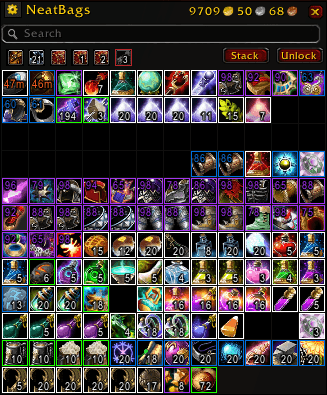
NeatBags is a simple, all-in-one replacement for your bags and bank window. It doesn't try to be a platform — no complex feature sets that only a handful of people ever touch, no config screens you need a wiki page to understand. It has the essentials done well, plus a couple of genuinely useful extras, and you can have it configured exactly how you like it in under a minute.
Features
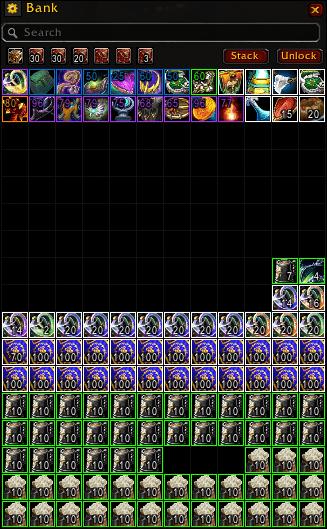
- Unified bag & bank windows — one clean grid for your bags, and a matching one for the bank, instead of a row of separate Blizzard windows.
- Live search — filters your bags and bank as you type, synced across windows, so searching in one filters the other too.
- One-click stack merging — the Stack button combines partial stacks of the same item together. It only merges, never sorts or moves full stacks around, so your layout stays where you put it.
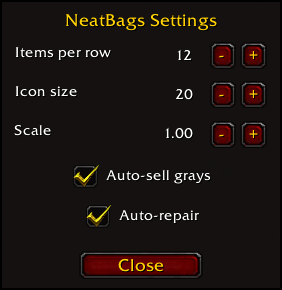
- Auto-sell grays (off by default) — automatically sells every Poor-quality item in your bags the moment you open a merchant window. Turn it on in the settings panel or with
/nb autosell on. - Auto-repair (off by default) — automatically repairs all your gear using your own gold, if you can afford it, the moment you open a merchant window. Turn it on in the settings panel or with
/nb autorepair on. - Per-bag show/hide toggles — hide a specific bag from the grid without unequipping it.
- Item level on gear — see an item's level right on its icon, no tooltip needed.
- Cooldown timers — swipe and countdown text on items on cooldown.
- Bank slot purchasing — buy your next bank slot straight from the window.
- Adjustable grid — set your own column count, icon size, and overall scale. Three sliders, no submenus.
- Lock/unlock windows — lock the window position once it's where you want it, so you don't drag it by accident.
Simple by design. Everything above is the whole feature set — there's no hidden complexity underneath, no advanced mode, nothing you'll need a guide to figure out. Open the settings panel, set your columns/size/scale and toggle whichever extras you want, and you're done.
Slash commands
/nb lock | unlock       - lock or unlock the window position
/nb reset               - reset window positions
/nb cols <4-20>         - set number of grid columns
/nb size <10-52>        - set icon size
/nb scale <number>      - set overall window scale
/nb autosell on | off   - toggle auto-selling gray items at vendors
/nb autorepair on | off - toggle auto-repair at vendors(/neatbags also works as the full command name.)
No dependencies. NeatBags is fully self-contained — it doesn't require or share settings with any other addon.
NeatBags Team