EnhancedTooltips
- By
Tooltips that follow your cursor, with class, reaction and reputation colors, pet owners, Rare/Elite/Boss tags, Target, Targeted by and Cast by lines, centered text and optional IDs. Almost everything can be toggled on/off. Works in every language.
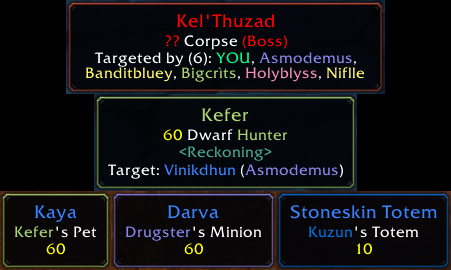
Target and Targeted by lines, with class-colored names. Pets, minions and totems show their owner's name in class color, and the border takes the owner's class color too.
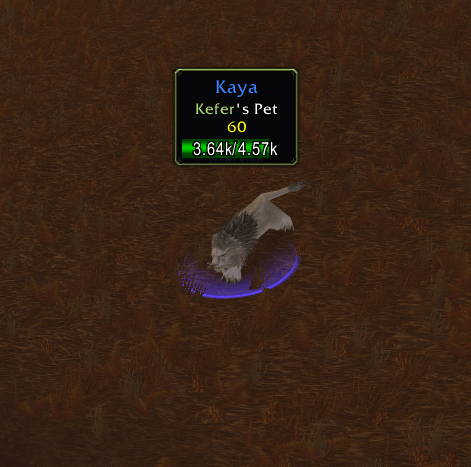
The tooltip opens right above what you hover (Position Above, Distance 50) and flips near screen edges. The health bar sits inside it with the health as text. Unflagged pet in blue; owner name and border in the owner's class color.
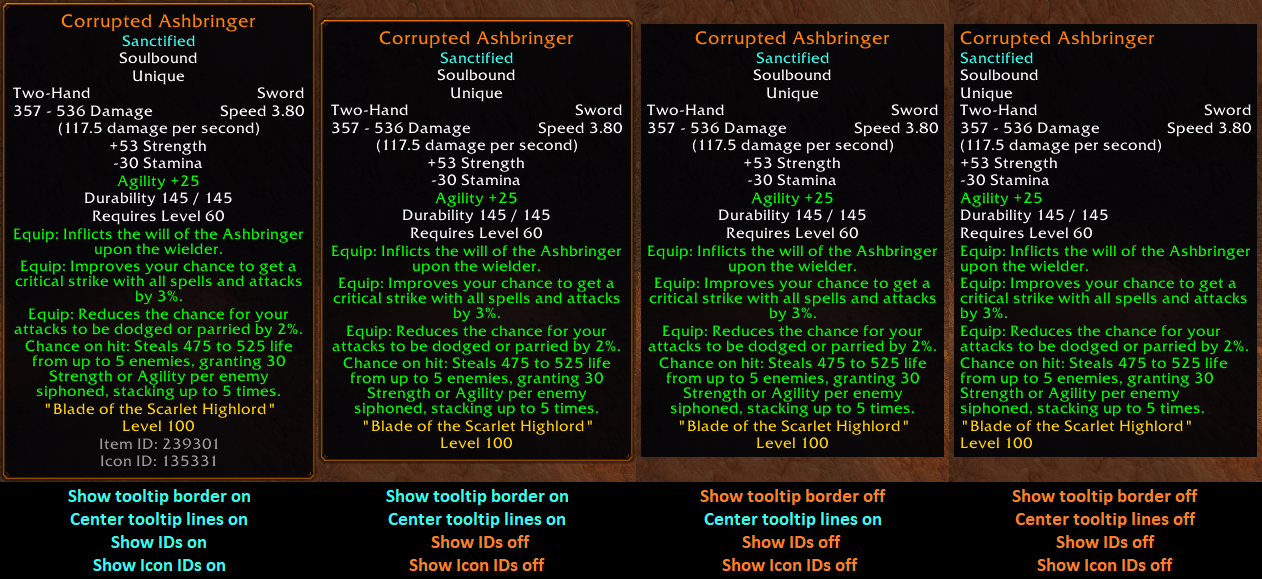
Some of the different ways you can customize the tooltip display.
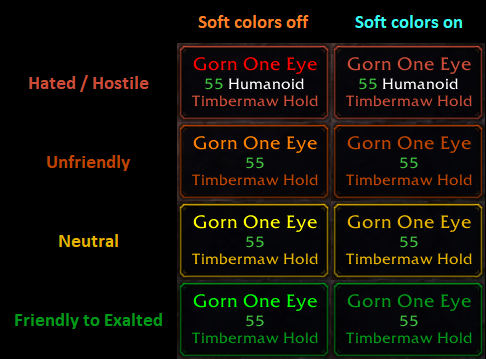
The name, faction line and border follow your reputation with the NPC's faction. Soft name colors swaps the fully saturated red, orange, yellow and green for softer shades (names only). Creature type is only shown on attackable units.
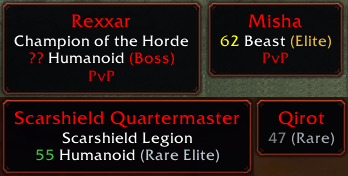
Boss, Elite, Rare Elite and Rare tags, each in its own color, built from the game's own data so every rare and boss is tagged. The level is colored by difficulty, from Blizzard's own UI.
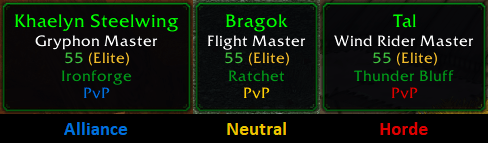
The PvP line shows whose side a unit is on: blue for Alliance, red for Horde, yellow for neutral factions like the Steamwheedle goblins.

Buff and debuff tooltips show who cast them, with the caster's name in their class color. Optional Spell ID and Icon ID lines can be turned on with /et ids and /et iconids.
Description
EnhancedTooltips
Blizzard's own tooltip, made more useful. EnhancedTooltips keeps the default look, then moves the tooltip to your cursor, colors it so you can read a unit at a glance, centers the text and adds a few lines that matter in Classic. Everything can be turned on or off in the options panel.
Features
Position
- The tooltip follows your mouse cursor. You pick the side (Above, Below, Right or Left), a Distance from the cursor and a Shift along the other axis. Near a screen edge it flips to the other side, so it never covers what you're pointing at.
- You choose which tooltips follow the cursor:
- Everything (default)
- Things in the world: players, mobs, NPCs and objects (campfires, signposts…). Your interface keeps Blizzard's position.
- Things in your UI: bags, action bars, the spellbook, buffs, unit frames, mail, windows, minimap buttons… Things in the world keep Blizzard's position.
- Nothing: Blizzard's position everywhere.
- Works for world units and objects, bags, action bars, the spellbook, buffs, mail, the Trade Skill and Enchanting windows, battleground/world-state widgets (e.g. tower counters), minimap-button tooltips, and supported addon tooltips (see Compatibility).
Colors
- Players: class-colored names, with a class-colored class in the level line. "Shaman in blue" is optional (on by default).
- NPCs: the name and border are colored by how the NPC reacts to you (red / orange / yellow / green). A mob tagged by someone else shows a grey name.
- Reputation: the NPC's faction line (e.g. "Timbermaw Hold") is colored by your standing with that faction (Hated → Exalted), including factions you haven't met yet. The border follows it.
- PvP line in the faction color; Civilian in grey.
- Pets, totems, companions: the owner's name in the "<Owner>'s Pet" line is class-colored. A player's pet that isn't PvP-flagged (and that nobody can attack) is shown in blue. Friendly pets and totems get their owner's class color on the border.
- Items: the border shows the item's quality color. If you use Pawn, its green upgrade border is kept.
- Soft name colors (optional): NPC and pet names use the softer red / orange / yellow / green of the border instead of the bright ones.
- Colored borders are drawn 1 pixel thicker and pixel-sharp. The border can also be hidden completely.
Extra lines
- Target: who the unit is targeting (shows "YOU" when it's you; a pet is shown with its owner's name, e.g. "Kaya (Kefer)").
- Targeted by (N): which party/raid members are targeting the unit.
- Cast by: who cast a buff or debuff, when it's known.
- Guild line under players (optional), with the player's guild rank after the guild name (optional). The rank is colored like item quality by its place in the guild: Guild Master orange, then purple, blue, green, white, and grey for the lower ranks.
- Classification tags built from the game's own data: Elite, Rare, Rare Elite, Boss, each in its own color.
- IDs (off by default): NPC ID, Spell ID (spellbook, action bars including macros, stance/form bar, pet bar, buffs, trainers, quest rewards, Enchanting), Item ID and Talent ID (also in Talented).
- Icon IDs (off by default): the icon's texture ID on spells, buffs, items and talents.
Health bar
- Drawn inside the tooltip, at the bottom or on top (above the name).
- Shows the health as text: 8.75k at full health, 5.1k/8.75k when hurt (up to 3 digits, e.g. 153k, 35.4M). Russian, Chinese and Korean clients use their own number units (Т / М, 万 / 亿, 萬 / 億, 만 / 억), and clients that write decimals with a comma show 7,2k.
- Other players outside your group show a percentage (the game only gives a percentage for them). Dead units show no bar.
- If a UI addon places the health bar itself, its bar and text are left alone.
Layout
- Centered lines: single-column lines are centered. Two-column lines (e.g. "Head / Plate", price rows) keep their left/right layout.
- A little more space under the name on unit tooltips, so letters like "g" don't touch the line below.
- Tooltip heights snap to whole pixels, so thin borders look the same on every tooltip.
- Your own and your target's portrait show the unit tooltip instead of Blizzard's "Player Options" tooltip (optional).
- Health bar under unit tooltips: hidden by default. It can be shown, and moved on top of the tooltip.
Minimap button (can be hidden)
- Left-click: options panel
- Right-click: IDs on/off
- Alt + right-click: Icon IDs on/off
- Middle-click: soft name colors on/off
- Drag: move the button
Options and slash commands
Open the options panel with /et (or Esc → Options → AddOns → EnhancedTooltips). Every option is also a command:
| Command | Option | Default |
|---|---|---|
/et cursor all / world / ui / off |
Tooltip follows the cursor on: Everything / Things in the world / Things in your UI / Nothing | Everything |
/et center |
Center tooltip lines | On |
/et border |
Show the tooltip border | On |
/et bordercolor |
Color the tooltip border | On |
/et pvptitle |
Show PvP titles | On |
/et guild |
Show guild line | On |
/et guildrank |
Show guild rank | On |
/et shaman |
Shaman in blue | On |
/et target |
Show the unit's target | On |
/et targetedby |
Show "Targeted by" | On |
/et portrait |
Unit tooltip on player/target portraits | On |
/et healthbar |
Show the health bar | On |
/et healthbartop |
Health bar on top | Off |
/et castby |
Show "Cast by" on buffs/debuffs | On |
/et softnamecolors |
Soft name colors | Off |
/et ids |
Show IDs | Off |
/et iconids |
Show Icon IDs | Off |
/et minimap |
Show the minimap button | On |
More commands:
/et cursoron its own switches the cursor placement off, or back on to the choice you had./et position <above|below|right|left> [distance] [shift]: where the tooltip opens, e.g./et position below 0 50/et status: show all current settings/et help: list all commands- The options panel has a Defaults button.
- Diagnostics (for bug reports):
/et trace,/et lines,/et edges,/et unit,/et repinfo,/et locale,/et perf,/et debug
Game version and languages
- For the WoW Classic Era client (1.15.9). Developed and tested on Season of Discovery.
- Works with every client language. Tooltip text is read from the game's own strings, never matched against English. Tested on English, Brazilian Portuguese, German, French, Spanish (EU and Latin America), Russian, Korean, and Simplified and Traditional Chinese.
- The addon's own texts are in English and Brazilian Portuguese. On other languages they show in English. Translations are welcome: send me the translated strings (the file
Locales.luashows the format).
Compatibility
- Enhanced Flight Map: the world-map flight-path tooltips are centered and follow the cursor.
- Altoholic, minimap buttons (LibDBIcon), and ElvUI's spellbook, datatext and config tooltips: centered and follow the cursor.
- Auctionator: no known conflicts. Its price rows keep their left/right layout, and the ID lines come after them.
- Questie: quest lines are finished and centered with the rest of the tooltip. If you turn on Questie's NPC/Item/Object ID tooltips, turn off
/et ids(or Questie's) so IDs aren't shown twice. - Pawn: Pawn's green upgrade border is shown. If you turn on Pawn's "Show item IDs", turn off
/et ids(or Pawn's) to avoid a double Item ID. - Leatrix Plus (Enhance tooltip): both can add a "Target:" line. Turn off Leatrix Plus → Enhance tooltip → Show unit targets (or
/et target). With Tooltip follows the cursor on, Leatrix Plus's tooltip Anchor setting has no effect. - ElvUI: works with ElvUI's tooltip skin (its border takes EnhancedTooltips' colors, and Show the tooltip border hides it). ElvUI adds some of the same lines, so turn off the ones you don't want on either side:
- ElvUI → Tooltip → Target Info (or
/et target+/et targetedby) - ElvUI → Tooltip → Modifier for IDs → Hide or a modifier key, or
/et ids+/et castby - ElvUI hides the "PvP" line by default. Turn on ElvUI → Tooltip → Allow Tag: PVP to see the colored PvP line.
- ElvUI's health bar keeps its own position and health text (Health bar on top only moves EnhancedTooltips' own bar).
/et healthbarturns it off. - With Tooltip follows the cursor on, ElvUI's tooltip anchor settings have no effect.
- ElvUI → Tooltip → Target Info (or
- Any other addon that positions the tooltip: only one addon can place it. Use
/et cursorto let the other addon do it. - Don't run a second full tooltip addon (TipTac, etc.) at the same time.
Support
Enjoying EnhancedTooltips? If you'd like to support its development, you can leave a tip. It's completely optional.
Reporting bugs
Please post in the Comments and include:
- What you hovered and what looked wrong (a screenshot helps a lot).
- Your client language and the addons you use.
- A trace: type
/et tracewith the mouse off the thing, then move onto it within 4 seconds and wait. The trace is printed in chat after 4 seconds. Copy it and paste the full trace in the comment. - For wrong settings, the output of
/et status. For a problem in another language, the output of/et localewhile hovering the unit.
Credits
EnhancedTooltips by Kefer, released under the MIT License.
Bundled libraries (thanks to their authors):
- LibStub: public domain. Kaelten, Cladhaire, ckknight, Mikk, Ammo, Nevcairiel, joshborke
- CallbackHandler-1.0: Ace3 Development Team, Ace3 BSD-style license
- LibDataBroker-1.1: Tekkub
- LibDBIcon-1.0: Ace3 BSD-style license
EnhancedTooltips Team