promotional bannermobile promotional banner

ChromaCast

A cast bar colored by spell school, with gradients for multi-school spells, spell icon, channel ticks, spell queue and latency zones, and a red Interrupted/Failed state. Fully adjustable in game. For Classic Era and WoW Forever.
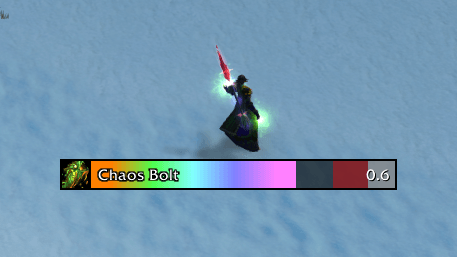
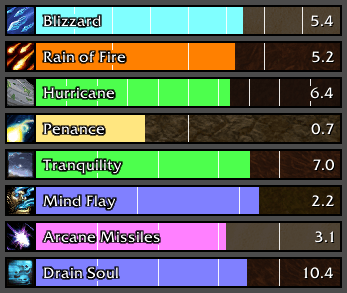
Every school at once. Multi-school spells get a gradient of all their schools’ colors.
Every school at once. Multi-school spells get a gradient of all their schools’ colors.

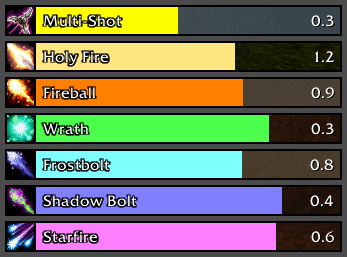
Each spell school has its own color: Physical, Holy, Fire, Nature, Frost, Shadow and Arcane.
Each spell school has its own color: Physical, Holy, Fire, Nature, Frost, Shadow and Arcane.

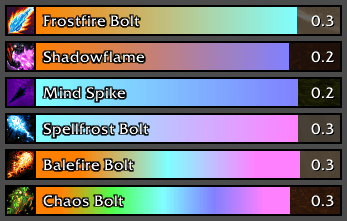
Spells with more than one school, like Frostfire Bolt or Shadowflame, blend their colors into a gradient.
Spells with more than one school, like Frostfire Bolt or Shadowflame, blend their colors into a gradient.

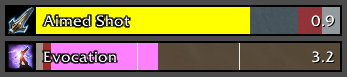
Channeled spells start full and drain, with a marker for each tick so you can see when the next one lands.
Channeled spells start full and drain, with a marker for each tick so you can see when the next one lands.

The end of each cast shows your spell queue window and your latency, so you know when to press the next spell. On channels the zones sit at the left end.
The end of each cast shows your spell queue window and your latency, so you know when to press the next spell. On channels the zones sit at the left end.

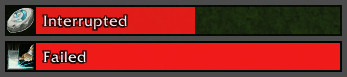
If a cast is interrupted or fails, the part already filled turns red and the bar fades out.
If a cast is interrupted or fails, the part already filled turns red and the bar fades out.

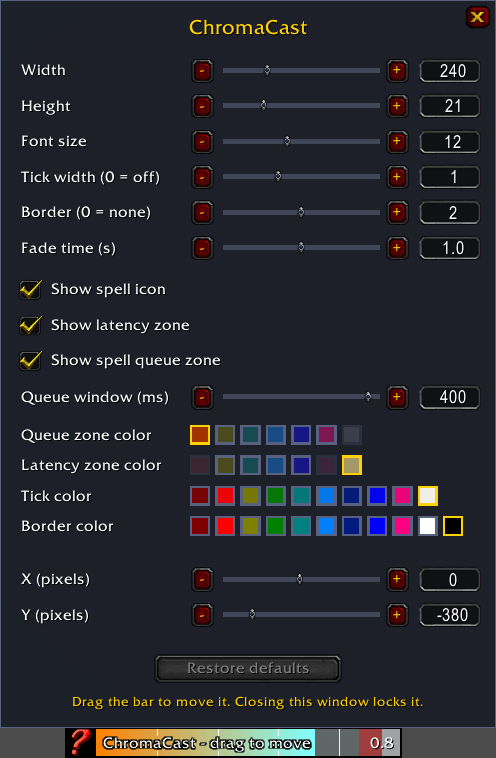
Size, font, ticks, border, fade time, zone and tick colors, the parts shown, and the bar’s position. Open it with /cc or the minimap button. Drag the bar to move it.

Size, font, ticks, border, fade time, zone and tick colors, the parts shown, and the bar’s position. Open it with /cc or the minimap button. Drag the bar to move it.

Description

ChromaCast

A cast bar that shows what you're casting at a glance: colored by spell school.

ChromaCast replaces the default player cast bar. Fire spells burn orange, Frost is icy blue, Shadow is purple, and so on. Spells of more than one school, like Frostfire Bolt or Shadowflame, get a gradient of their schools' colors.

Features

  • School colors for every spell school, with gradients for multi-school spells
  • Spell icon, name and time left
  • Channel ticks so you can see each tick of a channeled spell
  • Hunter shots: Aimed Shot and Multi-Shot (and Sniper Shot on WoW Forever) get a real cast bar from the moment you press the key, lasting as long as the shot really takes with your ranged haste. The game itself doesn’t show a cast bar for them.
  • Spell queue zone shows when you can press your next spell early, so it goes off as soon as the cast ends
  • Latency zone shows how much of the cast your connection takes up
  • Queue window slider changes the game's own Spell Queue Window setting right from the options
  • Interrupted / Failed: the bar turns red and shows the reason
  • Smooth fade-out after every cast, with adjustable length
  • Sharp at any UI scale: text and edges line up with your screen's pixels
  • Works on non-English clients

Options

Open the options with the minimap button, /cc or /chromacast.

  • Width, height, font size, tick width, border and fade time
  • Show or hide the spell icon, the queue zone and the latency zone
  • Colors for the queue zone, latency zone, ticks and border, all picked so they stay easy to tell apart from the school colors
  • Position: drag the bar while the options are open, or type exact X and Y values
  • Restore defaults (or /cc reset) puts everything back, including the game's spell queue window (400 ms)

Supported clients

  • Classic Era
  • WoW Forever

ChromaCast Team

profile avatar
Owner
  • 6
    Projects
  • 497
    Downloads

More from trovskView all

  • EnhancedTooltips project image

    EnhancedTooltips

    Tooltips that follow your cursor, with class, reaction and reputation colors, pet owners, Rare/Elite/Boss tags, Target/Targeted by/Cast by lines, buff/debuff type colors, spell coefficients and optional IDs. Classic Era and WoW Forever, any language.

    • 159
    • November 3, 2026
  • TrueColorPicker project image

    TrueColorPicker

    Adds R/G/B, hex and alpha entry boxes plus Copy, Paste, Class and Restore buttons to WoW's default color picker, inside the same window. Type exact values instead of dragging the wheel. For Classic Era / Season of Discovery 1.15.9.

    • 196
    • November 3, 2026
  • ClickCopyChat project image

    ClickCopyChat

    Click a chat line's timestamp or a web link to copy it, copy whole chat windows, short channel and group tags, flexible timestamps, a chat box that keeps focus, and sent messages kept after /reload. Classic Era, WoW Forever and Retail.

    • 17
    • November 3, 2026
  • NeatBags project image

    NeatBags

    A simple, unified bag and bank UI: live search, one-click stack merging, item level display, and optional auto-sell of grays and auto-repair — under a minute to set up, no other addons required.

    • 58
    • October 3, 2026
  • EnhancedTooltips project image

    EnhancedTooltips

    Tooltips that follow your cursor, with class, reaction and reputation colors, pet owners, Rare/Elite/Boss tags, Target/Targeted by/Cast by lines, buff/debuff type colors, spell coefficients and optional IDs. Classic Era and WoW Forever, any language.

    • 159
    • November 3, 2026
  • TrueColorPicker project image

    TrueColorPicker

    Adds R/G/B, hex and alpha entry boxes plus Copy, Paste, Class and Restore buttons to WoW's default color picker, inside the same window. Type exact values instead of dragging the wheel. For Classic Era / Season of Discovery 1.15.9.

    • 196
    • November 3, 2026
  • ClickCopyChat project image

    ClickCopyChat

    Click a chat line's timestamp or a web link to copy it, copy whole chat windows, short channel and group tags, flexible timestamps, a chat box that keeps focus, and sent messages kept after /reload. Classic Era, WoW Forever and Retail.

    • 17
    • November 3, 2026
  • NeatBags project image

    NeatBags

    A simple, unified bag and bank UI: live search, one-click stack merging, item level display, and optional auto-sell of grays and auto-repair — under a minute to set up, no other addons required.

    • 58
    • October 3, 2026