TrueColorPicker
- By
Adds R/G/B, hex and alpha entry boxes plus Copy, Paste, Class and Restore buttons to WoW's default color picker, inside the same window. Type exact values instead of dragging the wheel. For Classic Era / Season of Discovery 1.15.9.
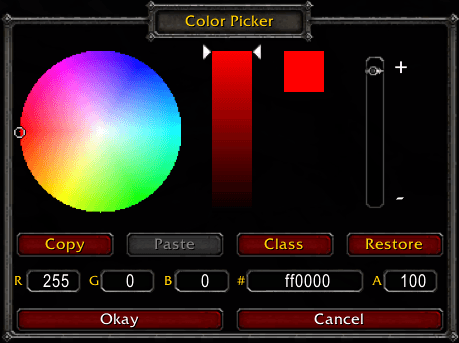
The default color picker with TrueColorPicker: exact R, G, B, hex and alpha boxes, plus Copy, Paste, Class and Restore buttons, all inside the same window.
Description
TrueColorPicker adds exact-value color entry to WoW's own color picker. Instead of replacing the picker with a different window, it keeps the default picker and adds a panel inside the same window, so it works wherever the game or another addon opens the standard color picker.
FEATURES
- R, G and B boxes (0-255)
- Hex box (6 digits, with or without a leading #)
- Alpha box (0-100), shown only when the picker was opened with opacity support
- Boxes follow the wheel and sliders live while you drag
- Copy / Paste: remember a color (and its alpha) and apply it later; Paste stays greyed out until you copy something
- Class: sets the color to your character's class color
- Restore: resets to the color the picker was opened with
- Hover any of the four buttons for a short description
- The picker opens in the middle of the screen and can be moved by dragging the "Color Picker" title box
- Okay / Cancel are widened to fill the window
- Chat and keybinds keep working while the picker is open
HOW TO USE
Open any color picker. Drag the wheel as usual, or click a box, type a value and press Enter, Tab or click away to apply it. Tab moves to the next box.
INSTALLATION
Unzip the TrueColorPicker folder into Interface\AddOns, then restart the game or /reload. There are no slash commands, no settings and no saved variables.
NOTES
- Built and tested on WoW Classic Era / Season of Discovery 1.15.9. Other versions have not been tested.
- The copied color is kept only until you log out or reload.
- The picker's position is not saved: it opens centered after every /reload, and dragging it only moves it for the current session.
The TrueColorPicker Team