promotional bannermobile promotional banner

Belphie's Quest Log

Stop fighting the default quest log. Replace it!
Main Quest Log

Main Quest Log

Quest Giver and Turn In Different NPCs

Quest Giver and Turn In Different NPCs

Different Zone Quest Giver Map

Different Zone Quest Giver Map

Side-by-side Blizzard Quest Log vs Belphie's Quest Log

Side-by-side Blizzard Quest Log vs Belphie's Quest Log

Description

Belphie’s Quest Log

Belphie's Quest Log is a complete overhaul of the default World of Warcraft quest log, built to deliver a cleaner, more modern, and fully customizable experience.

Instead of fighting against the limitations of the Blizzard UI, this addon replaces it entirely with a flexible system designed for clarity, control, and usability.


✨ A Better Way to Manage Your Quests

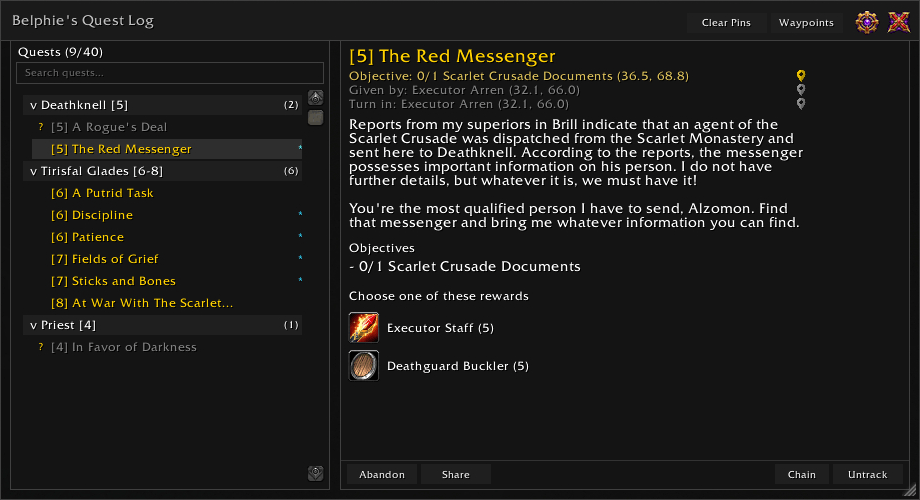
At its core, Belphie's Quest Log introduces a two-column layout that lets you browse quests and view full details at the same time.

  • Quest list on the left
  • Full quest details on the right
  • No more switching views or losing context

Everything is designed to make questing smoother and easier to manage.


🗺️ Know Where You're Going

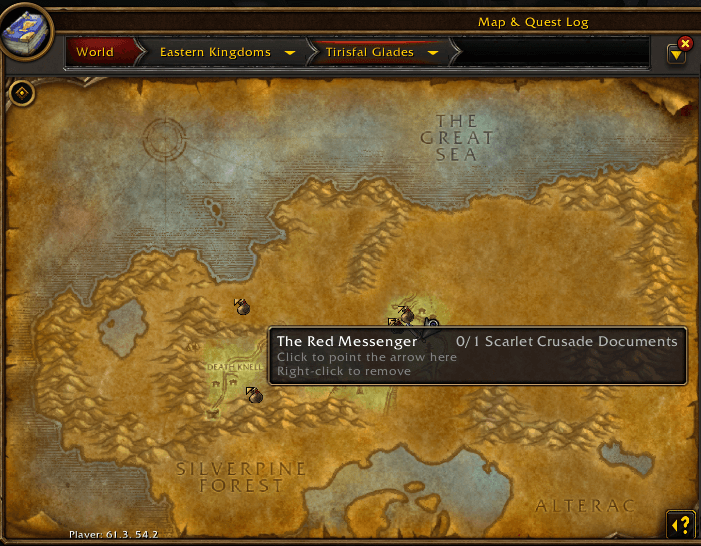
Belphie's Quest Log now shows you exactly who gave you a quest and where to turn it in — without ever leaving the quest log.

  • Quest giver name and coordinates displayed below the quest title
  • Turn-in NPC name and coordinates displayed below the giver
  • Click either to open an interactive map popup showing the NPC's exact location
  • Shift-click to set a TomTom waypoint directly (requires TomTom)

The interactive map popup is built entirely from the game's own map art — no external assets required.

  • Shows your current position on the map with a distance indicator
  • Accurate cross-zone distance calculation
  • Quest giver and turn-in use distinct icons so you always know what you're looking at
  • Draggable and closable with Escape

📍Smarter Quest List

The quest list has been completely overhauled to give you more information at a glance.

  • Zone headers group your quests by area with level ranges shown (e.g. Terokkar Forest [62-68])
  • Collapsible zone headers — click to collapse or expand any zone
  • Quest count shown per zone header (e.g. "(4)")
  • Search box for instant quest filtering — find any quest by name in seconds
  • Completed quests show a golden indicator so you always know what's ready to turn in
  • Group, Dungeon, and Heroic quest tags displayed inline
  • Quest tracking indicators visible at all times
  • See which party and raid members share your active quests
  • Right-click any quest to toggle tracking
  • Shift-click any quest to share the link in chat

📋 Smarter Quest Information

Quest details are presented in a clearer, more structured way:

  • Objectives displayed as individual rows with completion-based coloring
  • Improved reward layout with proper grouping
  • NPC tooltip enrichment — hover any NPC in the world to see which quests they give or finish, with In Progress, Turn In, and Available status tags
  • Item tooltip enrichment — hover any quest item to see which quest needs it and your current progress (e.g. 11/12), or whether it starts a quest you haven't picked up yet

You always know exactly what needs to be done and what you’ll get.


🔗 Quest Chain Visualiser

Never lose track of where you are in a quest chain again.

  • Click the Chain button in the detail panel to view your entire quest chain
  • Supports both linear chains and branching chains
  • Aldor/Scryer faction branches automatically filtered for your character
  • Alliance/Horde quest variants filtered by your race
  • Pin quest givers and turn-in NPCs directly from the chain view
  • Select any quest in the chain to jump straight to it in your log

See the whole story, not just the next step.


📊 Zone Completion Panel

Track how much of each zone you've actually done.

  • Completion progress bar and fraction for every TBC open world zone
  • Separate Dungeons & Raids tab with per-instance quest tracking
  • Shared quest pool indicator for instances that share quest data (e.g. Hellfire Citadel wings)
  • Powerful sort options — TBC progression order, completion %, alphabetical, most quests remaining
  • Filter options — hide completed zones, hide zero progress zones, hide individual zones, show only zones above or below a custom completion threshold
  • Floating mode (always visible) or docked mode (embedded in the detail panel)
  • Full colour customisation for bars and text

Find out what you've done — and what you've been avoiding.


🔖 Quest Browser

Click any zone in the ZCP to drill down into a full quest list showing:

  • Completion status for every quest in the zone
  • Difficulty-coloured level indicators relative to your character
  • Group, Dungeon, Raid, and Daily tags
  • Prerequisite lock indicators — see exactly which quest is blocking you
  • Click a locked quest to view its blocking quest chain
  • Click any available quest to set a waypoint to the quest giver
  • XP reward displayed for every quest
  • Hide Complete filter to focus on what's left to do

⏱️ XP Tracker

Stay on top of your levelling progress without leaving the quest log.

  • XP bar with rested overlay and fill animation
  • XP to next level shown directly on the bar
  • XP/hour and time to level calculated from your current session
  • Level time and session time tracked separately
  • Session XP gained shown in the header
  • Per-level XP and time history tracked across sessions and logins
  • Floating mode (always visible) or attached mode (docked to the quest list)
  • Auto-hides at max level (configurable)

Because "am I making progress?" shouldn't require a spreadsheet.


🔍 Powerful Sorting & Filtering

Quickly find what matters most:

  • Sort by level or alphabetical order
  • Hide completed quests
  • Show tracked quests only

The quest log stays focused and relevant, even with a full quest list.


🎨 Built for Customisation

This addon gives you full control over how your quest log looks and feels.

  • Adjust font sizes for every element independently
  • Customize colors across the entire UI - quest names, objectives, headers, bars, tooltips, chain visualiser, zone completion, XP tracker
  • Choose from three built-in themes — Dark, Darker, Gray
  • Resize and reposition the window to suit your layout

Whether you prefer a minimal UI or something more detailed, Belphie’s Quest Log adapts to you.


📦Built-in Quest Database

Belphie's Quest Log bundles the full Questie TBC quest and NPC database so it works completely standalone.

  • No Questie installation required
  • All quest giver and turn-in locations available out of the box
  • When Questie is installed, its runtime data is used automatically for the best accuracy
  • Covers all TBC Outland zones, instances, and Classic zones

🧱 Designed for Stability

Belphie’s Quest Log has been built with stability and consistency in mind:

  • Clean UI refresh handling
  • Safe color and configuration management
  • Improved /reload behavior
  • Careful separation of styling and logic systems

⚠️ Known Compatibility Note

A Lua error may occur when using Details! (or certain plugins such as Raid Check or Tiny Threat) while in a group and performing a /reload.

  • This does not occur with Belphie’s Quest Log alone
  • Functionality remains unaffected
  • The issue appears to originate from external addon interaction and is under investigation

🔗Optional Dependencies

  • TomTom — required for waypoint functionality
  • Questie — optional, BQL works fully without it

⌨️Slash Commands

  • /bql — toggle the quest log
  • /bql config — toggle the settings panel

🎯 Why Use Belphie’s Quest Log?

If you want your quest log to feel like part of a modern UI instead of a legacy system, this addon is built for you.

It’s clean, flexible, and designed to enhance the way you play without getting in your way.

The Belphie's Quest Log Team

profile avatar
Owner
  • 1
    Projects
  • 199
    Downloads