Belphie's Dialogue
- By
Replaces the windows NPCs open on WoW: Forever (gossip, quests, vendors and trainers) with one set you can move and restyle. One click hands a quest in with its dearest reward; buy any number at a vendor.
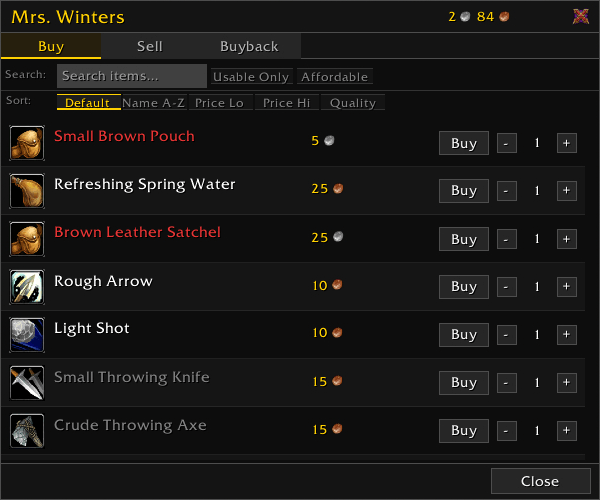
Buy, Sell and Buyback tabs, a search box, Usable Only and Affordable filters, and sorting by name, price or quality.
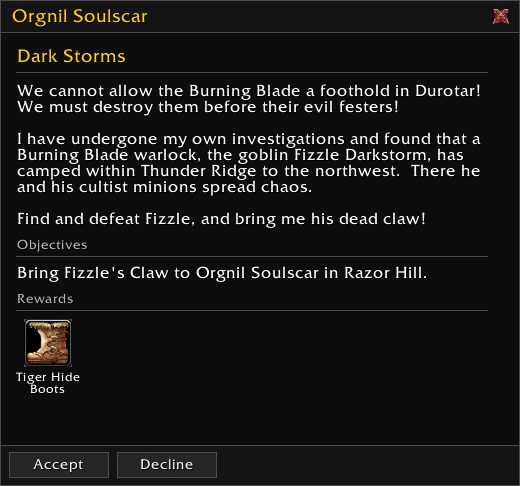
The story, objectives and rewards, with Accept and Decline: Orgnil Soulscar's Dark Storms.
Description
Belphie's Dialogue replaces the windows an NPC opens on WoW: Forever: gossip, quest offers, quest hand-ins, a quest giver's list of quests, vendors and trainers. They share one look, which you can change down to each window's fonts and colours, and each one can be dragged where you want it and stays there. Escape closes them.
What it changes
Quests
- Gossip, quest offer, quest hand-in and quest greeting windows in one consistent frame instead of four different ones, with an NPC's options laid out in columns when there are many.
- Take the marked reward in one click. When a quest offers a choice of rewards, a gold coin marks the one a vendor pays most for, and a Take marked button beside Complete Quest hands the quest in and takes it. Pointing at the button names the reward. A quest with one reward, or none a vendor buys, has no Take, and Complete Quest works as before.
- The biggest upgrade, marked. When one of a quest's reward choices is an upgrade for your spec, as BLib judges it, the biggest has a small green arrow in its top right corner, and Take marked takes that one instead of the dearest (pointing at Take says why).
/blib gearshows which spec your gear is judged for, and/blib gear spec <name>chooses it. - Quests accepted and handed in for you, if you want it. Two switches, both off until you turn them on (Quests > Automation): "Accept quests as they are offered" and "Hand in finished quests". The window still opens for a moment, and it is the window's own button that is pressed. Hold Shift as you talk to someone to do it yourself that time. A quest with rewards to choose between waits for you, and so does one that costs money and one another player is sharing. A quest that can be handed in again and again (Runecloth, Scourgestones) is never picked from an NPC's list for you.
- A mark on quests that are new to Forever, if you want it (off until you turn it on, Quests > Display): a small teal mark after the title of a quest vanilla did not have, in the quest windows and in an NPC's list of quests. With Belphie's Quest Log installed, the two addons agree on which quests those are.
- Quests the game accepts or starts for you are handled the way Blizzard's own window handles them, instead of opening a window you did not ask for.
Vendors
- Buy, Sell and Buyback tabs, with a search, Usable Only and Affordable filters, armour and weapon types, and sorting by name, price or quality.
- Buy any number. Click a row's number to type it, or Shift-click "+" or "-" to step a whole stack. An order of more than a stack is bought a stack at a time, and stops with one line in chat if your money or your bag space runs out first. Pointing at Buy shows what the lot comes to.
- The Sell tab lists every bag, the reagent bag too, and can leave out items that bind on equip and anything below the quality you choose.
- Junk sold when a vendor opens, once a visit (on as installed; Vendor > Selling).
- Repairs when a vendor opens, if you want it (off until you turn it on, Vendor > Selling): everything is repaired once at a vendor who repairs, and a line in chat says what it cost. Without enough money nothing is repaired and the line says what it would have cost. Hold Shift as you open the vendor to skip it that time. The window has a Repair All button as well.
Trainers
- Skills grouped by category, with a search, Available Only and Learn All. Available Only alone decides what is listed, whatever Blizzard's trainer window was set to, and Blizzard's settings are put back as you left them when the window closes.
The look
- Three themes (Dark, Darker, Gray), the background's opacity, and the font sizes and colours of each kind of window. A window fits its content, or keeps the size you set on the Window sizes page.
Every setting is in one window: /bdl, Settings on its row in the Addon Launcher (/blib, or BLib's button on the
minimap), or Options > AddOns > Belphie's Dialogue. A word typed in the search at the top of the launcher finds any
of them, and a click opens the window on that page.
Built for the content Forever is made of
A vanilla NPC whose only business is handing out quests opens the conversation with a quest greeting, which modern clients barely use: nearly everything there arrives as gossip. An addon made for those clients can miss it, and you would never notice on retail; on Forever you meet it at your first quest hub, as an NPC who greets you and shows no window. Belphie's Dialogue handles it.
Commands
| Command | |
|---|---|
/bdl |
the settings window |
/bdl reset |
every setting back to how it was installed |
Requirements
BLib, which the CurseForge app installs with it; keep it updated alongside this addon.
Version support
Built for WoW: Forever, and used on its beta until the beta closed on 24 October. There is no Forever client between then and launch, so 1.7.0 was tested on retail (12.1.5). Seen working there: Take marked, handing a quest in with the reward the gold coin marks. Not seen yet: the green arrow on an upgrade, because no quest on retail offered a choice of rewards that was one; it will be looked at on Forever at launch. 1.7.0's change to Complete Quest, which now waits for the game's answer, was tested on the Forever beta. TBC Anniversary is no longer a development target.
Belphie's Dialogue Team