Countinghouse
- By
An auction house window of its own for WoW: Forever, with full scans in seconds, a month of market prices, search by stats, one-press buying and selling, your sales tracked, and the cheapest way to fill a Waylaid Crate.
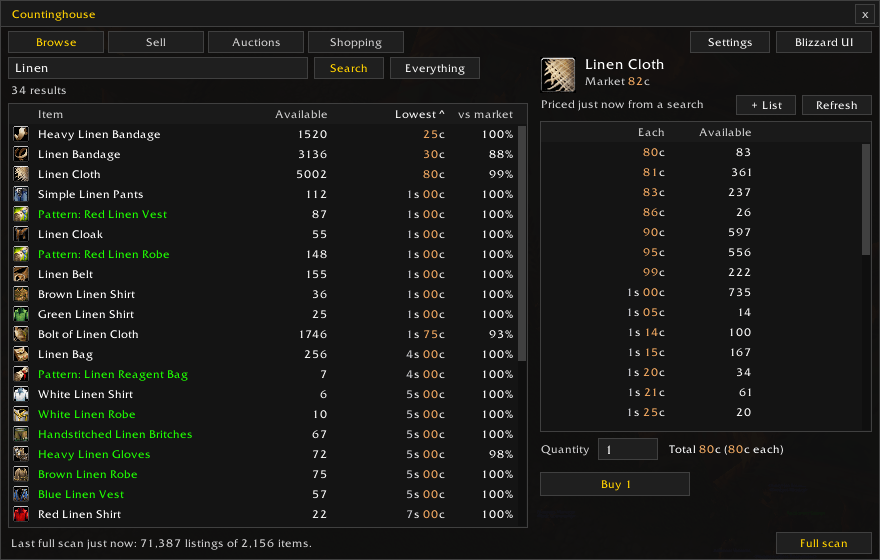
Search the auction house and pick an item to see every price it is listed at, with the market price, how far each result is from market, and a Buy button for the quantity you want.
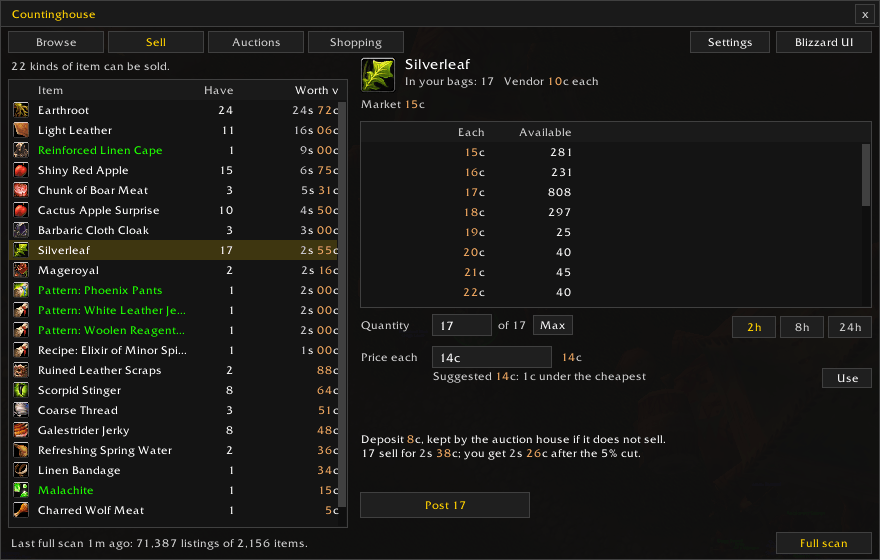
Pick something from your bags and Countinghouse suggests a price just under the cheapest, never below what a vendor pays, and shows the deposit and what you get after the auction house's cut.
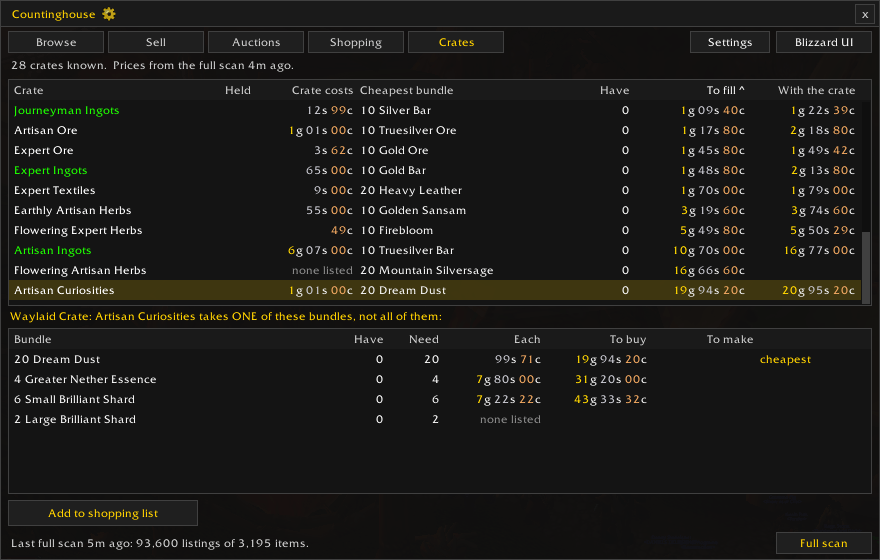
Every crate you carry and every crate for sale, with what each bundle would cost at today's prices and the cheapest marked. A crate takes one bundle, so the cheap one is all you need.
Description
Forever has the modern auction house: search one item at a time, and a price is whatever the first page shows you. Countinghouse reads the whole house at once and remembers it.
Talk to an auctioneer and Countinghouse's window opens in place of Blizzard's. Blizzard's stays open out of sight behind it, so the auction house itself behaves exactly as it always does, and one button swaps back to it for the rest of the visit.
What it does
- Scans the whole auction house when you open it, if the last scan is more than 20 minutes old: about 79,000 listings of 2,100 items on the beta realm, in around 20 seconds.
- Market prices that one silly listing cannot drag around. The average of the cheapest 15% of what is listed, leaving out an item dumped far below everyone else or parked far above. Kept per realm and faction, with 30 days of history, and shown on item tooltips. Hold Shift over an item for the history: its lowest, highest and average price over the days recorded, whether it is up or down, and how many were listed. Pick an item on the Browse tab and its History view draws the last 30 days as a chart, a column a day.
- Browse and buy. Search, see each item's cheapest listing against its market price, and buy. Stackable goods are bought by quantity in one press; if the price rose by more than 5% while you looked, it waits for a second press so you see the new price first.
- Sell. Everything in your bags the auction house will take, with a suggested price just under the cheapest other seller, the deposit, and what you get after the auction house's cut. Right-click an item in your bags to open it there.
- Your auctions, each marked cheapest, tied or undercut and by how much, with "Cancel next undercut" to take them down one press at a time. Your bids are on their own page.
- What became of your auctions. A Results view on the Auctions tab lists, item by item, how many you posted, how many sold, expired or were cancelled, the share that cleared, how long a sale took, and what it brought in after the auction house's cut. Each auction is followed from the moment you list it, and your mailbox fills in what ended while you were away.
- Shopping lists with a quantity and the most you will pay, bought one "Buy next" press at a time. Anything waiting in your mailbox counts toward the list. With Forgemaster installed, one button turns your crafting plan's shopping list into a Countinghouse list.
- Waylaid Crates, filled the cheapest way. A crate takes any one bundle from a short list, and the bundles can differ a hundredfold in price. The Crates tab lists every crate you are carrying and every crate for sale, costs each bundle at auction prices less what you already hold, and marks the cheapest. One button puts what is missing on a shopping list. What a crate takes is read from the crate's own tooltip, so nothing goes out of date after a patch, and a crate's tooltip names its cheapest bundle wherever you see one.
- Settings for every character or for one, and kept in BLib's profiles, so a setup can be saved, moved to another computer or shared.
Finding things
The Browse tab's Filters panel, and short terms typed in the search box:
- Stats: tick Strength and Stamina (or any others, with a minimum if you like) and see only items that have them all. Random-suffix items count with their real stats, so "of the Bear" gear turns up in a Strength and Stamina search.
- Suffix and role: "of the Owl" alone, or a role such as Tank or Healer for items with any of its stats. A Stats column shows each item's bonuses, and results can be sorted by stats per gold.
- Everything else: Blizzard's categories, rarity, required level and item level, price, bargains against the market price, armor type and slot, usable or upgrades only, and recipes you already know left out.
- Typed terms:
str sta,bear,lvl 20-30,ilvl 30+,<5g,rare+,plate chest,healer,bargain. Other words search the name. - Your last full scan can be searched instead of the live auction house: instantly, and away from the auctioneer, to plan what to buy.
- Saved and recent searches, and Alt-click a result for items with the same stats.
- A search that was not read to its end says so. Countinghouse reads about the first 15,500 results of one search; when more are listed, the count line tells you to narrow it, where a part of the list would otherwise pass for the whole.
One press, one action
Forever lets no addon buy, bid, post or cancel on its own: each needs a key press or a click behind it. So Countinghouse never does any of them by itself. Every purchase, post and cancel is one press of a button in its window, and the only thing it finishes unasked is confirming a price you have already seen.
Prices, and what Forever takes
- Gear and other single items are posted in whole silver; the auction house refuses anything else, whatever the client says. Countinghouse undercuts them by a silver (you can change that).
- Stackable goods take copper, and sell cheapest first, so Countinghouse undercuts them by a single copper.
- The full scan does not say who is selling what. Searching an item does, so your own listings are left out of the undercut checks.
Commands
| Command | |
|---|---|
/ch |
the window (at an auctioneer) |
/ch config |
settings |
/ch scan |
a full scan now |
/ch blizzard |
Blizzard's window for this visit |
/ch price <item link> |
what Countinghouse knows about an item, and its price day by day |
/ch results |
what became of your own auctions |
/ch crates |
the cheapest way to fill each crate it knows of |
/ch status |
how many prices are kept, and the last scan |
Requirements
BLib 1.10.0 or later, which the launcher should fetch alongside this addon.
Version support
Built for and used on WoW: Forever. Not tested on retail.
Countinghouse Team