Dynamic Nutrition
Dynamic Nutrition adds five nutrients to the game: carbohydrates, protein, fat, vitamins and
minerals. Hunger tells you how long it has been since you ate, and the nutrients tell you what you
ate. Every food fills them by different amounts, based on real nutritional data, and each one drains
at its own rate. Keep a nutrient high and it gives you an effect; let it run low and it gives you a
penalty instead.
Nutrients
The values come from real per-100g composition rather than from a category label, so a carrot is
worth far more vitamins than cooked beef, and cooked beef far more protein than a carrot. Vegetables
are low in carbohydrates, protein and fat and high in vitamins and minerals, as they are in real food.
Each nutrient drains at its own speed. Carbohydrates go fastest, while fat, which the body stores,
barely moves.
Variety
Eating the same food again is worth less. Of your last eight meals, every repeat of a food after the
first lowers its value, down to a floor it never goes below. A rotation of eight or more foods loses
nothing, three foods lose about a third, and a single food eaten every time stays at the floor.
Variety changes nutrition only and never hunger, so hunger works the same as without the mod.
Effects
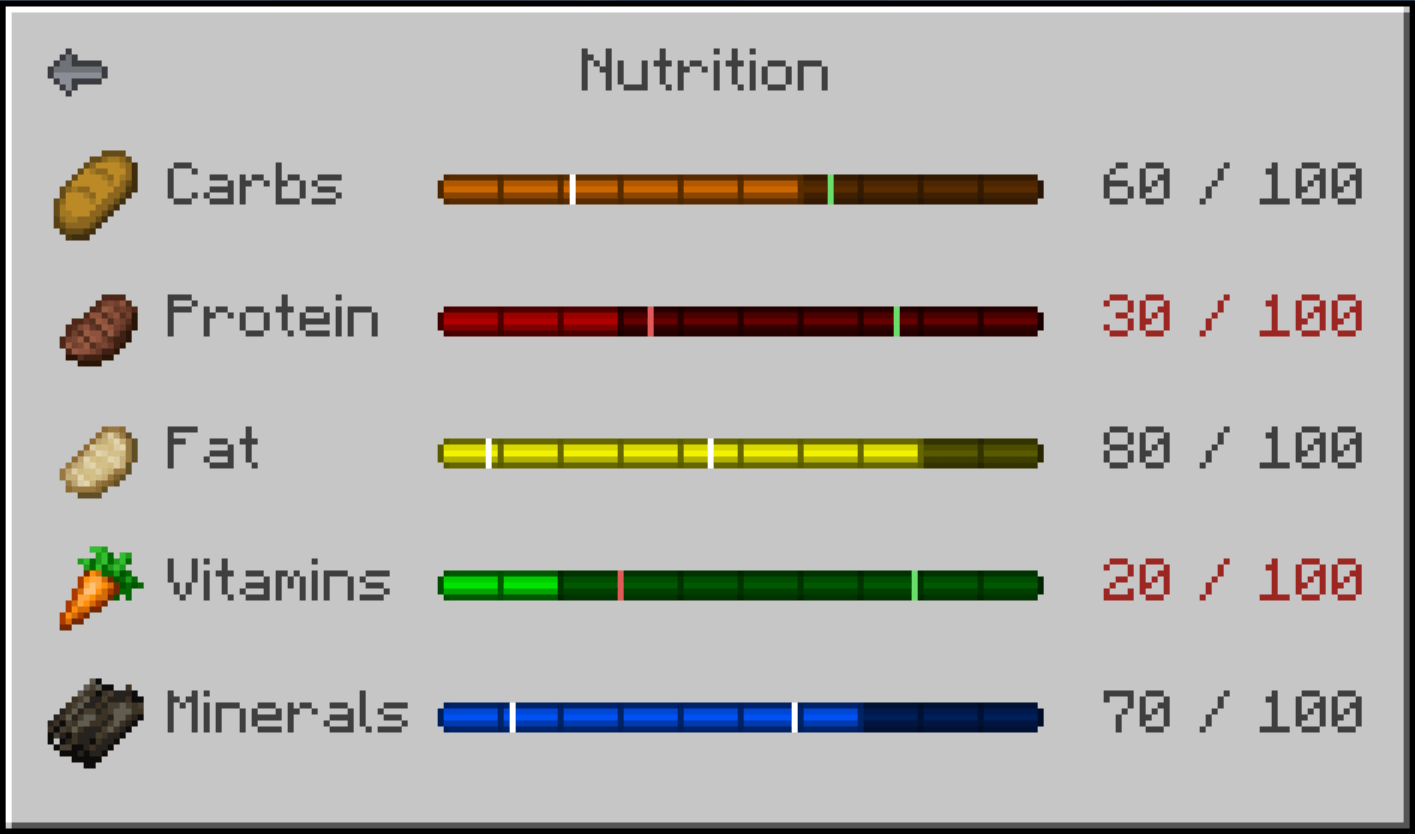
Above its green line, each nutrient gives an effect: Speed for carbohydrates, Strength for protein,
Resistance for fat, Regeneration for vitamins and Haste for minerals. Below its red line it gives
Slowness, Weakness, Hunger, Blindness or Mining Fatigue instead. All ten work at half the vanilla
strength by default, and each one has its own setting from 0 to 100%.
They appear as two icons rather than ten. Every buff your diet earns is grouped under Well Nourished
and every penalty under Malnourished, and both show at once when one nutrient is high and another is
low. Hover either icon beside your inventory to see which effects it stands for, each in the colour
of its nutrient. A potion or beacon that gives the same effect keeps its own icon, so no effect is
shown twice. Milk does not clear them, because the cure for a deficiency is food.
The two lines are different for each nutrient and follow how the body stores it. Fat has months of
reserve and a real deficiency is rare, so its red line is low. Protein has no store at all, and the
vitamin deficiencies are the ones with names. Both lines are marked on every bar, and a mark turns
white once you are past it.
On screen
- Press N, or click the small button in your inventory, to open the nutrition screen. The key
always works, so if the button overlaps another mod's button you can turn it off in the settings
- A strip beside the hunger bar shows all five nutrients. Each section is ten pixels wide, and
one pixel is ten points. It sits above the other bars in that column, so a bar from another mod
keeps its place and the strip moves up. Tested with Tough As Nails, Iron's Spells 'n Spellbooks, Thirst Was Taken, Legendary Survival Overhaul,
Survive, AsteorBar, ParCool, Cold Sweat and Dehydration, on the loaders and versions listed in the
changelog
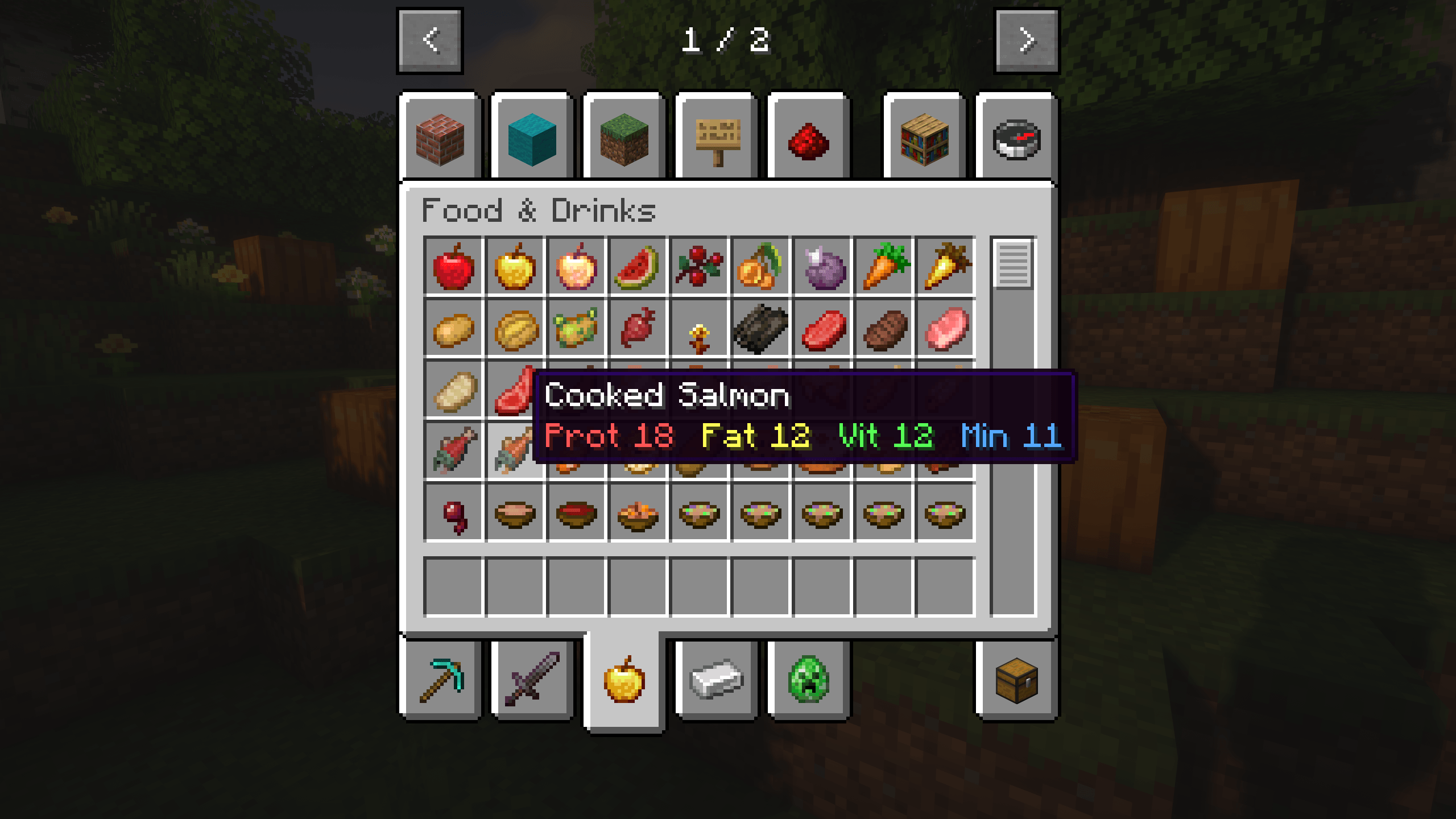
- Food tooltips show what a food is worth to you right now, including any reduction for
repeats. With advanced tooltips on (F3 and H) they also show where the values came from
Food from other mods
Foods the mod has no data for get their values worked out automatically, in stages. Data written for
the food comes first, including base values for common modded ingredients such as flour, butter,
cheese and tofu, then item tags, then the recipe, so bread counts as a carbohydrate because wheat
does, even through ingredients that cannot be eaten on their own. A dish takes the mix of its
ingredients in proportion, so fried rice is mostly carbohydrates, and its size follows its hunger
value. After that come the food and
drink tags, including the ones mods add for their own foods. Then a food served another way, such as
a stew in a cup or a serving from a feast, takes the values of the food it comes from. Last, the
food's own name is read, so spider meat counts as meat.
In 18 test packs with about 280 food mods on 1.20.1 and 1.21.1 (30,668 foods), 97.6% of the foods
got values this way; on NeoForge 26.2 (28 food mods) 99.5%, and on 26.1.2 (45 food mods) 98.5%. Writing values by hand for every mod's food is close to impossible: there are
thousands of modded foods, they change from one version to the next, and many are fantasy foods with
no real counterpart, so it would take hundreds of hours and still fall behind. Working the values out
automatically is what covers the most foods as accurately as possible, and the algorithm will keep
improving in future versions.
If a food gets no values, or values that look wrong, please report it on the issue tracker. I am
actively looking for edge cases like these. /dynamicnutrition unassigned lists every food that has
no values in your game.
For modpack authors
/dynamicnutrition export (operators only) writes the whole table of values to a CSV, with where
each value came from, so you can check the balance of your own pack in a spreadsheet. A second file
lists the ingredients each value was derived from.
Languages
English, Chinese (Simplified), Russian, Portuguese (Brazil), Spanish, German, French, Japanese and
Korean. The translations are machine-assisted; corrections are welcome on the issue tracker.
Settings
Cloth Config gives the mod a settings screen in four tabs: the strip beside the hunger bar, the
inventory button and tooltips, variety, and the nutrient effects, where each of the ten has its own
strength and either icon can be hidden. Where Cloth Config is optional, the mod runs on its default
settings without it.
Supported versions
| Minecraft |
Fabric |
NeoForge |
Forge |
| 26.1 to 26.3 |
Yes |
Yes |
n/a |
| 1.21.11 |
Yes |
Yes |
Yes |
| 1.21 to 1.21.1 |
Yes |
Yes |
Yes |
| 1.20 to 1.20.1 |
Yes |
1.20.1 |
Yes |
There is one file per loader, and it picks the right build for the version it is installed on. On
NeoForge 1.20.1 the NeoForge file runs the Forge build, which NeoForge supports at that version.
Every loader was tested in game on 1.20.1, 1.21.1 and 1.21.11, and Fabric and NeoForge also on
26.1.2, 26.2 and 26.3.
Dependencies
| Mod |
Fabric |
NeoForge |
Forge |
| Fabric API |
Required |
n/a |
n/a |
| Cloth Config |
Required on 1.21.x, optional otherwise |
Required on 1.21.x, optional otherwise |
Required on 1.21 and 1.21.1, optional on 1.20.x |
| Cloth Config API Forge |
n/a |
n/a |
Required on 1.21.11 |
| Mod Menu |
Optional |
n/a |
n/a |
On Forge 1.21.11, Cloth Config has no Forge build, so the settings screen comes from Cloth Config API
Forge, a separate project. Because one Forge file covers versions that need different ones, both are
listed as optional on the Forge file; install the one for your version.
Credits
Several of the interface textures are derived from Minecraft's own and remain Mojang's property.
An original mod, written from scratch. Not a fork or a port.