Balance Kit
- By
Scales mob and player health, damage and movement speed, plus player attack speed and underwater air time, from one config file.
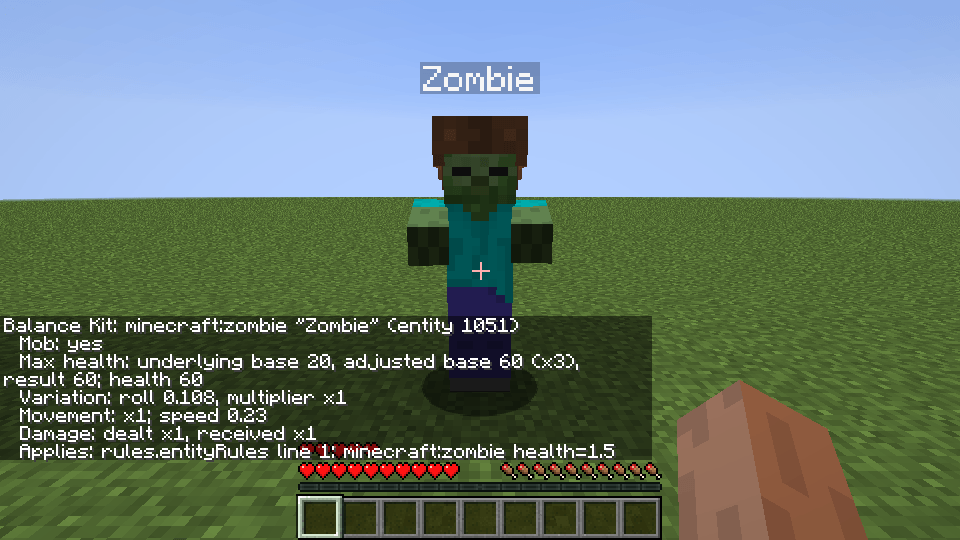
/balancekit inspect on a zombie with mobs.health=2.0 and the rule minecraft:zombie health=1.5: base health 20 becomes 60, and the report names the rule that applied.
Description
Balance Kit scales the health, damage and movement speed of mobs and players, player attack speed and how long a player's air lasts underwater, all from one config file. With the default settings it changes nothing.
AI usage disclaimer: This mod was developed with AI-agent assistance using this agent workflow. The project owner reviewed the work during development.
Settings
All settings are in config/balancekit.cfg, grouped by section. 1.0 means no change. Each setting in the file has a comment with its default and allowed values, and the README lists every key. An invalid entry, or an entity ID from a mod that is not installed, is skipped with a warning in the log. Restart the game or server to apply changes.
Mobs
Every non-player creature counts as a mob: hostile, peaceful, water and ambient mobs, villagers, golems, tamed pets, bosses, and modded creatures.
- Max health:
mobs.health=2.0doubles every mob's max health. A mob keeps its share of health when the value changes, so a mob at half health stays at half health. Max health never goes above the game's cap of 1024. - Damage dealt and received:
mobs.damageDealtandmobs.damageReceivedscale the damage mobs deal and take, before armor. - Movement speed:
mobs.movementSpeedscales how fast mobs walk. This includes horses you ride. Flying and swimming mobs, and some modded mobs with their own movement, can keep their normal speed. - Health variation: set
mobs.variationLowerandmobs.variationUpper, for example 0.8 and 1.2, and each mob gets a random max health multiplier between those values, on top ofmobs.health. A mob keeps its place in that range for its whole life.
Health and speed bonuses from effects, equipment and other mods still apply on top of Balance Kit's change.
Rules for specific mobs
An entity rule changes one mob type, or a variant of it chosen with an NBT condition in /summon syntax. Add rules to rules.entityRules, one per line. They multiply with the global values:
minecraft:zombie {IsBaby:1b} health=1.5 dealt=0.5
minecraft:wither received=0.5
minecraft:spider movement=1.3
A mob's NBT conditions are checked once, when it first appears. A new or edited NBT condition does not match mobs that already exist, and a mob that changes later, for example a baby that grows up, keeps its first result.
Blocklists in the blocklists section let a mob skip one kind of change: health, damage, movement or variation, one entity ID per line, with an optional NBT condition. The damage blocklist skips only the mob's own damage multipliers; a player's damage multiplier still applies to hits on it.
Players
- Base health: turn on
player.baseHealthEnabledand setplayer.baseHealth, for example 30 for fifteen hearts. Health Boost, equipment and other mods still change it from there. - Damage dealt and received:
player.damageDealtandplayer.damageReceivedscale damage before armor. The void and/killare never scaled. In PvP, both players' multipliers apply. - Movement speed:
player.movementSpeedscales walking speed. - Attack speed:
player.attackSpeed=2.0halves the time a swing takes to recharge, and the attack indicator follows it. Bows are not affected. - Breathing:
player.breathingDuration=2.0makes air last twice as long underwater. Respiration still adds its bonus. The breathing setting does not change Water Breathing or drowning damage; drowning damage still usesplayer.damageReceived.
Fake players used by automation mods get no player multipliers.
Damage sources
A player's arrows, TNT and thorns count as that player's damage, so the player's damage multiplier applies to them. Spells and summoned minions count the same way when their mod names the player as the attacker, as Electroblob's Wizardry does. A creeper explosion, a skeleton's arrow or a tamed wolf's bite counts as the mob's damage. Burning, poison and wither left after a hit count as no one's damage, so only the victim's multiplier applies.
To keep some damage unscaled, list its damage type name in damage.excludedDamageTypes, for example fall. Turn on diagnostics.logDamageTypes to see the names, including modded ones, in the server log.
Checking the numbers
/balancekit inspect shows what Balance Kit did to the mob you look at, or to a player or mob you name: its base and resulting max health, its multipliers, and which rules and blocklists apply. Operators and the server console can use it.
Scaling Health
With Scaling Health installed, both mods' health changes stack. Scaling Health leaves extra health and damage on saved players and mobs when it is removed from a pack. Set compat.removeScalingHealthModifiers=true to remove those leftovers; a mob keeps its share of health. The option does nothing while Scaling Health is installed.
Other mods
Tested together with Balance Kit:
- Spartan Weaponry and Better Spartan Archery: a longsword, crossbow bolts and longbow arrows count as the player's damage.
- RLCombat: hits are scaled, and
player.attackSpeedapplies to the main hand. - Aqua Acrobatics:
player.breathingDurationworks the same.
Installation
Install Balance Kit on the server. Players can join without it, and clients may also install it. In single player, install it normally. It also runs on Cleanroom 0.7.14-alpha.
Balance Kit saves only a small record of its own on each mob and player: whether it has been balanced and its share of health, and for mobs also its variation roll and which NBT conditions it matched. The stat changes themselves are not saved. A changed value applies the next time a mob or player loads. Without the mod, they return to normal.
Source: GitHub
Balance Kit Team