Vesper
- By
What is worth doing tonight for what you play for, and when you are done for the week.
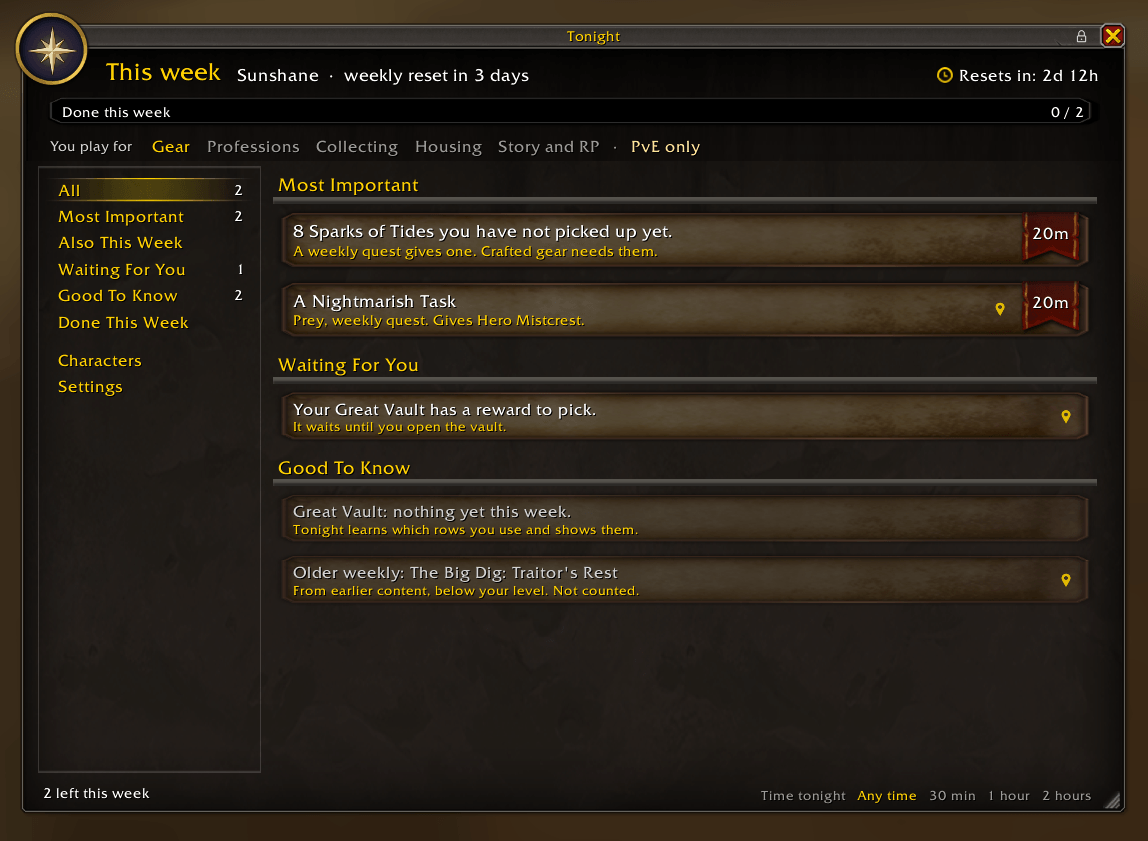
What is worth doing tonight, most important first, with what waits for you and what is good to know.
Description
Vesper answers two questions when you log in: what is worth doing tonight, and are you done for the week? It only shows what you play for, and only the parts you actually do. When nothing important is left, it says so.
What you see
- Most important: what runs out at the weekly reset and matters most. The Spark of Tides you have not picked up yet, the Great Vault rows you use, weekly quests that pay the season's currencies, profession weeklies and your neighborhood endeavor.
- Also this week: the other weekly quests, housing weeklies too.
- Waiting for you: a vault reward to pick, quests ready to hand in, knowledge points to spend, Community Coupons, and the same for your other characters.
- Good to know: renown close to its next level, favor to your next house level, room for more decor and the campaign. None of it runs out.
- When it is all done: You are done for the week.
Quests from older content, well below your level, are moved down to Good to know and are not counted.
What you play for
Right under the bar sits a row with your goals: Gear, Professions, Collecting, Housing, Story and RP, and PvE, PvP or both. Gold means on. Click a word to switch it, and the list changes at once. The first time, Vesper picks them from what your character does. Someone who plays for housing and roleplay never sees the Great Vault.
It learns what you do
A Great Vault row only shows up if you have used it in the last four weeks. A weekly quest you did last week comes back as "Pick up again", in case it is offered again.
Showing the way
Click a row with a pin. Quests get tracked, places get a pin on your map, and an arrow leads you there, a bit like TomTom. The arrow is the star itself: it stands in a gold ring, and a small arrowhead runs round the ring toward where you are going. It turns smoothly as you turn, and under it you see what to do there, the way the game words it: "Enter the Wizard's Sanctum". Pick a quest in the objectives on the right, or a flight path, a delve, an event, a rare or a treasure on the map, and the arrow follows that one instead. At the quest the arrow fades out, and it comes back when you walk away. Vesper learns where a weekly quest is given and where your Great Vault stands the first time you are there. Hold Shift and click a quest to open the map at it. Housing rows open the housing window. Click a row with the right mouse button to set it aside for the week.
A star nearby
When you are close to something worth doing, a small gold star lights up where the arrow sits. Click it and Vesper opens with that task marked, and the arrow takes you there. It goes out after a while, and lights up again the next time you come by.
Your characters
One line each: a vault reward waiting, knowledge to spend, or nothing important. A character is updated when you log in on it.
Good to know
- Vesper only reads what the game already shows you. It sends nothing and never accepts, hands in or clicks anything for you.
- Time to play, at the bottom of the window, shows only what fits in 30 minutes, an hour or two hours, most important first.
- The settings are inside the window. You can pick a key of your own that opens and closes Vesper, and Escape closes it like the game's own windows.
- Quests under a collapsed header in your quest log are hidden from addons.
- The arrow cannot work in dungeons, raids and delves, where the game hides your position. Turn it off in the settings if you use TomTom.
- Type /vesper to open the window.
Vesper Team