Postmark
- By
A new mailbox that collects everything in one click, shows auction receipts at a glance and sends to your own characters without typing a name.
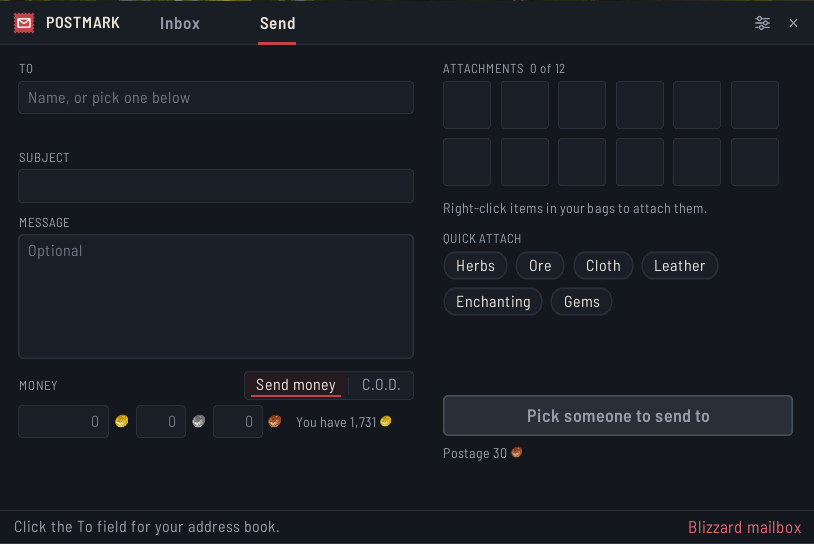
Your characters, friends and guild on the To field, a subject that fills itself in, twelve slots, Quick attach and a Send button that says what it will do.
Description
Postmark
Postmark is a new mailbox for World of Warcraft. It takes the place of the game's mailbox window with one that collects everything in one click, shows auction receipts at a glance and sends to your own characters without typing a name. It is made as a tribute to Postal and covers everything Postal did, in one clean window. Everything happens on your click: Postmark never opens, takes or sends anything on its own.
The inbox
Your mail is sorted into three groups: Auction House, Players and Blizzard. Chips on top filter by kind, Sold, Pending, Won, Outbid, Expired, Cancelled, From players and Returned, and each chip shows how many mails it holds and the gold waiting in them. The search field finds a mail by sender, subject or item name.
Every row shows the first item in its rarity colour, the sender, the gold and the days left. The day box turns yellow and then red near the end, and a small icon tells you what happens then: an arrow when the mail goes back to the sender, a bin when it is deleted. Hover a mail to see every item in it in its rarity colour, the gold or cash on delivery, and when it runs out.
Collect all
One button takes all the gold and items, one piece at a time with a short pause, the same way the game's own Open All button does. It always leaves cash on delivery and mail from Blizzard for you, stops taking items when your bags are full but still takes the gold, and tells you what it collected when it is done. Pick a chip or search first and Collect takes only those. You can keep a few bag slots free in the settings.
Reading a mail
A sold auction shows its receipt right away: the sale price, the Auction House cut, the deposit you get back and what you receive. A mail is only marked as read when you click it. Take, Reply, Forward, Return and Delete sit under the mail and only show when they can be used. Cash on delivery asks twice before it pays, and a mail with something still in it asks twice before it is deleted.
Forward starts a new mail with the text and the items that do not stack, so you only pick who gets it. Copy shows the whole mail as plain text, ready to paste anywhere.
Many at once
Tick the boxes on the left to take or return a whole set of mails together. Shift click a mail to take everything in it, and Ctrl click a mail from a player to send it back.
Sending
Click the To field and your address book opens: your own characters in their class colours, your friends, your guild and the people you wrote to lately. The subject fills itself in from the gold or the first item until you write your own, and the Send button says on its second line exactly what will happen, like 500g to Thandrel. Gold always goes through the game's own confirmation. Send money and C.O.D. share one switch.
Quick attach puts all your herbs, ore, cloth, leather, enchanting materials or gems in the mail with one click. In your bags, Alt click an item to attach it, or to send it straight away when it is the only thing in the mail and someone is picked. Ctrl click attaches every stack of the same item.
Your other characters
The game only ever tells a character about its own mailbox, so Postmark writes down what each of yours had the last time it stood at one. A line in the bottom corner then says how many characters have mail waiting, and turns yellow when one of them is running out of time. Open it for the list: how many mails, how much gold, and how long the first one has left. A click on a name starts a mail to that character.
You can open the list anywhere with /postmark mail, or from a minimap button that you turn on in the settings.
Good to know
- The Blizzard mailbox link in the bottom right corner opens the game's own window for that visit, and a Postmark button in its title bar takes you back. The next mailbox you open is Postmark again.
- Trades are blocked while you stand at the mailbox, and the game's setting goes back to how it was when you leave. You can turn this off.
- Settings are under Options > AddOns > Postmark, and /postmark opens them. You can switch back to the game's mailbox there.
- Items that are cosmetic wear the same corner mark as in the game's own mailbox, and every item keeps its rarity colour.
- With a bag addon like Baganator, use its own setting to open your bags at the mailbox.
- Only Blizzard's public addon API, no libraries. The font is Inter, under the SIL Open Font License.
- Still early: feedback is welcome in the comments.
The Postmark Team