Scene
- By
Cuts the noise of local chat and lets you follow individual scenes: the people you are talking to in their own tabs, with search, memories and alerts.
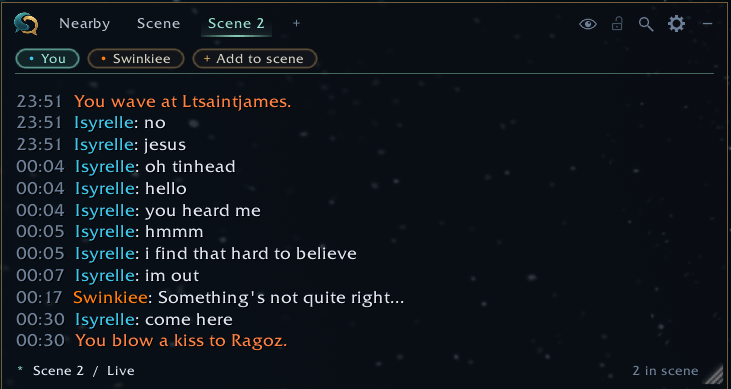
A scene: only the people you are talking to, in their own tab, with participants as pills under the tabs.
Description
Scene
Scene is a chat window for roleplay. It splits local chat into Nearby, where everything shows, and scenes, where you only see the people you're actually playing with.
It only shows chat your game already receives, so people still need to be in range. It never sends anything unless you type it yourself.
Getting started
- Click the + in the Scene window to make a scene.
- Click a name in the chat and pick your scene. Do the same for everyone you're playing with.
- That tab now only shows them and you. Everyone else stays in Nearby.
What's in it
Nearby. All /say, emotes and yells. Names in class colours or Total RP 3 colours, OOC lines dimmed, dice rolls and drunk lines if you want them. Party and raid chat can be turned on.
Scenes. One tab per conversation, as many as you like. Right-click a tab to rename, share or delete it. Click someone's name under the tabs to show only them for a while.
Scene Link. Share a scene with friends who also run Scene, and the list of people stays the same for all of you. Only names are sent, never chat.
Quick Look. Target someone, or hover their name, and see their last lines in a small box.
Eyes on you. See who has you targeted and who has looked at you lately. Can be its own window, with a sound. Needs friendly nameplates on.
Notes. Write what your character knows about someone, and what you know OOC. It shows in their tooltip.
Whispers. Whispers get their own view in Scene or their own small window, with a list of conversations, search and pinning. Battle.net whispers too.
History. Everything Scene has heard lately, a day at a time, under Options. Search it and copy it as text.
Memories. Scene keeps your evenings by itself. Next time you play with the same people it shows what happened last time. Copy an evening as text or for Discord.
Alerts. A sound when someone says your name or your Total RP 3 name, and if you want, when your target posts. It can flash the taskbar too.
Scene Score. Music from the game's own soundtrack for your scene: taverns, forests, cities. Off by default.
Map scan. Uses Total RP 3 to list who's on a whole continent and where people are roleplaying. Off by default.
Good to know
- Works in Midnight and WoW Forever.
- English, German, French, Spanish and Simplified Chinese.
- Respects Blizzard's chat restrictions in dungeons, raids and PvP.
- History, notes and memories stay on your computer.
- Music, map scan and most extras start off. Settings are under Options > AddOns > Scene, with a search box.
- Click the Scene logo for What's new.
- Also from me: Scene Stage (emote wheel) and Scene Cast (who's around you).
Feedback and ideas are welcome in the comments. A lot of what's in Scene came from there.
Scene Team