Scene Stage
- By
Your emotes close at hand: a wheel for your favourites, a box for everything else, and emotes in your own words.
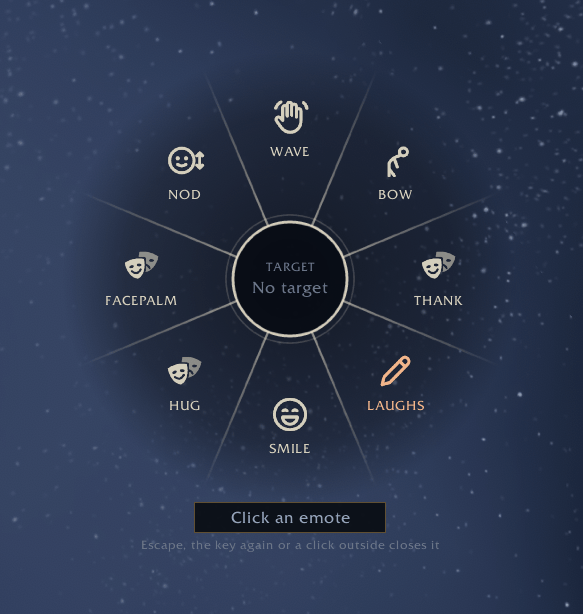
Press your key and the wheel opens at the mouse. Click an emote to perform it.
Description
Scene Stage
Scene Stage is made for roleplayers who want their emotes close at hand. Press a key and a wheel with your favourite emotes opens where your mouse is, click one and your character does it. Everything else lives in a small box with search, groups and emotes in your own words. It belongs to the Scene family, looks and fades like Scene, and works just as well on its own. It only ever sends the emote you choose.
The wheel
Pick a key in the settings, press it, and the wheel opens at the mouse with eight emotes. Click the one you want. If you would rather hold the key, switch the wheel to hold and release over an emote instead. The middle of the wheel shows who you have selected, and a line under it shows what will happen before you choose. Press the key again, press Escape or click outside the wheel to close it.
You can fill up to five wheels of eight. Scroll, or click the small arrows under the middle, to go to the next one. Wheels without emotes are skipped.
The box
Every emote in one place, sorted into Greet, Mood, Body, Tavern and Rude, each with an icon that says what it does. Type a few letters in the search field and press Enter to perform the first match. The search finds every emote the game knows, not only the ones in the groups, and any of them can be kept under Added. Click an emote to perform it, or right click it to put it on the wheel, move it or edit it. Drag the corner to make the box wider or taller, and a slim gold bar shows where you are in the list.
All five wheels also sit beside the box. Drag an emote from the box onto any place to put it there, drag between two places to swap them, and drag one off the wheel to remove it. An empty place stays empty, so the other emotes keep their spots.
Your own emotes
Write emotes in your own words and sort them into Greetings, Talking, Warm, Worried, Tavern, On guard, Cold or Other. Put {target} where the name of the person you have selected should go, and it becomes their Total RP 3 name when they have one. Each emote can also have a line for when nobody is selected. Scene Stage comes with close to seventy general ones to start from, such as Nod slowly, Hand on heart, Raise a toast, Keep watch and Wring hands, and sharper ones like Slow clap, Cold stare and Unimpressed.
Profiles
A profile holds your wheels, your own emotes and your settings. Each character uses one, and characters on the same profile share it, so a new character can start with everything in place. Window spots and the wheel key stay with each character.
Export turns a profile into one line of text that you can send to a friend. Import reads it back as a new profile: it shows the name, what is inside and every emote of your own before anything is added, never replaces a profile you have, and checks and cleans everything that comes in.
The row
Rather click than press a key? Turn on the row: a small bar with the emotes from your wheels. With Scene, it sits right below or above Scene's window, just as wide, moves along with it and hides while Scene is minimized. Set it free to place it anywhere and drag it wider.
Made to sit next to Scene
The box and the row use Scene's colours and follow Scene's background opacity. With Same fade as Scene turned on, Scene Stage fades after the same quiet time as Scene and they wake up together, with Scene Cast too when Cast has the same option on. Without Scene installed, Scene Stage simply uses its own settings, and the options that need Scene are greyed out.
Good to know
- One click, or one release of the key, sends one emote. Nothing is ever sent on its own, and a double click by mistake is held back.
- Blizzard's chat restrictions in dungeons, raids and PvP are respected: Scene Stage simply waits and works again afterwards.
- Profiles are kept for your whole account, window spots per character. Only Blizzard's public addon API, no libraries.
- Settings are under Options > AddOns > Scene Stage, sorted into Wheel, Box and row, Fading, Profiles and General. Right click the minimap button to get there, /stage opens the box and /stage profiles opens the profiles.
- The lock icon frees the box and the row to be moved.
- Still early: things may move around, and feedback is welcome in the comments.
Scene Stage Team