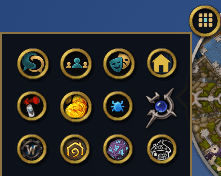
Click the Pocket button and all your minimap buttons open in one small panel, with the ones you use the most first.
Description
One button that keeps all your addon minimap buttons in a separate place.
Click it and your addon buttons open in a small panel, with the ones you use the most first. It closes by itself when the mouse leaves.
- Right click the button for the settings. There you can also keep any button on the minimap instead.
- Hold Shift and drag to move the Pocket button.
- Pocket never rewrites other addons. A button that misbehaves is simply handed back to the minimap.
- If you use another addon that collects minimap buttons, turn it off first.
The Pocket Team