Speccy
- By
Talent loadout manager in the talent window: unlimited loadouts, folders, previews, other specs, and auto-learn while leveling.
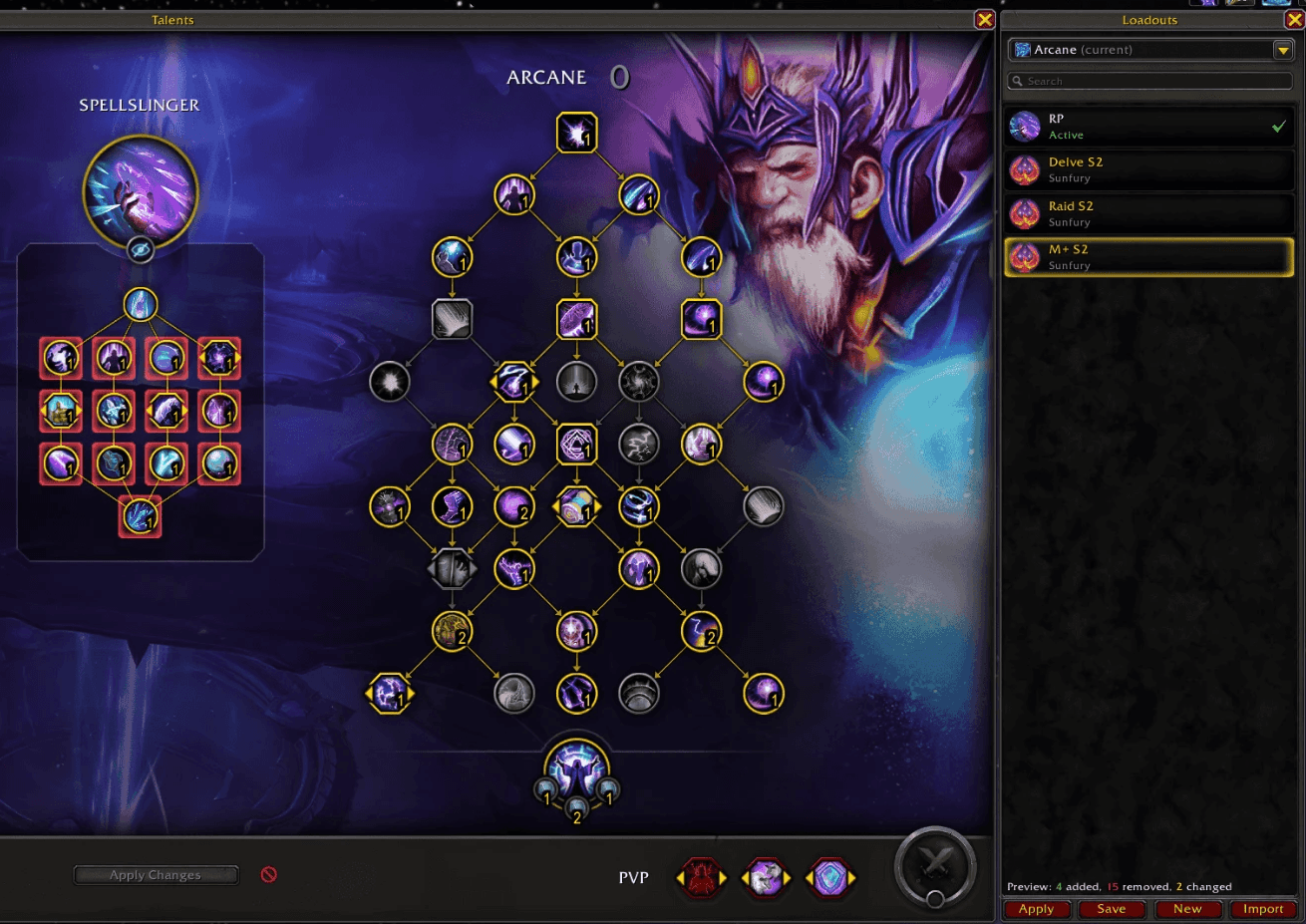
Click a loadout to see what would change before you switch: green is added, red is removed.
Description
Speccy is a talent loadout manager that sits next to the talent window. I made it because I wanted something like Talent Loadout Manager, but with a list that's nicer to use and that doesn't make you link loadouts to Blizzard's slots by hand.
Coming from Talent Loadout Manager?
Enable both addons, log in, and click Import under Options > AddOns > Speccy (or type /speccy import tlm). Your custom loadouts for that class come over to Speccy; run it once per class. Your Blizzard loadouts are already there.
What it does
- Your Blizzard loadouts show up in the list automatically and stay in sync both ways. Rename or delete one in either place and the other follows.
- Keep as many extra loadouts as you want. They don't use up Blizzard's loadout slots.
- Sort loadouts into folders and drag them into the order you like.
- Click a loadout to see on the tree what would change before you switch: green is added, red is removed, yellow is changed.
- For choice talents, the preview also shows which of the two options the loadout picks.
- Import a max level build while leveling and Speccy learns the rest for you as you level up. Only out of combat, and it stops if you start editing the tree yourself.
- Look at your other specs' loadouts in the same list. Applying one switches spec first.
- Each loadout also remembers your PvP talents, which Blizzard's loadouts don't, and puts them back when you switch.
- Import and export use the normal Blizzard talent strings, and Share > Post in Chat puts a clickable talent link in chat.
How to use it
Open your talents with N. The list is on the right, and the Loadouts button in the bottom bar hides or shows it.
Click a loadout to preview it and double-click (or press Apply) to switch to it. Right-click a loadout for rename, folders, export and a few other things. Settings are under Options > AddOns > Speccy, or type /speccy settings.
To switch loadouts from a macro or keybind, use /speccy load <name>. It understands macro conditions too, like /speccy load [spec:1] Raid; Dungeon.
Good to know
- The game won't let you switch to a build that both changes talents and leaves points unspent. Speccy sets it up anyway and asks you to spend the rest and press Apply Changes, then saves the finished build.
- If you want a loadout in the game's own list too (for
/loadoutnamemacros or its own action bars), right-click it and pick "Pin to Blizzard loadouts". - Speccy doesn't change anything in Blizzard's talent window, so it shouldn't cause "action blocked" errors.
- If you use EllesmereUI or ElvUI, Speccy matches their look.
- Available in English, German and French.
Found a bug?
Tell me what you did and what happened. If it was during a talent switch, do a /reload and include what /speccy log shows.
Speccy Team