Atelier
- By
Search the Appearances tab and the transmogrifier by color, find pieces that match, and dress your character in one click.
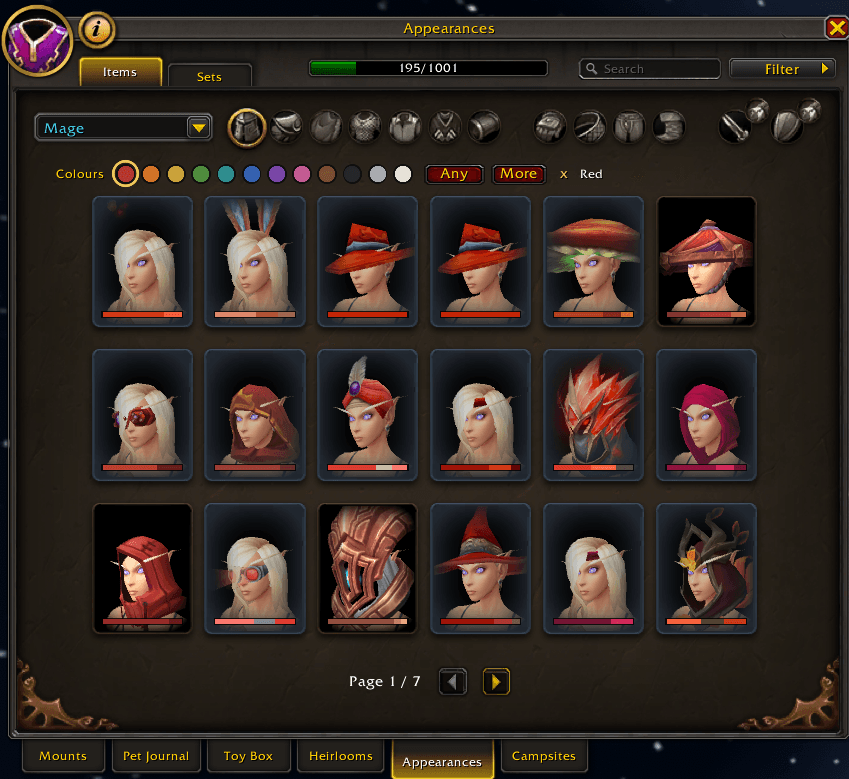
Pick a colour above the Appearances tab and the pieces with the most of it come first. The bar under each piece shows its colours.
Description
Atelier
Atelier adds color search to the game's own Appearances tab and to the transmogrifier. There is no new window and nothing new to learn. Pick a color and the grid shows only what has it, with the most of that color first.
What it does
- A row of twelve colors above the grid. Pick one or two, for example red and gold.
- Light or dark narrows a color to its lightest or darkest shades, like light blue or navy.
- Find matching pieces: right click any appearance and the grid sorts itself by how alike the colors are. The match follows you from slot to slot.
- Match what you wear: the More button lists the pieces you show right now, transmog included, and your whole outfit.
- Dress me: at the transmogrifier, one click puts the closest piece you have collected on every armor slot as a preview. Weapons stay as they are, and nothing changes until you press Apply.
- Sets: the same color search in both Sets tabs. A set also counts when one of its recolors fits.
- Saved searches: keep the color combinations you like and pick them again with one click.
- A thin color bar under every tile, and the colors in the tooltip.
Where the colors come from
Atelier knows the colors of about 65 000 appearances. They were measured from each item's own textures and 3D model, counting only what shows on the outside, with the front counting the most. They come close to what you see, but the game's light and shine can make an item look a little brighter or more golden than its colors say. Appearances that are newer than the addon get a rough guess from their icon or name until the next update.
Good to know
- /atelier tells how many appearances Atelier knows, and /atelier clear shows everything again.
- Atelier only reads and sorts what the game already lists. It never changes what you wear on its own.
Atelier Team