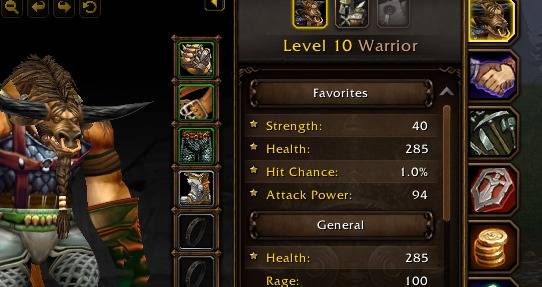
favStats.jpeg
Description
Your most important stats – always at the top.
Slaxxie's Favorite Stats adds a Favorites category above all other categories in the WoW Forever character stats. Pick the stats you check the most – Attack Power, Crit, Armor, Fire Resistance, whatever matters for your class – and see them first every time you open your character sheet.
Features
- New Favorites category at the top of the character stats
- Hover any stat and click the star, or simply right-click the row
- Favorites are copies – the stat also stays in its original category
- Click the star again to remove the copy – the original is never touched
- A gold star shows at a glance which stats are favorited, both in Favorites and in the original category
- Works with every stat, including resistances
- Saved per character – your warrior and your mage can track different stats
- Uses the regular Blizzard stat list – no replacement frame, nothing to configure
- Lightweight, no libraries, no dependencies
- English and German localization
Slash commands
/sf– show help/sf clear– remove all favorites/sf debug– diagnostic info (please include this in bug reports)
Installation
With the CurseForge app (recommended)
- Open the CurseForge app and select World of Warcraft.
- Make sure your WoW Forever installation is selected at the top.
- Search for Slaxxie's Favorite Stats and click Install.
- Restart the game. Updates are installed automatically by the app.
Manual installation
- Download the latest file from the Files tab.
- Find your WoW Forever folder: in the Battle.net launcher, select WoW Forever, click the gear icon next to Play and choose Show in Explorer.
- Open the WoW Forever subfolder (it starts with an underscore) and go to
Interface\AddOns. Create theInterfaceandAddOnsfolders if they don't exist yet. - Extract the ZIP so that the
StatFavoritesfolder sits directly insideAddOns:...\Interface\AddOns\StatFavorites\StatFavorites.toc - Fully restart the game –
/reloaddoes not detect newly installed addons. - On the character selection screen, click AddOns (bottom left) and make sure Slaxxie's Favorite Stats is enabled.
Compatibility
Made for WoW Forever (Interface 16001) and its character frame. Addons that completely replace the character stats panel may conflict – please report any issues in the comments.
Slaxxie's Favorite Stats Team