Description
See what every quest is worth – right in your quest log.
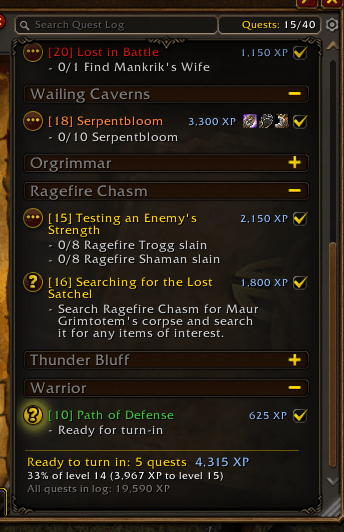
Slaxxie's Quest Reward Preview shows the XP reward and the reward items directly next to every quest title in the WoW Forever Map & Quest Log. No more clicking through each quest to find the one with the upgrade or the most XP. On top of that, it tells you how much XP is waiting for you in quests that are ready to turn in.
Features
Rewards in the quest list
- XP reward next to every quest title
- Reward item icons right in the list – guaranteed rewards first, choice rewards after a small gap
- Hover an icon for the full item tooltip, marked as Guaranteed reward or Choice
- Shift-click an icon to link the item in chat, Ctrl-click to preview it in the dressing room
- Long quest titles wrap neatly, the "(Elite)" tag stays visible
XP summary
- Summary at the bottom of the quest list: total XP of all quests ready to turn in
- Shows whether that XP is enough for a level-up, or how much of your current level it covers
- Also shows the total XP of all quests in your log
Quest XP window
- Separate, movable window (
/qrp windowor click the summary) - XP bar with your current XP plus the XP of all quests ready to turn in
- Every quest in your log with its XP, split into Ready to turn in and In progress, sorted by XP
- Remembers its position, closes with ESC, updates automatically
General
- XP values update automatically when you level up
- Lightweight, no libraries, no dependencies
- English and German localization
Slash commands
/qrp– show help/qrp window– open/close the Quest XP window/qrp xp– toggle XP in the quest list/qrp items– toggle item icons in the quest list/qrp sum– toggle the summary below the quest list/qrp icons <1-8>– max. icons per quest (default 4)/qrp size <10-24>– icon size (default 14)/qrp clear– clear the reward cache/qrp debug– diagnostic info (please include this in bug reports)
Installation
With the CurseForge app (recommended)
- Open the CurseForge app and select World of Warcraft.
- Make sure your WoW Forever installation is selected at the top.
- Search for Slaxxie's Quest Reward Preview and click Install.
- Restart the game. Updates are installed automatically by the app.
Manual installation
- Download the latest file from the Files tab.
- Find your WoW Forever folder: in the Battle.net launcher, select WoW Forever, click the gear icon next to Play and choose Show in Explorer.
- Open the WoW Forever subfolder (it starts with an underscore) and go to
Interface\AddOns. Create theInterfaceandAddOnsfolders if they don't exist yet. - Extract the ZIP so that the
QuestRewardPreviewfolder sits directly insideAddOns:...\Interface\AddOns\QuestRewardPreview\QuestRewardPreview.toc - Fully restart the game –
/reloaddoes not detect newly installed addons. - On the character selection screen, click AddOns (bottom left) and make sure Slaxxie's Quest Reward Preview is enabled.
Compatibility
Made for WoW Forever (Interface 16001) and its Map & Quest Log. Addons that completely restyle the quest list may conflict – please report any issues in the comments.
Slaxxie's Quest Reward Preview Team