betterUpgrades.jpeg
Description
What is that item really worth for your character?
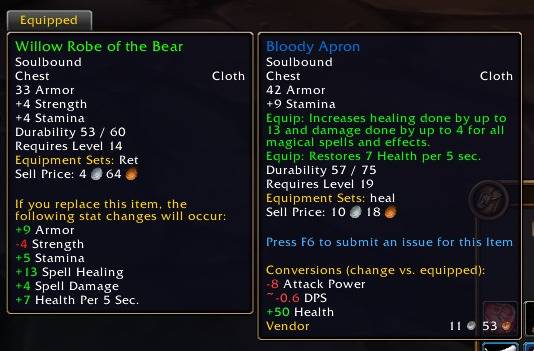
Slaxxie's Better Upgrades adds a block to every item tooltip that shows what the item's stats turn into – Attack Power, DPS, crit, health, mana, healing and more – compared to what you currently have equipped. No more guessing whether +5 Strength or +4 Agility is the better pick for your class.
Features
Primary stats, converted for your class
- Strength → Attack Power (+DPS), Block Value
- Agility → Attack Power, Ranged Attack Power, Crit, Armor, Dodge
- Stamina → Health
- Intellect → Mana, Spell Crit
- Spirit → Mana and Health regeneration
"Equip:" effects included
- Healing and Spell Damage – combined, separate or for a single school (Fire, Frost, Shadow, …)
- Attack Power and Ranged Attack Power
- Hit and Crit, Spell Hit and Spell Crit
- Mana and Health per 5 sec.
- Defense (with its Dodge/Parry/Block bonus), Dodge, Parry, Block Chance, Block Value
Smart comparison
- Compares against the item in the same equipment slot – green is a gain, red a loss
- Rings, trinkets and one-handers compare against a free slot first
- Equipped items and comparison tooltips show the item's own contribution
- Stat bonuses and equip effects are combined – e.g. crit from Agility and "+1% Crit" become one line
Accurate and safe
- Uses the game's own stat functions – class rules are always correct
- Values marked with
~are close approximations (DPS, Dodge, regeneration) - Works in combat – stats are cached, no Lua error popups
- Lightweight, no libraries, no dependencies
- English and German localization
Slash commands
/statconv– show help/statconv compare– toggle comparison with the equipped item/statconv debug– show calculation errors in chat (please include them in bug reports)
Installation
With the CurseForge app (recommended)
- Open the CurseForge app and select World of Warcraft.
- Make sure your WoW Forever installation is selected at the top.
- Search for Slaxxie's Better Upgrades and click Install.
- Restart the game. Updates are installed automatically by the app.
Manual installation
- Download the latest file from the Files tab.
- Find your WoW Forever folder: in the Battle.net launcher, select WoW Forever, click the gear icon next to Play and choose Show in Explorer.
- Open the WoW Forever subfolder (it starts with an underscore) and go to
Interface\AddOns. Create theInterfaceandAddOnsfolders if they don't exist yet. - Extract the ZIP so that the
StatConversionsfolder sits directly insideAddOns:...\Interface\AddOns\StatConversions\StatConversions.toc - Fully restart the game –
/reloaddoes not detect newly installed addons. - On the character selection screen, click AddOns (bottom left) and make sure Slaxxie's Better Upgrades is enabled.
Compatibility
Made for WoW Forever (Interface 16001). "Equip:" effect detection is verified on the English client; German patterns are best-effort – please report anything that isn't recognized.
Slaxxie's Better Upgrades Team