Slaxxie's Detailed Map
- By
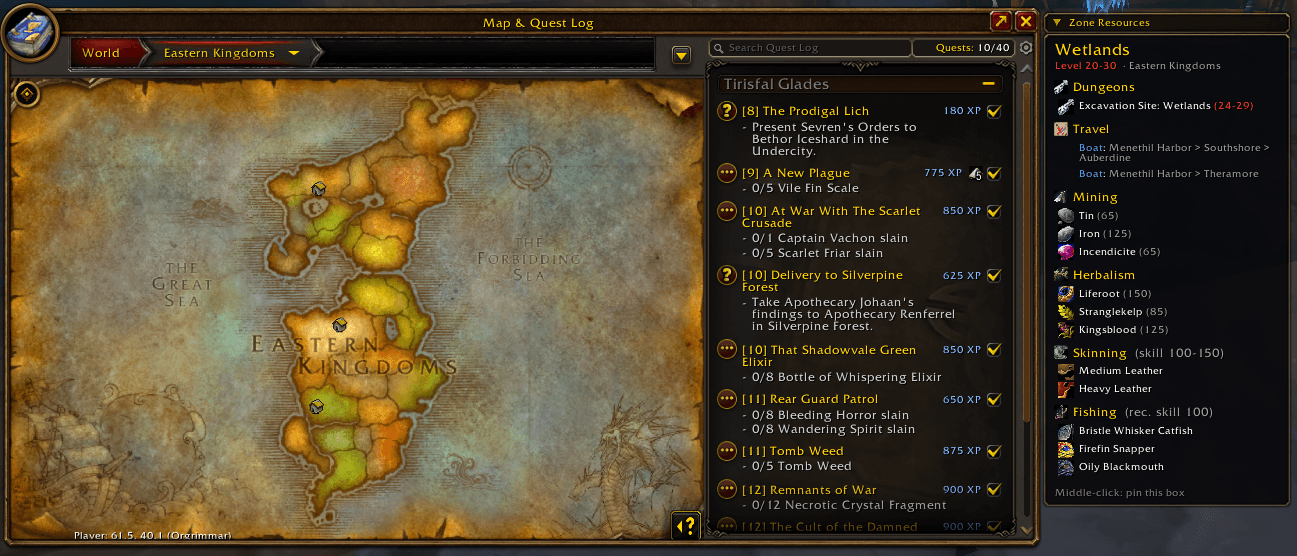
Zone info on hover: levels, dungeons, travel routes and gathering resources with required skills.
sdm2.PNG
Description
Everything about a zone – right on your world map.
Hover a zone and Slaxxie's Detailed Map shows a compact info box with its level range, dungeons, travel connections and gathering resources. Planning your next leveling zone, farming route or dungeon run has never been easier.
Features
Zone overview
- Level range taken directly from the game, colored by your level
- Dungeons with level ranges – including all new WoW Forever dungeons: Hall of Thanes, Ruins of Lordaeron, Excavation Site: Wetlands, City of Dalaran, The Drowned City, Krol'dok Stronghold, Alcaz Prison, Blackmaw Hold and Shaper's Terrace
- Dungeons inside a capital are also listed in the surrounding zone
Travel
- Boats, ferry, zeppelins, skyships and the Deeprun Tram with all stops
- Multi-stop routes show both directions (e.g. Southshore → Menethil Harbor / Auberdine)
- Connections of the other faction are greyed out
Professions
- Mining: ores with required skill
- Herbalism: herbs with required skill
- Skinning: required skill for the zone's creatures and the leather you'll get
- Fishing: fish and recommended skill
- Your own skill colors every requirement – green = you can, red = not yet
Capitals
- Weapon masters and the weapon skills they teach
- Skills you already know are highlighted
Comfortable to use
- Hover any icon for the full item or spell tooltip, Shift-click to link items in chat
- Pin the box with a middle-click on the map – it stays while you move the mouse
- Collapsible title bar with left-click (collapse) and right-click (pin)
- Optional key binding for pinning
- Small map (with or without quest log): attached to the right of the map window
- Maximized map: top right corner, movable by dragging the title bar
- Lightweight, no libraries, no dependencies
- English and German localization
Controls
- Hover a zone, capital or dungeon icon on the world map
- Middle-click the map – pin / unpin the box
- Title bar: left-click – collapse / expand, right-click – pin / unpin, drag – move (maximized map)
- Key binding: Options → Keybindings → AddOns → Zone Resources → Pin / unpin box
Slash commands
/zr– enable / disable the addon/zr reset– reset the box position on the maximized map/zr ids– show learned / missing item IDs/zr debug– diagnostic info (please include this in bug reports)
Installation
With the CurseForge app (recommended)
- Open the CurseForge app and select World of Warcraft.
- Make sure your WoW Forever installation is selected at the top.
- Search for Slaxxie's Detailed Map and click Install.
- Restart the game. Updates are installed automatically by the app.
Manual installation
- Download the latest file from the Files tab.
- Find your WoW Forever folder: in the Battle.net launcher, select WoW Forever, click the gear icon next to Play and choose Show in Explorer.
- Open the WoW Forever subfolder (it starts with an underscore) and go to
Interface\AddOns. Create theInterfaceandAddOnsfolders if they don't exist yet. - Extract the ZIP so that the
ZoneResourcesfolder sits directly insideAddOns:...\Interface\AddOns\ZoneResources\ZoneResources.toc - Fully restart the game –
/reloaddoes not detect newly installed addons. - On the character selection screen, click AddOns (bottom left) and make sure Zone Resources is enabled (that's the addon's name in the game).
Compatibility
Made for WoW Forever (Interface 16001). Zone names are matched in English; other client languages may not show every box yet. Raids are hidden for now and will be added when raiding opens. Found a wrong value or missing route? Please let me know in the comments.
Slaxxie's Detailed Map Team