SimpleForeverTip
- By
Lightweight and customizable unit tooltip frame replacement featuring target tracking, custom status colors, player talent inspection, and a movable anchor.
2.png
1.png
Description
Yes — exactly. The description itself should be rendered normally, with CurseForge Markdown syntax visible as formatting, not inside a code block.
SimpleForeverTip
SimpleForeverTip is a lightweight unit tooltip enhancement addon for WoW Forever.
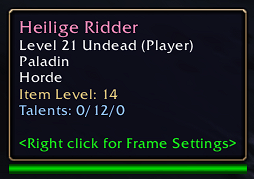
It provides useful player information directly in unit tooltips, including targets, target-of-target, player status, class colors, item level, and talent information.
✨ Features
🎯 Target & Target-of-Target
- Display a player's current target.
- Display the target's target.
- Highlight when a player is targeting you.
- Highlight when the target-of-target is you.
- Apply class colors to player targets.
- Enable or disable target information.
👤 Player Status
Display important player status information directly in tooltips.
Supported statuses include:
- AFK
- DND
- Offline
Each status has its own configurable color.
🎨 Class-Colored Player Names
SimpleForeverTip automatically applies class colors to player names.
- Uses WoW class color information.
- Applies class colors to player targets.
- Falls back to standard class colors when required.
- Requires no manual class configuration.
📊 Item Level
Display player item level directly in the tooltip.
- Display your current average item level.
- Retrieve inspected player item level when available.
- Use
C_PaperDollInfo.GetInspectItemLevel()when supported. - Retain a compatibility fallback for unavailable inspect APIs.
- Cache inspected item levels.
- Enable or disable item level display.
🧠 Talent Information
View player talent information directly from their tooltip.
- Display your active talent configuration.
- Request talent information from inspected players.
- Display talent point information.
- Support talent tree point splits such as
15/25/21. - Use modern
C_TraitsandC_ClassTalentsAPIs. - Cache inspected talent information.
- Safely handle unavailable inspection data.
🔍 Player Inspection
SimpleForeverTip automatically requests inspection data when additional information is required.
Inspection handling includes:
- Inspection range checks.
Inspecting...status while waiting for data.- Cached inspection results.
- Throttled inspection requests.
- Inspection timeouts.
- Duplicate-request protection.
- Safe handling of unavailable inspection information.
📍 Movable Tooltip Anchor
SimpleForeverTip includes a movable tooltip anchor.
- Unlock the tooltip anchor from the configuration panel.
- Drag the anchor to your preferred location.
- Lock the tooltip position when finished.
- Save the position between sessions.
- Disable custom positioning if another addon controls your tooltip.
- Reset the position with
/sft resetpos.
⚙️ Configuration
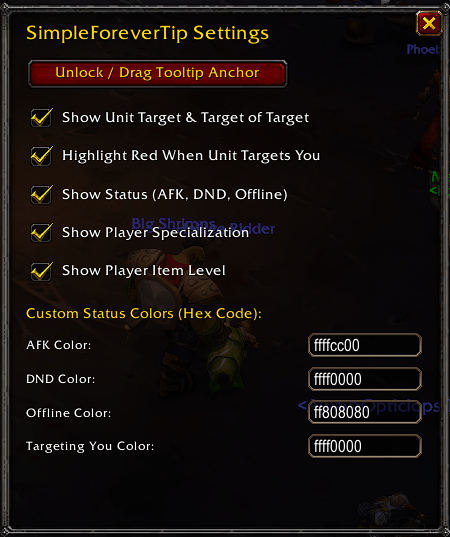
The in-game Options panel allows configuration of:
- Show or hide target information.
- Show or hide target-of-target information.
- Show or hide the
Targeting Youindicator. - Show or hide player status.
- Show or hide talent information.
- Show or hide item level.
- Lock or unlock the custom tooltip position.
- Show or hide the minimap button.
- Configure AFK color.
- Configure DND color.
- Configure Offline color.
- Configure Targeting You color.
🎨 Custom Status Colors
Customize the colors used by SimpleForeverTip.
Available color settings:
- AFK Color
- DND Color
- Offline Color
- Targeting You Color
Color values use hexadecimal formatting.
Invalid color values are automatically rejected and replaced with the configured default color.
🖱️ Manual Controls
Tooltip Anchor
Use the Unlock / Drag Tooltip Anchor button to display the movable tooltip anchor.
Drag the anchor to your preferred location and lock it again when finished.
Minimap Button
The minimap button provides quick access to SimpleForeverTip.
- Left-click: Open the configuration panel.
- Right-click: Toggle the tooltip anchor.
- Drag: Move the icon around the minimap.
- The minimap button can be hidden from the configuration panel.
⌨️ Commands & Access
Use:
/sft
or:
/simpleforevertip
to open or close the SimpleForeverTip configuration panel.
Use:
/sft config
to open the configuration panel.
Use:
/sft unlock
or:
/sft move
to display the movable tooltip anchor.
Use:
/sft lock
to hide the tooltip anchor.
Use:
/sft reset
to restore the default SimpleForeverTip settings and positions.
Use:
/sft resetpos
to reset the tooltip and minimap positions without resetting your other settings.
You can also access the addon through the minimap icon.
💾 Saved Settings
SimpleForeverTip stores its configuration using WoW SavedVariables.
Saved settings include:
- Tooltip anchor position.
- Minimap button position.
- Target display state.
- Targeting You display state.
- Status display state.
- Talent display state.
- Item level display state.
- Tooltip position lock state.
- Minimap button visibility.
- Custom status colors.
New configuration options are automatically added when the addon is updated.
🔄 Automatic Tooltip Updates
When hovering over a player, SimpleForeverTip can automatically:
- Identify the unit.
- Apply the appropriate class color.
- Determine the player's status.
- Check the player's target.
- Check the target's target.
- Display cached item-level information.
- Display cached talent information.
- Request inspection data when required.
- Update the tooltip when inspection results become available.
Inspection requests are cached and throttled to reduce unnecessary requests.
🧠 Modern WoW API Support
SimpleForeverTip uses modern WoW APIs where available while retaining compatibility fallbacks.
The addon uses:
TooltipDataProcessorfor modern unit tooltip handling.C_Traitsfor talent information.C_ClassTalentsfor active talent configurations.C_PaperDollInfo.GetInspectItemLevel()for inspected item level when available.- Legacy API fallbacks where required.
The addon also includes defensive handling around restricted or unavailable WoW API values.
🔒 Designed for WoW Forever
SimpleForeverTip is built specifically for World of Warcraft Forever and its Interface 16001 client environment.
The addon focuses on useful player information while keeping the standard WoW tooltip experience lightweight and uncluttered.
📦 Compatibility
Game: WoW Forever
Interface: 16001
💾 Data & Storage
SimpleForeverTip stores its configuration using the WoW SavedVariables system.
Stored data includes:
- Tooltip position.
- Minimap position.
- Display settings.
- Tooltip lock state.
- Minimap visibility.
- Custom status colors.
- Cached inspection information.
🛡️ Built for Better Player Inspection
SimpleForeverTip is built around one simple goal:
Make player tooltips more useful.
See who someone is targeting, whether they're AFK, their item level, their talents, and whether they're targeting you — directly from the standard tooltip.
Hover the player. See the information. Keep playing.
Author: Haldon
SimpleForeverTip Team