EPGP Forever
- By
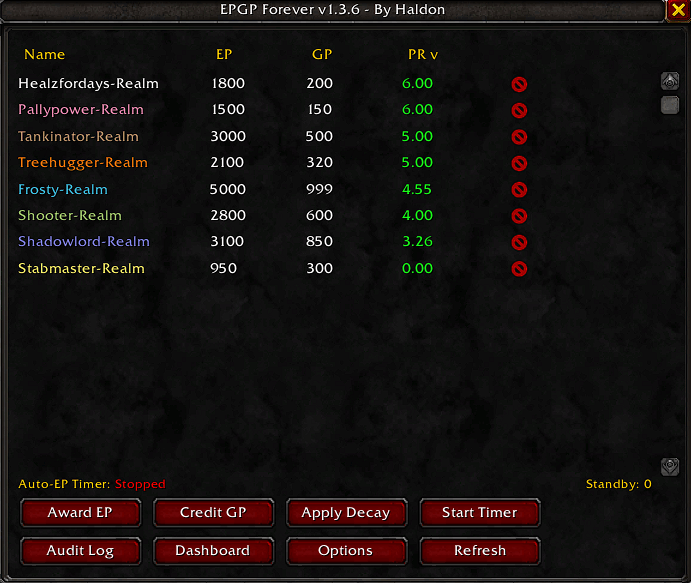
EPGP Forever is a modern EPGP addon for World of Warcraft Forever featuring transparent loot voting, transaction tracking, persistent audit history, GUID-based player tracking, CSV tools, standby management, and permission-aware security.
1.png
5.png
3.png
4.png
Description
EPGP Forever
EPGP Forever is an EP/GP loot-management and guild EPGP tracking addon for WoW Forever.
It provides a complete EPGP workflow with officer-note storage, Main–Alt linking, loot voting, transaction tracking, audit history, CSV import/export, rollback tools, and a permission-aware officer dashboard.
✨ Features
📊 EPGP Management
- Track EP (Effort Points) and GP (Gear Points) for guild members.
- Store EPGP values using guild officer notes.
- Calculate Priority (PR) from EP and GP.
- Configurable base GP, minimum EP, decay percentage, attendance EP, attendance interval, and new-member starting EP/GP.
👥 Main–Alt Support
EPGP Forever allows alt characters to share their main character's EPGP balance using guild officer notes.
🔗 How to Link an Alt to Your Main
- Open the guild roster.
- Find the alt character you want to link.
- Edit that character's Officer Note.
- Enter
Main:CharacterName, replacingCharacterNamewith your main character's name. - Save the Officer Note.
Example:
If your main character is named Arthas and your alt is named Jaina, set Jaina's Officer Note to:
Main:Arthas
Jaina will then use Arthas's EPGP balance for supported EPGP calculations and loot-priority calculations.
Important:
- Enter the main character's name after
Main:. - Make sure the name matches your main character.
- Only the alt needs the
Main:CharacterNameentry. The main does not need to link back to itself. - Characters without a Main–Alt link continue to use their own EPGP balance.
- If you cannot edit Officer Notes, ask a guild officer with the appropriate permissions to configure the link.
Main–Alt Features
- Shared EPGP Balances: EP awards, GP costs, and supported loot-priority calculations use the linked main's balance.
- Consistent Loot Priority: Linked alts use their main's balance rather than maintaining a separate EPGP balance.
- Recipient Tracking: Loot history records the character who actually received the item while associating the EPGP transaction with the linked main.
- Independent Characters: Characters without a Main–Alt link continue to use their own EPGP balance.
- Link Validation: Invalid or unresolved main references are handled safely to help prevent EPGP changes from being applied to the wrong character.
- Test Mode Support: Main–Alt transactions and undo behavior can be tested using the fake roster without modifying real guild officer notes.
🧾 Transaction & Audit System
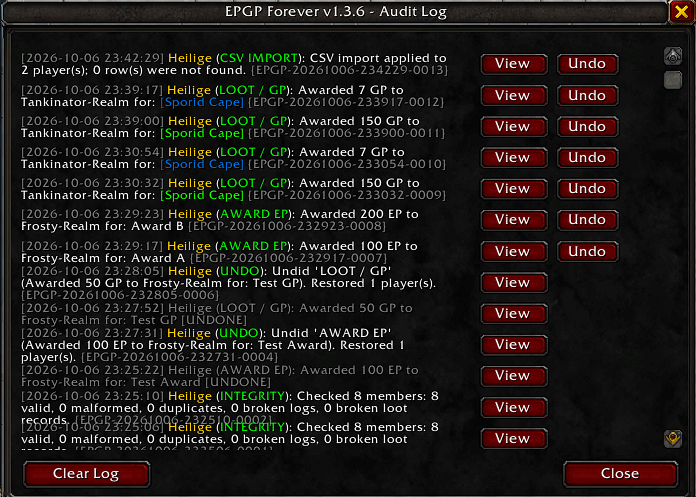
Major EPGP actions are recorded in a persistent audit history.
Transaction records include:
- Unique transaction ID
- Timestamp
- Author
- Action type
- Reason
- Affected players
- Previous EP/GP values
- New EP/GP values
- EP/GP deltas
- Transaction status
Tracked actions include:
- EP awards
- GP awards
- Decay
- Resets
- CSV imports
- Loot awards
- New-member initialization
- Undo operations
- Rollbacks
↩️ Safe Undo & Rollback
EPGP Forever checks a player's current EP/GP before undoing a transaction.
If newer changes have been made since the original transaction, those changes are protected and the player is skipped rather than having newer values overwritten.
Snapshots are also available for broader EPGP rollback operations.
🎲 Loot Voting
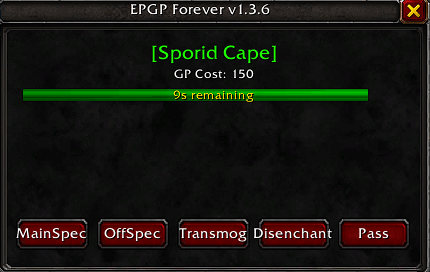
The built-in loot voting system supports:
- Main Spec
- Off Spec
- Transmog
- Disenchant
- Pass
Loot votes use unique sessions to prevent stale responses from affecting later votes.
Additional safeguards include:
- GUID-based voter tracking
- Raid-member validation
- One vote per player
- Re-voting replaces the previous vote
- Authoritative vote-session ownership
- Vote countdown timer
- Tie detection
- Duplicate loot-award protection
💰 Loot Awards & Loot History
Officers can award GP directly from the loot results window.
Loot awards are recorded with:
- Loot session ID
- Transaction ID
- Item
- Winner
- GP cost
- Timestamp
For linked alts, loot history retains the actual recipient's character name while associating EPGP accounting with the linked main.
The addon prevents the same loot session from being awarded more than once.
📋 Officer Dashboard
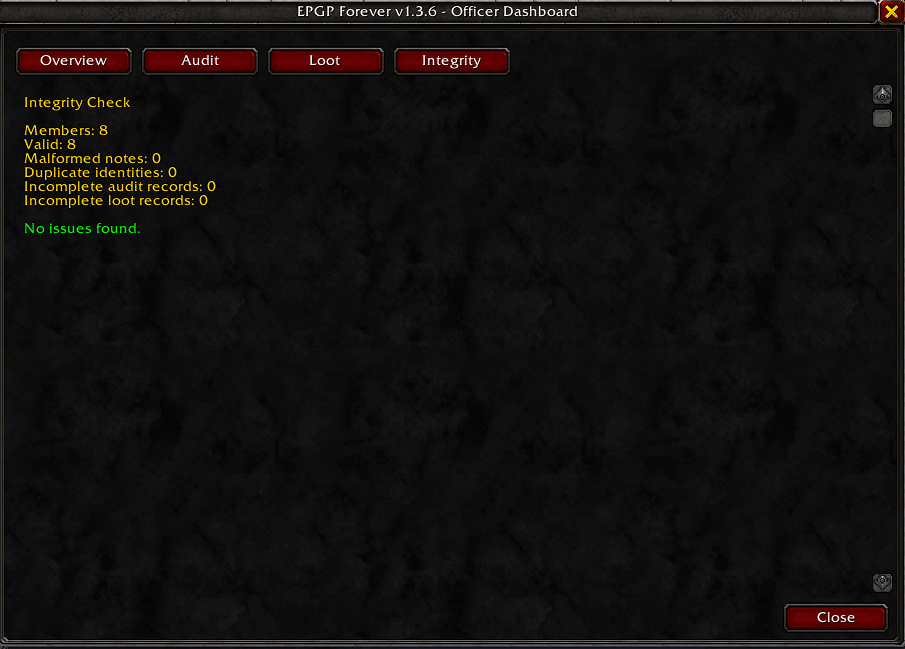
The Dashboard provides:
- Overview
- Audit
- Loot History
- Integrity
Dashboard access is permission-aware:
- Full access: officers who can edit officer notes
- Read-only access: members who can view officer notes
- Limited access: players who cannot view officer notes
Players without officer-note access are not shown misleading 0 / 0 EPGP values.
🔍 EPGP Integrity Checker
The Integrity tools can help identify:
- Malformed officer notes
- Duplicate identities
- Invalid audit records
- Invalid loot-history data
📥 CSV Import & Export
Export guild EPGP standings to CSV.
CSV imports use a validation and preview step before any changes are applied.
Supported formats:
Name,EP,GP
and
Name,Class,EP,GP
The importer handles:
- Extra whitespace
- UTF-8 BOM
- Missing names
- Invalid EP/GP values
- Duplicate players
- Malformed rows
Cancelling the preview leaves existing EPGP values unchanged.
👥 New Guild Member Handling
New guild members are tracked using their GUID.
Existing guild members are baselined on first run so they are not accidentally treated as new members.
New members with a blank officer note can be automatically initialized to:
- EP: 0
- GP: 100
These starting values are configurable.
Existing members and existing officer notes are protected from automatic overwriting.
If officer-note editing permission is unavailable, initialization can remain pending until permission becomes available.
New-member initialization is recorded in the audit history.
⏱️ Automatic Attendance EP
EPGP Forever can automatically award attendance EP at a configurable interval.
The automatic EP timer stops when leaving or ending a valid raid, preventing attendance EP from continuing outside the raid.
🧪 Test Mode
Test Mode provides a fake roster so EPGP functionality can be tested without modifying the real guild roster.
Test Mode covers:
- EP/GP transactions
- Main–Alt linking and shared EPGP balances
- Loot voting
- Loot awards
- Rollback
- Transaction undo, including Main–Alt transactions
- Duplicate-loot protection
- CSV import/export workflows
🔐 Permissions
EPGP Forever respects WoW's officer-note permissions.
| Permission | Dashboard Access |
|---|---|
| Can edit officer notes | Full access |
| Can view officer notes | Read-only |
| Cannot view officer notes | Limited access |
Actions that modify officer notes require the appropriate edit permission.
⚙️ Configuration
The Options panel allows configuration of:
- Base GP
- Minimum EP
- Decay percentage
- Automatic attendance EP
- Attendance interval
- Attendance reason
- Loot vote timer
- Announcement medium
- New-member starting EP
- New-member starting GP
- Minimap button
- Loot tracking behavior
- Standby settings
📦 Compatibility
Game: WoW Forever
Interface: 16001
🛡️ Data & Storage
EPGP values continue to use the guild officer-note EPGP storage model.
Additional addon data such as transactions, audit history, loot history, snapshots, new-member tracking, and configuration is stored in the addon SavedVariables database.
Main–Alt relationships are defined through the alt's officer note using the Main:CharacterName format.
🚀 Release
EPGP Forever
A complete EPGP management and auditing toolkit for WoW Forever, with safer transactions, Main–Alt support, shared EPGP balances, loot voting, persistent history, CSV tools, new-member handling, and a permission-aware officer dashboard.
Author: Haldon
EPGP Forever Team