CompactFrames
- By
Compact, healer-friendly party and raid frames with mouseover spell casting, existing WoW hotkey support, class-colored health bars, power bars, role icons, group headers, previews, and flexible layouts.
1.png

2.png
3.png
Description
CompactFrames
CompactFrames is a lightweight, healer-friendly party and raid frame addon built specifically for World of Warcraft Forever.
Designed around fast target selection, clean information density, and mouseover healing, CompactFrames provides compact group frames without forcing you to configure a separate click-casting system.
Use the keybinds you already know. Hover a player. Cast your spell.
📌 What is CompactFrames?
CompactFrames replaces the need for bulky or overly complicated unit-frame setups with a focused party and raid interface designed around the information healers need most.
The addon automatically works with your existing WoW action-bar keybinds, allowing your current keyboard and mouse bindings to function as mouseover spells on CompactFrames.
For example:
3 = Flash of Light
Hover a party or raid member and press 3 to cast Flash of Light on that player.
Mouse-button bindings such as BUTTON4 are supported as well.
✨ Key Features
🩺 Healer-Friendly Party & Raid Frames
- Compact party frames designed for quick target selection.
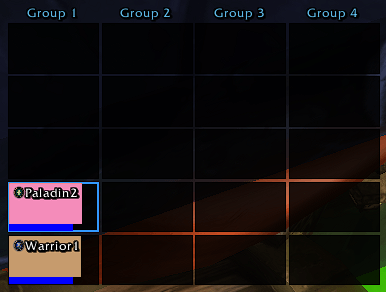
- Raid frames organized by group with clear group headers.
- Supports both party and raid environments.
- Optional player frame when playing solo.
- Clean information layout designed to minimize screen space.
🖱️ Mouseover Spell Casting
CompactFrames uses your existing WoW action-bar bindings instead of requiring you to configure every spell again inside the addon.
- Keyboard spell bindings work automatically.
- Mouse-button bindings are supported.
- Automatically detects spells assigned to your existing action-bar bindings.
- Hover a CompactFrames unit and use your normal hotkey.
- Your existing keybinds remain the source of truth.
No separate click-casting configuration required.
🎨 Class-Colored Health Bars
Health bars automatically use the player's class color, making it easy to identify classes at a glance.
The frame also provides a clear health percentage display while keeping the health information visually compact.
💙 Power Bars
Optional power bars display the player's current resource beneath their health bar.
Power bars can be enabled or disabled from the configuration window.
🛡️ Role Indicators
CompactFrames can display role icons for:
- Tank
- Healer
- DPS
This provides an immediate visual overview of the group's assigned roles.
🏷️ Raid Group Headers
Raid groups are visually separated using group headers, making larger raid rosters easier to scan.
Each active raid group receives its own header while the frame layout automatically adapts to the number of groups and players present.
📐 Flexible Party Layouts
Party frames can be displayed in either:
- Horizontal
- Vertical
Choose the layout that best fits your UI and preferred healing setup.
🧪 Preview Mode
Preview your frames without needing to assemble a party or raid.
- Preview Party — Displays a simulated five-player party.
- Preview Raid — Displays a simulated raid layout.
Useful for configuring your frame position and checking the appearance of the UI before entering combat.
📍 Movable Frames
CompactFrames can be unlocked and repositioned to fit your preferred UI layout.
Once positioned, the frame location is saved for future sessions.
⚙️ Simple Configuration
CompactFrames keeps configuration focused on the things that actually matter.
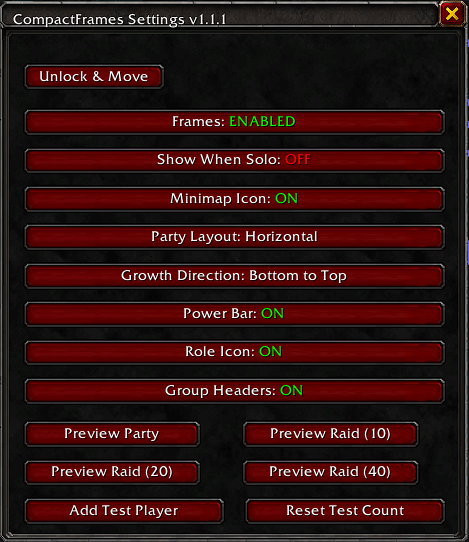
Available options include:
- Enable / disable frames
- Show when solo
- Minimap icon
- Party orientation
- Power bar visibility
- Role icon visibility
- Group header visibility
- Frame positioning
- Party preview
- Raid preview
The goal is a small, understandable configuration panel rather than a large collection of unnecessary options.
🖱️ How Mouseover Casting Works
CompactFrames does not replace your normal WoW keybinds.
Instead, it detects the spells already assigned to your action bars and makes those bindings available while hovering over a CompactFrames unit.
For example:
3 → Flash of Light
4 → Holy Light
BUTTON4 → Purify
Hover a player and use the same key you normally use.
Move your cursor away from the CompactFrames unit and your normal WoW binding behavior remains unchanged.
🎯 Designed for Fast Healing
CompactFrames is built around a simple principle:
See the player. Hover the frame. Press the spell.
There is no separate spell configuration system to maintain and no need to duplicate your existing keybind setup inside the addon.
Your WoW action bars remain the source of truth.
🔧 Interface & Layout
CompactFrames provides a compact visual hierarchy containing:
- Player name
- Health
- Health percentage
- Power
- Class color
- Role
- Raid group
- Optional group headers
The layout is intentionally compact so that more of your game world remains visible during combat.
🛡️ Designed for WoW Forever
CompactFrames is built specifically around the current WoW Forever interface and secure-frame environment.
The addon uses Blizzard's secure unit-frame and secure-action systems for protected targeting and spell casting.
This allows mouseover spell casting to work while respecting WoW's combat lockdown and protected-action rules.
⚙️ Configuration
Open the CompactFrames configuration window using:
/cfThe configuration panel provides access to the frame visibility, layout, display, positioning, and preview options.
🛠️ Slash Commands
/cf— Open the CompactFrames configuration window./cwf— Legacy command, if retained from an earlier installation.
CompactFrames Team